
New in Encited: Research, Write, Get found
What's new in Encited: Content Ideas, Citations, content-draft Workflows, Fan-out Queries, and real-time crawl logs, the tools to get your brand cited by ChatGPT, Claude, and other AI search engines.
Purchase decisions are increasingly happening inside chatbots. Instead of clicking through a page of blue links, people ask AI to recommend a solution. With this update, Encited shows you what to write, where to get mentioned, and what to do next to get recommended more often, on top of the tracking and analytics you already have on your performance and your competitors'.
They're live in your dashboard today, in the order you'd use them.
What's new
- Content Ideas: content ideas tailored to your brand and industry, ranked by traffic impact and difficulty, with a one-click on-brand draft.
- Cited sources: list of sites AI already trusts you can engage, submit your business or earn placements to improve off-site brand visibility.
- Actions: ready to work on action items to improve your rank both in SEO and AI search, ranging from content ideas, keywords to backlink opportunities.
- Content Workflows: workflows for every stage of your content related work, automated: research → blueprint → draft.
- Fan-out Queries: the exact set of web searches AI runs before it answers you, aggregated and turned into content plans.
- Real-time Crawl Logs: see a crawler hit any page almost as it happens.
1. Content Ideas
Content Ideas gives you topics to write about, drawn from real search volume, content-gap analysis, and your competitors' most-cited pages. Each topic is ranked by traffic impact and ranking difficulty, so you can see which ones are worth the effort and start there.
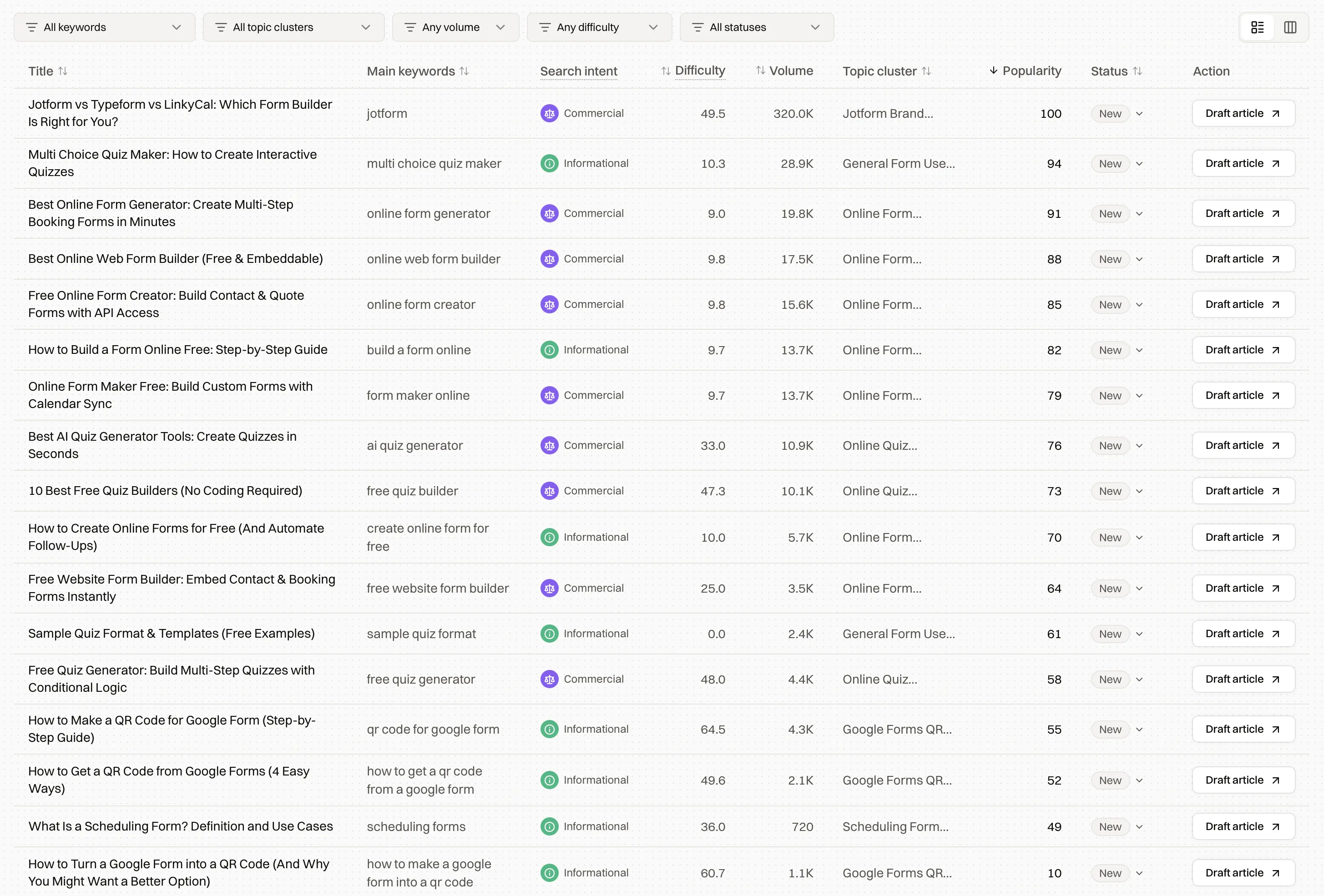
When a topic's worth writing, you draft it from the table. That draft is built from the pages already ranking for the query.
How Encited writes content drafts
The reason we didn't want to add content generators for the longest time is that we wanted to do it properly, instead of stuffing in a bunch of keywords, a two-sentence prompt about your brand's tone of voice and calling the AI-generated slop a content draft. Today, I think we've achieved something close to our vision, a proper way to research, write and integrate a content piece into rest of your content collection. Below is how Encited drafts articles, mimicing the workflow of a seasoned SEO content expert across the full seven steps:
1. Scrape the SERP for your query and collect the pages currently ranking to study.
2. Analyze ranking pages for keywords, outline, heading structres, sections and their orders, wordcount, FAQs and more.
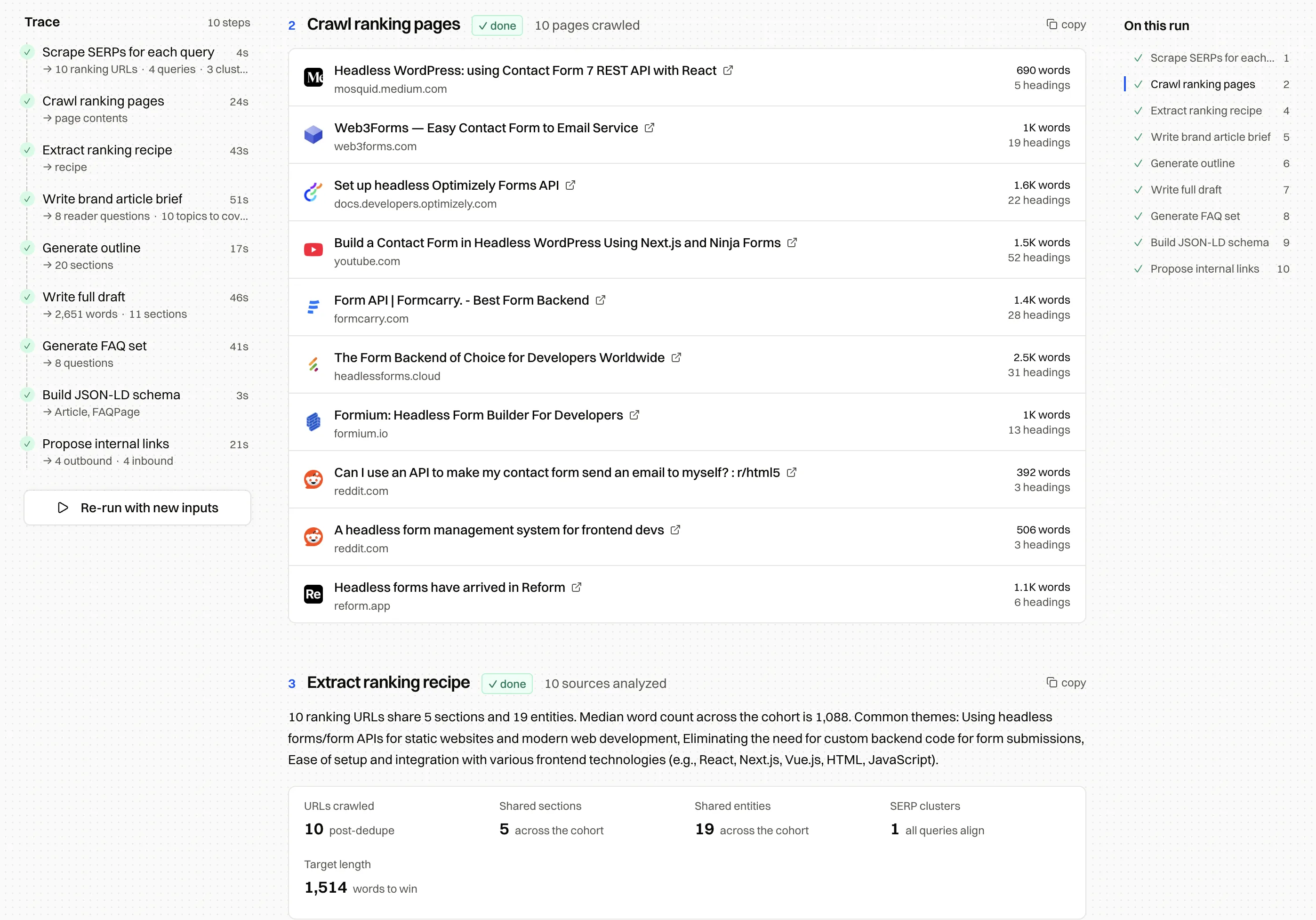
4. Write a brief: Turn the analysis into ranking recipe and build a brief: the goal, the audience, the reader questions to answer, entities to cover and the points the article has to include.
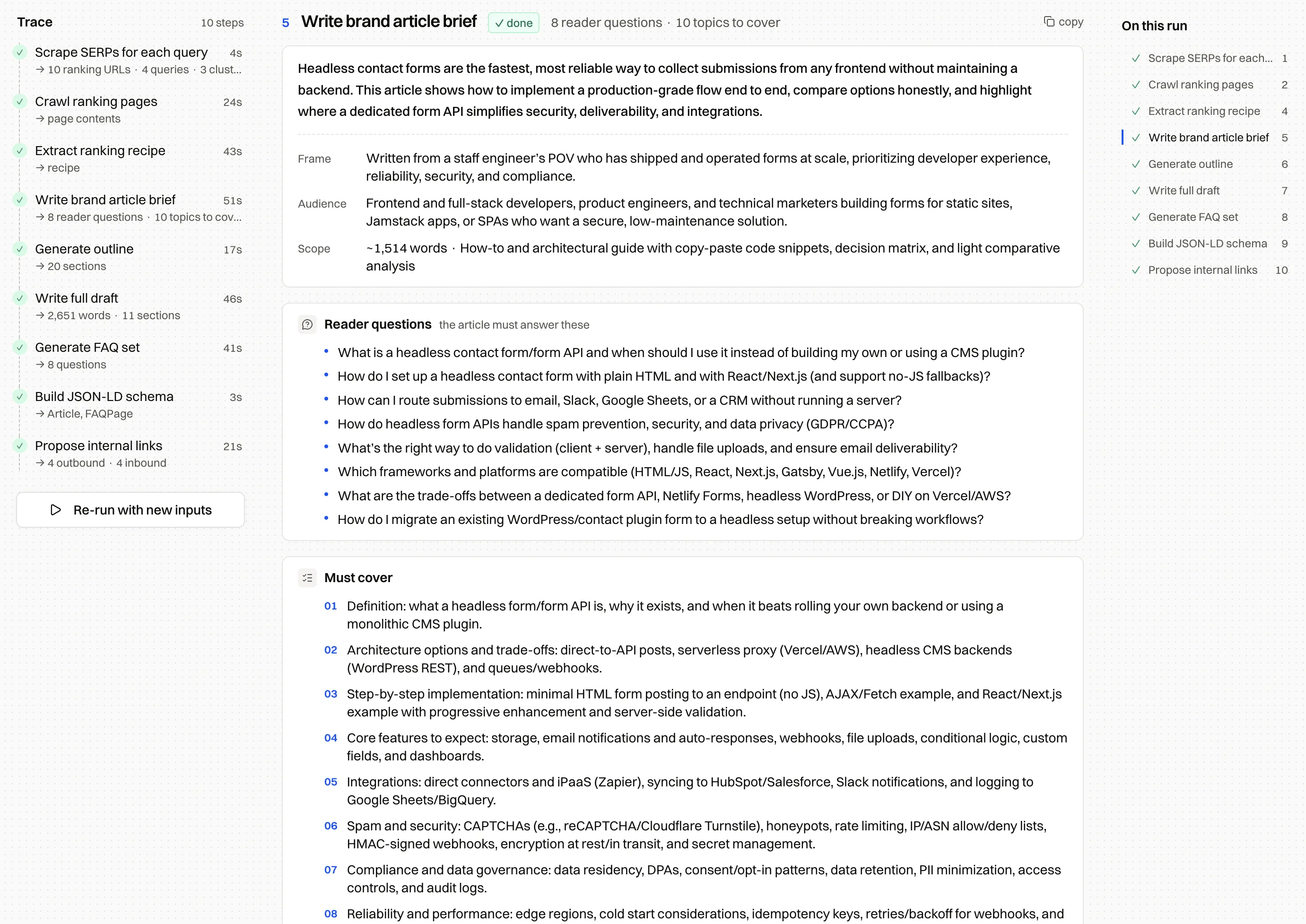
5. Generate an outline from the recipe and the brief.
6. Write the draft in your brand's tone of voice from your brand foundations.
7. Add FAQ and JSON-LD schema, and propose internal links to pages you already have indexed for faster discovery and indexing.
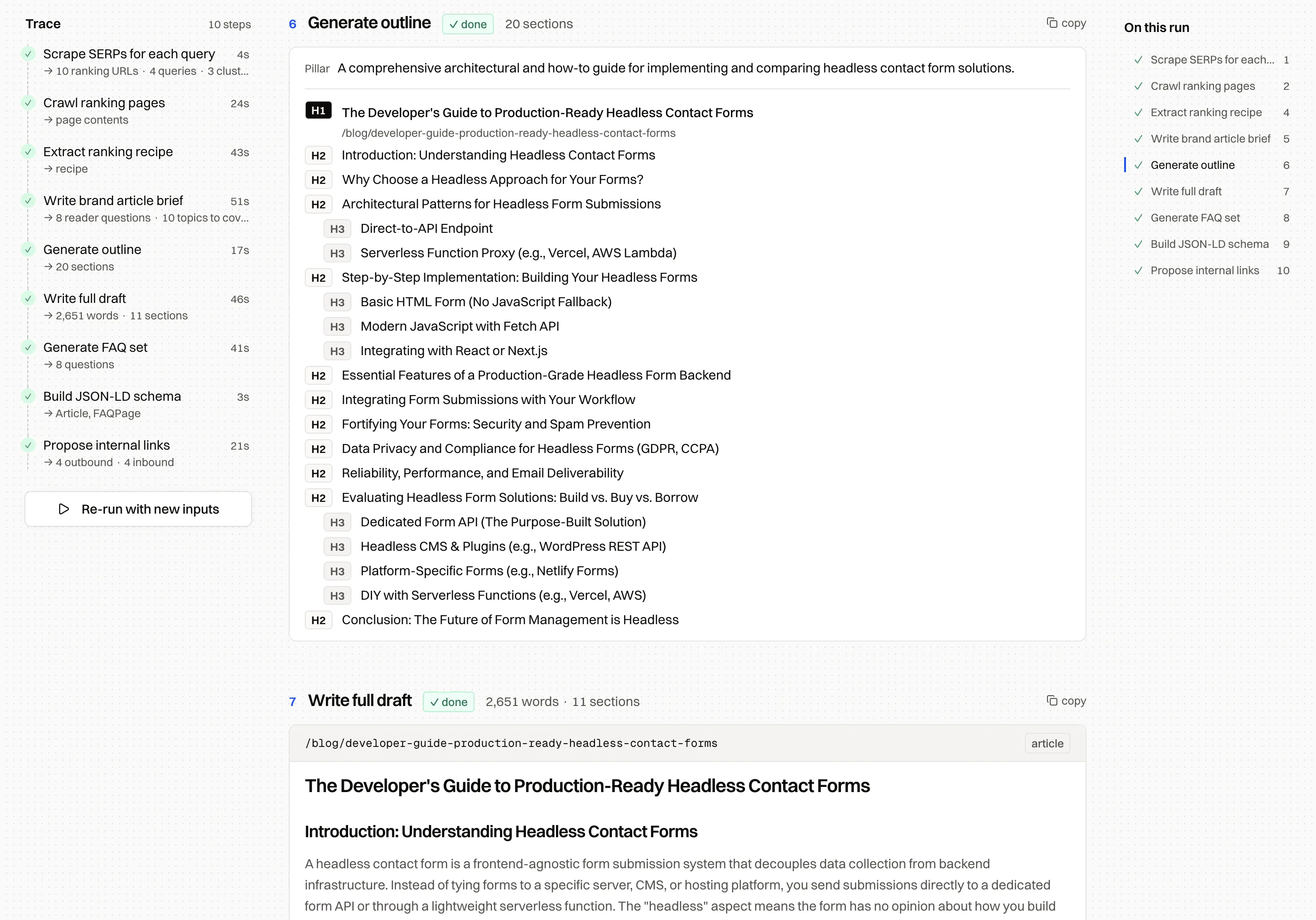
The draft lands grounded in the structure, length, and themes that already rank for the query, and shaped like your blog. You can change the inputs and re-run any step before it writes.
2. Citations
Citations are sources AI already trust that you can earn backlinks from or replicate on your own site. Getting recommended by AI still leans heavily on search rankings. When someone asks ChatGPT or Claude for a recommendation, the model searches the web, reads the candidates it finds, and recommends the ones it judges best. If your pages don't rank for those queries, your brand barely shows up, which is the spot most new sites are in.
There's a way around that. You can get cited without any of your own pages ranking on the first page of the search engine behind each model (Bing for ChatGPT, Brave for Claude) by earning off-site citations on the third-party pages those models already pull from. The Citations page shows you the exact sources AI is recommending: Reddit threads, LinkedIn posts, Facebook discussions, directories, listicles, reviews, and YouTube videos, each with how often it's cited and by which model.

Once you can see which sources AI trusts, you know where to show up: reply on that Reddit thread, get listed in that directory, pitch a mention in that listicle. Actions, next, turns these into a prioritized list.
3. Actions
Actions gives you priority items you can start on now to improve your odds of getting recommended by ChatGPT or Claude. The specifics: the Reddit threads where you should drop your value prop, the already-ranking Facebook group discussions AI is citing that you can go engage, the most-cited directories you should submit to, and the content pieces you should write or refresh.

Encited pulls these from your recent visibility reports, tags each one Visibility or Outreach, and ranks them by priority. Accept the ones worth doing and they drop onto a To Do / Doing / Done board. Staring at pretty charts doesn't increase brand visibility. Taking action does, and the list is ready for you to start.
4. Content Workflows
This one's been live in your dashboard for a while, but we never properly announced it. It's the largest of these updates. Think of a content task you do by hand; chances are it's in the catalog, automated. Three to call out:
- Tear down the SERP for a query. Analyze what's ranking now: word count, title structures, heading outline, number of sections and their order, FAQs, JSON-LD schemas, and target keywords. You get the ranking blueprint before you write a line, and you can draft an article off it with one click.
- Plan content from a query. Keyword research inside Encited, tuned to your niche. Type one seed query and it expands into the terms that pull traffic in your space: the queries people are paying for, with real volumes, plus the phrasings from your Perplexity FAQs. Then it organizes them into pillars and posts, each with its intent and the reason it earned a slot. It saves you digging through Ahrefs for the keywords that matter.
- GSC Audit. Audit technical and indexing issues, find page-poaching wins, benchmark your CTR, and surface keyword-cannibalized pages from your Search Console data.
There are twelve more workflows in the catalog, covering everything from narrow niche tasks to broad research. Each one runs as a step-by-step recipe you can inspect at every stage, so you can adjust the brief while it's still a brief.
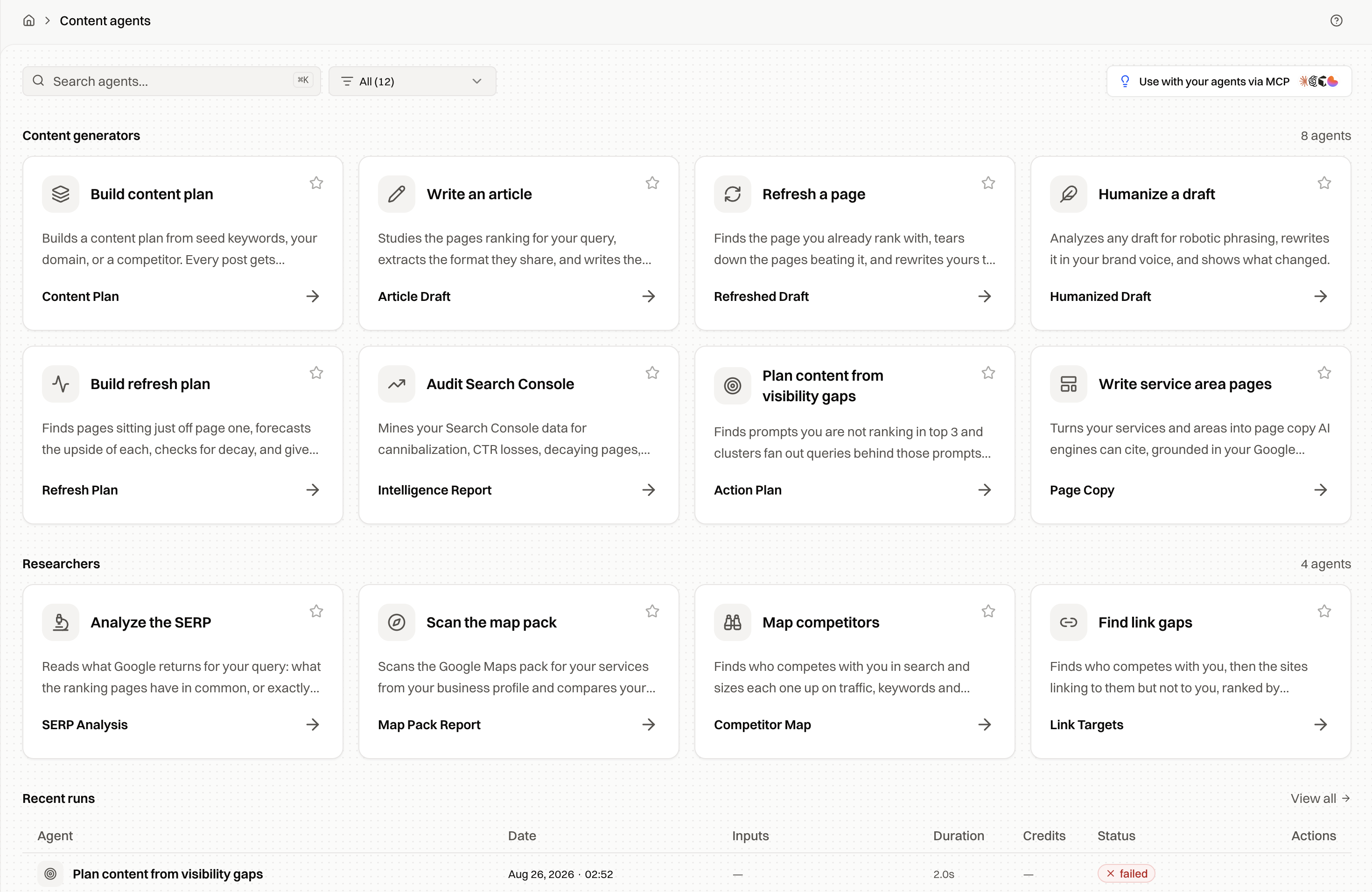
Workflows are metered in credits, summed from the steps, and the cost is shown before you run.
Guesswork no more, work is laid out - take action now
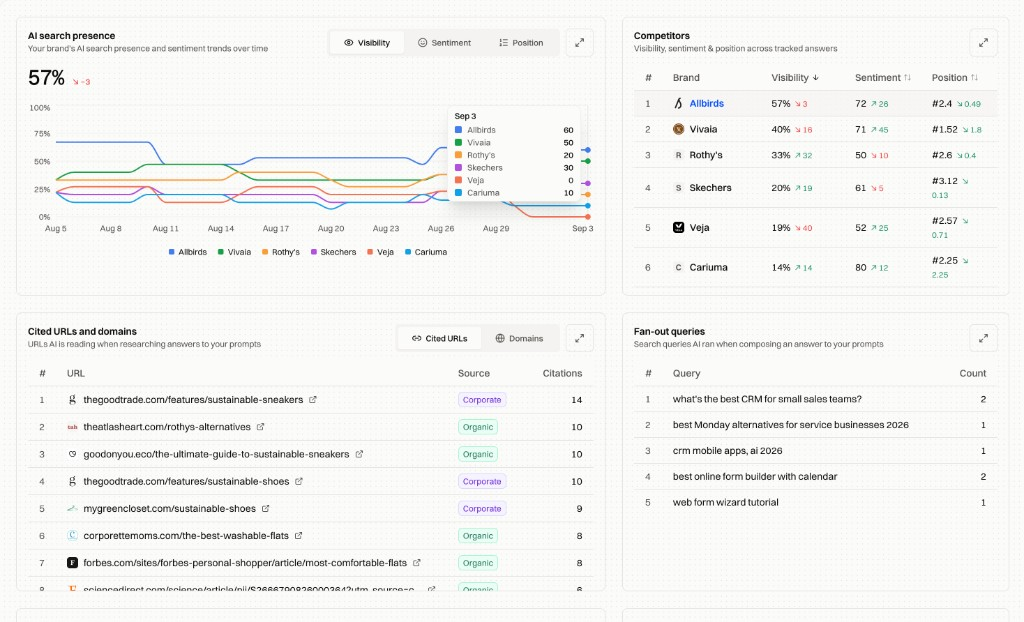
5. Fan-out Queries
You can now see the web searches AI models run before they answer your prompts. Each row shows how often a search ran, which models ran it, and which brands rank on it.
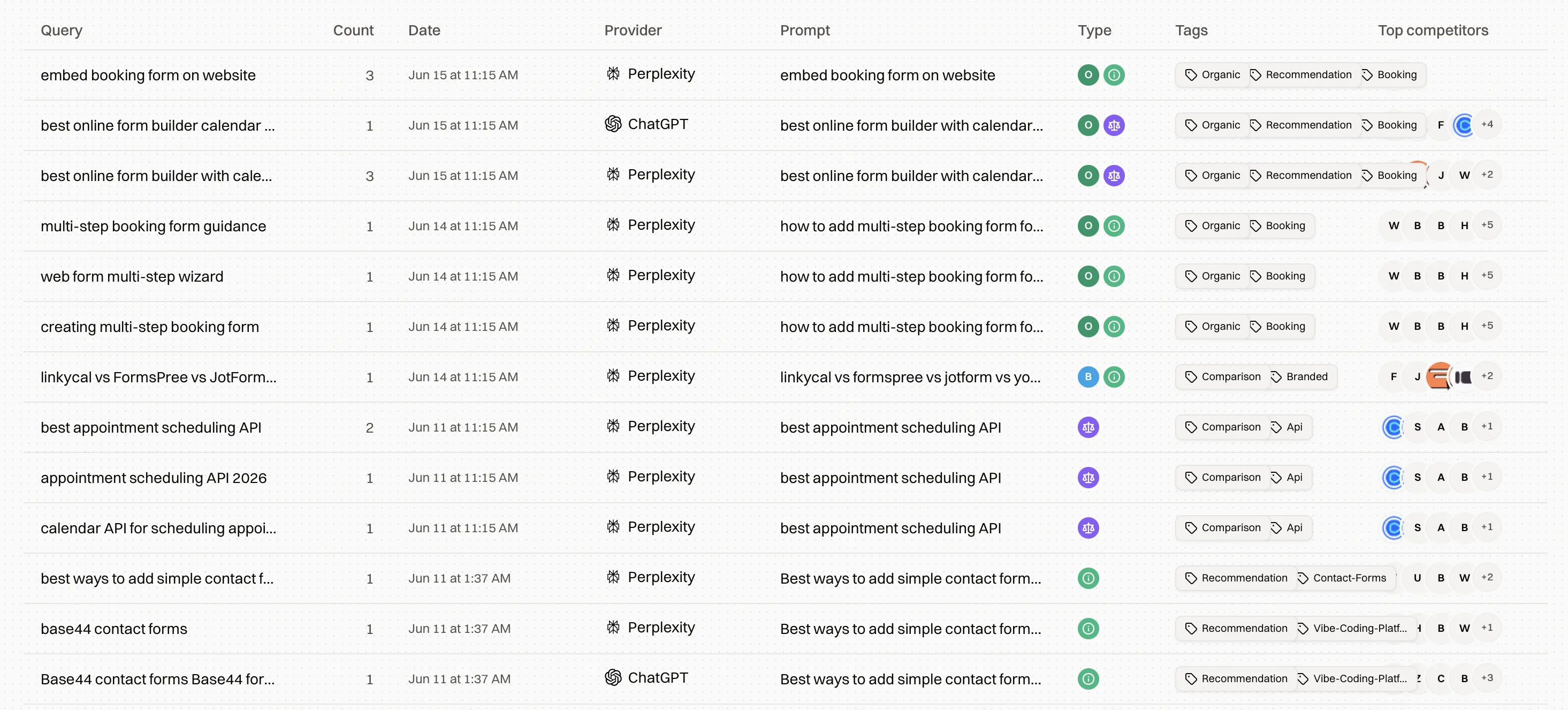
That's a keyword list written by the model itself: the phrasings it uses to research your topic. Feed them back into Content Ideas and Workflows and your next piece covers what the engines look for. When a competitor shows up on a query and you don't, you've found a specific gap to close.
6. Real-time Crawl Logs
We already showed you crawler activity over the last 30 days. Now you can see a crawler hit any of your pages almost as it happens, down to the individual visit.
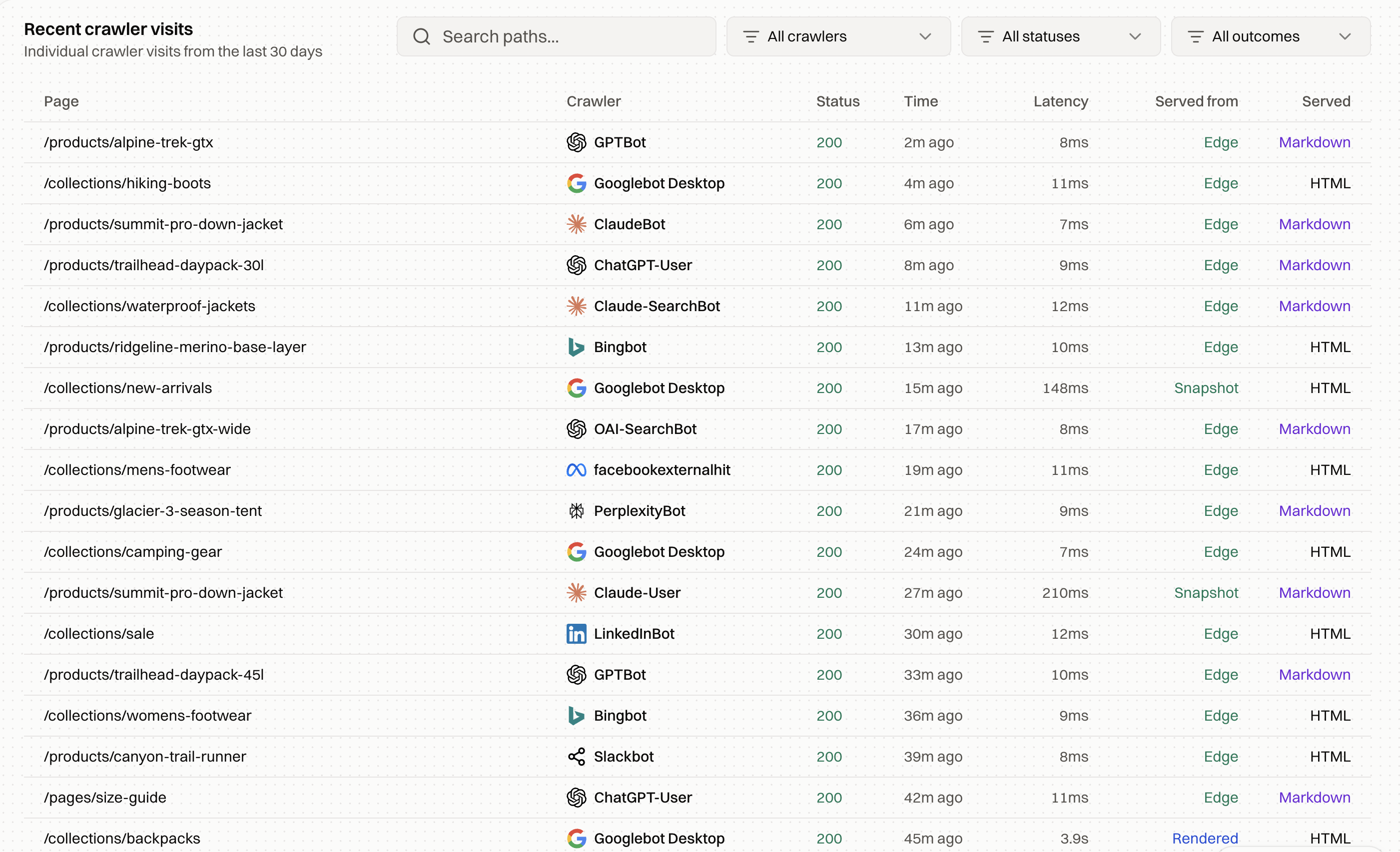
That granularity lets you answer questions you actually have: is Googlebot visiting the pages you asked it to index or re-crawl? Is newly published content getting picked up? How often does each page get crawled, and when are the peaks? It also shows which pages AI is guessing you have but you don't: a crawler reaching for a URL that isn't there points to content worth creating.
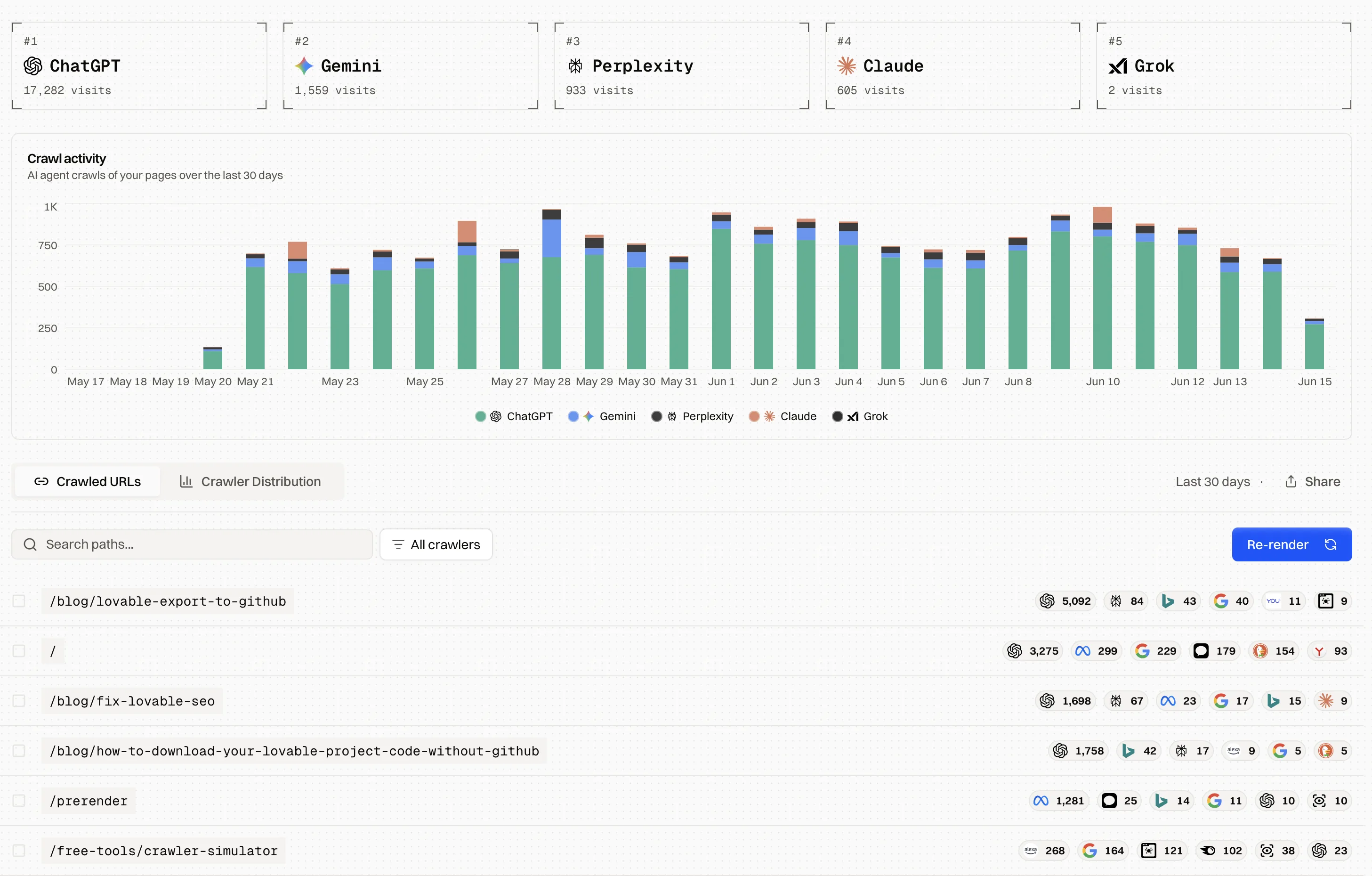
The 30-day trend is still there in Crawl Analytics: per-provider visit counts and a daily stacked chart across ChatGPT, Gemini, Perplexity, Claude, and Grok, with an AI-agents toggle. The logs work because Encited sits in front of your site, serving rendered HTML to crawlers and clean Markdown to AI agents. We push over 20 million crawl requests a month through that proxy, and prerendered pages get indexed about 5x faster than they would on their own.
How they work together
The six features map to the steps of getting a page written, mentioned, and indexed:
- Content Ideas: pick the topic, ranked by traffic impact.
- Content Workflows: turn it into a draft built from the pages already ranking.
- Citations: find the off-site sources worth getting mentioned on.
- Actions: keep the next moves prioritized.
- Fan-out Queries: see what the engines want covered next.
- Crawl Logs: confirm the bots picked up what you published.
Once a page is live, what you learn from the crawl and your visibility reports feeds the next topic.
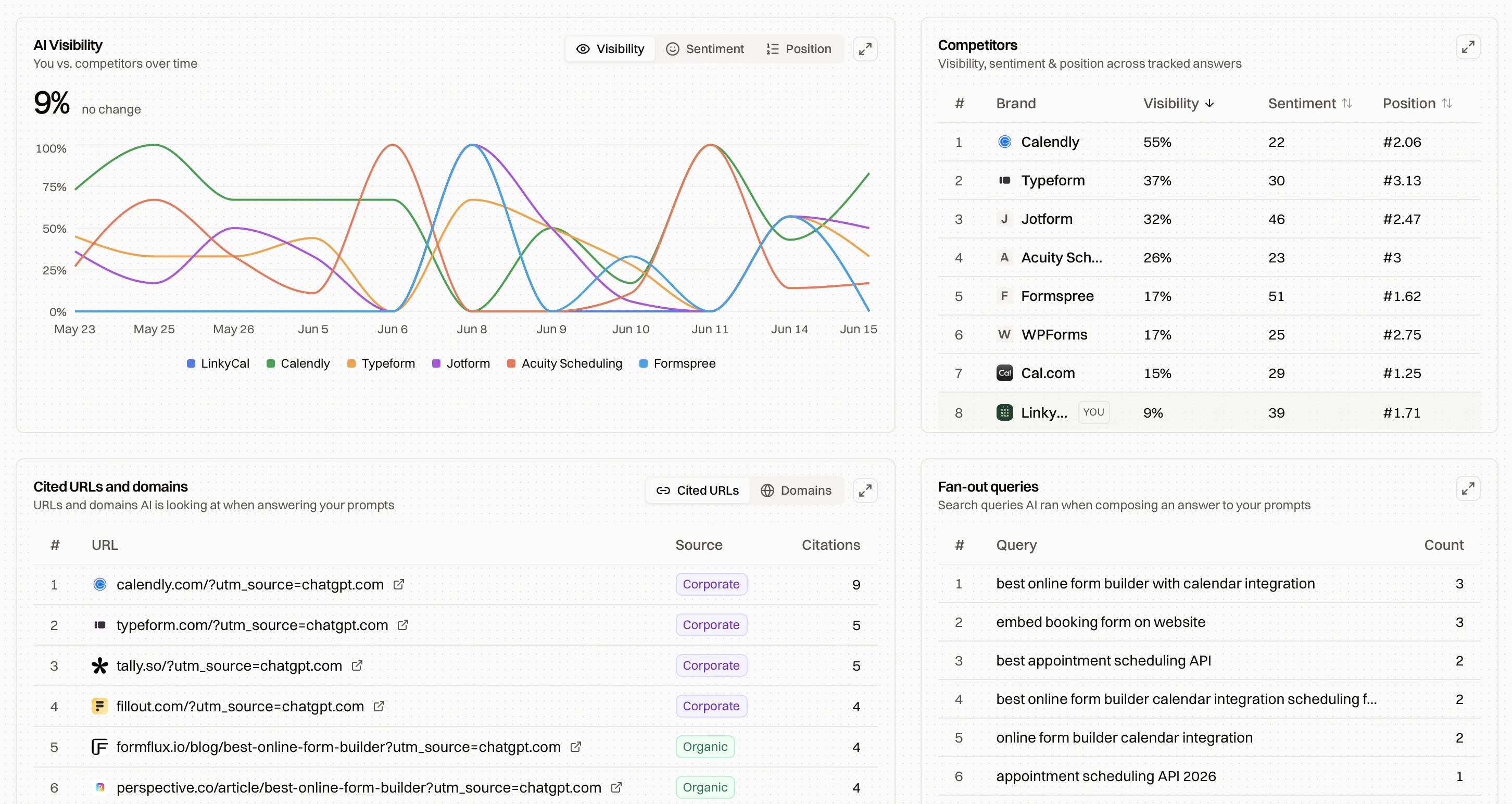
See which prompts surface your brand versus a competitor's, and which sources they cite.
FAQ
What does it mean to get cited by AI?
When someone asks ChatGPT, Claude, or Perplexity for a recommendation, the model searches the web, reads what it finds, and names a few brands in its answer. Getting cited means being one of those brands, and ideally the source the model links to. Encited shows which prompts already surface you, who gets named instead, and what to change to show up more often.
Do my own pages have to rank for me to get recommended?
No. Ranking helps (the models lean on the search engine behind them, Bing for ChatGPT and Brave for Claude), but you can also get cited through the third-party pages those models already trust: Reddit threads, directories, listicles, reviews, and YouTube. The Citations page lists those sources, and Actions turns them into a prioritized list of places to show up.
Is the content generator just keyword-stuffed AI writing?
No, and that's why we held off on building one for so long. Every draft runs through a seven-step workflow: scrape the live SERP, analyze the pages currently ranking, extract a ranking recipe, write a brief, generate an outline, draft in your brand's tone of voice, then add an FAQ, JSON-LD schema, and internal links. The result is grounded in what already ranks for the query and shaped like the rest of your blog, and you can adjust the inputs and re-run any step before it writes.
What are fan-out queries?
The web searches an engine runs for itself before it answers your prompt: the model's own research terms for your topic. Encited aggregates them so you can see how often each ran, which models ran it, and which brands rank on it, then feed them back into Content Ideas and Workflows to cover what the engines actually look for.
How are Content Workflows billed?
In credits, summed from each workflow's steps, with the total shown before you run. Because every workflow is a step-by-step recipe, you can tweak the brief and re-run a single step instead of paying to regenerate the whole thing.
Which crawlers does Encited track?
All of them. Encited logs every programmatic request that hits your site, from Googlebot and the AI crawlers like GPTBot, PerplexityBot, Gemini, Claude, and Grok, down to a plain curl. An AI-agents view filters to just the assistants, Real-time Crawl Logs show individual visits almost as they happen, and Crawl Analytics keeps the 30-day per-provider trend.
How much faster will my pages get indexed?
Encited sits in front of your site and serves fully rendered HTML to crawlers and clean Markdown to AI agents, so there's no JavaScript for a bot to execute and give up on. Prerendered pages get indexed about 5x faster than they would on their own.
The update is everything we use ourselves at Encited to do our own SEO and AI search optimizations. We hope they also help you improve yours!
Aki
Founder, Encited