SSR vs SSG vs Pre-rendering for SEO: What Crawlers Actually See
How SSG, SSR and pre-rendering differ for SEO and AI search, what each one gives a crawler, and how Encited serves clean HTML and Markdown from the edge.
Every page becomes HTML somewhere, for humans and increasingly for AI agents.
Humans browse the web with powerful browsers running on powerful machines. Crawlers on the other hand, are simple fetchers. They request your page and settle for whatever your server responds with. They have no browser to execute complex scripts, and they cannot wait for the dynamic pieces of your page to finish loading and settle. They do not have that capability.
If showing up on Google's first page or getting read and recommended by AI matters for your site, where your page becomes full HTML matters a great deal.
Below are the different rendering techniques and how SSG, SSR and pre-rendering differ for SEO and AI accessibility.
Read this with your AI. Summarize, ask questions or read it in your language. Use the Open in ChatGPT button at the top right, above the "On this page" sectionat the top of the article ↗
The four ways a page becomes HTML
Client-side rendering (CSR), on your browser. There are no servers. Just statically bundled HTML, scripts, styles and assets stored somewhere, relying on the visitor's browser to execute, parse, render and fetch the dynamic data. The entire process is browser dependent. This approach is effectively a no-go for SEO and AI search, because crawlers do not browse in a browser like humans do, at least most of the ones you care about. This is usually called a Single Page Application, or SPA for short.
Static site generation (SSG). The HTML is built at deploy time and sits on a CDN as a file.
This is the ideal architecture for mostly linear, content websites like blogs, newsletters and documentation sites with a simple layout. SSGs are not as flexible as CSR or server-side rendering. Anything genuinely interactive falls outside the model: filters, live search, configurators, carts, anything holding state. You can hydrate those in the browser after the fact, and at that point that part of your page is client-side rendered again with all the same problems.
And build time becomes a problem once the page count reaches a significant volume. Since you have to convert all your products, directory listings or profiles and threads into static HTML and CSS pages, you will be spending a lot of time building and rebuilding these pages. There are techniques to reduce this and optimize it, which we will not get into here.
Server-side rendering (SSR). With server-side rendering you have two options.
-
You run your queries and data fetching on the server, inject the data, and pass the full HTML to whoever asked for it, a real visitor or a bot. This is the more traditional approach and it is getting less common, because people do not like mixing server and data code with presentation code, and it gets expensive and error prone as the codebase grows. It is usually slower too.
-
The initial HTML, usually the template with some basic data injected server-side, is returned first, and the rest of the page loads its data after that HTML lands in the browser. This is the modern approach you see everywhere with Next.js, TanStack Start and similar frameworks. The appeal is that your server does less work per request, so responses stay fast and cheap under load, the page paints something immediately, and your data fetching stays where the components live instead of in a separate server layer. The server-rendered shell is also identical for every visitor, so it can be cached on a CDN, while the per-user parts like cart, stock or recommendations get fetched in the browser. Option 1 cannot do that, because its HTML is already personalised by the time it leaves the server.
The catch with the second option is the one this whole post is about. Whatever loads after the initial HTML does not exist as far as crawlers are concerned. Your product specs, reviews, listings and prices can be perfectly visible to a human and completely absent from what a crawler receives.
Pre-rendering. A layer on top of any of the above rendering methods, usually SSR and CSR sites.
Dynamic content SEO. Pre-rendering has been the solution to crawl budget and dynamic content SEO problems for over a decade now. It works because it gives 100% content coverage regardless of how and where your pages are rendered. Tabs, click to reveal content, accordions, modals, drawers, any type of content that requires user interaction is usually missed by crawlers even on server-side rendered sites. Pre-rendering was the original solution to this, way before single page applications were a thing.
Rendering for humans vs crawlers. Another use case is tweaking the page depending on who is asking. For a human visitor you may want to show a cookie consent bar, a popover modal for conversion, a lead magnet, or some kind of verification before you show the main content. Every one of these things hides your main content and is a massive problem for crawlers, because they cannot click or execute scripts. They are not in a browser.
Agent friendly pages in Markdown. A newer use case is serving pages in Markdown for AI agents. AI agents are Markdown native. After fetching a page, they process its HTML into Markdown through their own pipeline, one you have no control over. When they do read the HTML, they read top to bottom up to a certain point and cut off, because they need to save tokens and context window. Inline SVGs, styles and scripts pollute that window, so the model can end up with little to no actual content. The industry started experimenting with serving Markdown instead, and it is increasingly becoming the standard.
Encited is the only major pre-rendering and edge delivery platform that serves both token-efficient HTML and Markdown to crawlers, and actively does content negotiation at the edge with crawlers on behalf of your site.
| CSR | SSG | SSR | Pre-rendering | |
|---|---|---|---|---|
| Where HTML is built | the visitor's browser | at deploy time | your server, per request | ahead of time, in a real browser |
| What crawlers see | empty boilerplate shell | the full page | initial HTML, before dynamically loaded content | the entire page, including dynamic content |
| Crawler response time | slow, JS has to execute first | very fast, it's a static file | 15-600ms, depends on your server capability, database and code speed | ~15ms from the Encited edge |
| Cost per crawler hit | your origin | near zero | your origin | near zero |
| Keeping pages current | instant | full rebuild, grows with page count | instant | re-render the pages you touched |
| What it takes to run | a static host and a JS bundle | a build step and a CDN | a live server on every request | your existing site and an edge proxy |
How Encited pre-renders your pages
Encited loads every page in a real browser, the same way a visitor would. Your JavaScript runs, your data fetching completes, your components mount. Once the page settles with no more changes in either the requests or the page itself (the DOM), Encited takes the loaded HTML as the snapshot.
Waiting for the page to settle. The timing decides whether pre-rendering is worth anything at all. Product grids, review panels, location data, pricing and recommendations usually arrive well after the first response. A snapshot taken at the initial load event preserves your loading skeletons and nothing else. A snapshot taken once network activity and DOM changes have quieted down preserves what a human would actually read on that page.
Cleaning the snapshot. Once the page has settled, Encited strips out everything a crawler gains nothing from: scripts, styles, tracking code, browser performance hints, duplicate metadata and internal rendering parameters. Structured data stays, because it is one of the few things every crawler reliably reads. Across dozens of sites migrated off Prerender.io, Encited snapshots carried about 25% more readable content on average, and the files themselves came out smaller.
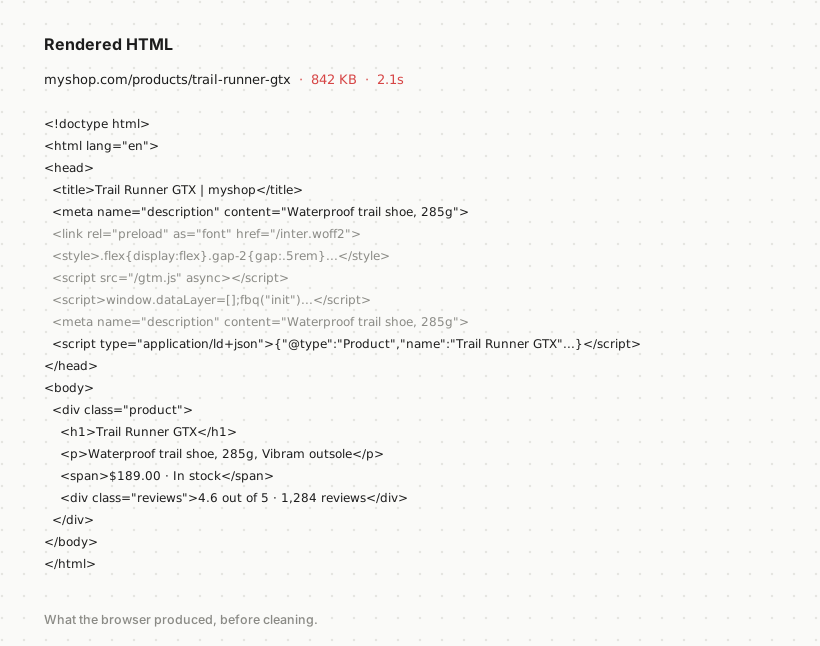
Run a free render check on any URL and compare the raw HTML your server returns against the fully rendered page a visitor gets.

Why the size of your HTML matters now. An AI agent reads your page inside a context window it is also spending on the user's question, the chat thread, its skills and its memory. Add to that the dozens of other pages it pulls in to read and compare before it can put a final response together. Every kilobyte of <div class="flex items-center gap-2 rounded-xl"> is budget that never reaches your product specs. A bloated page used to be a crawl budget problem. It is now a comprehension problem as well.
Token-efficient HTML, and Markdown in milliseconds
Search crawlers expect HTML, so that is what they get: the complete rendered page, semantic, with everything that is not content taken out.
AI agents can do better than that. Encited builds a Markdown version from the same rendered snapshot and hands it to anything that asks for it. The Markdown version keeps:
- the page title and description
- the document language
- JSON-LD structured data
- headings, paragraphs, lists, links, tables and code
It drops layout wrappers, scripts, styles and everything else that costs tokens without carrying meaning.
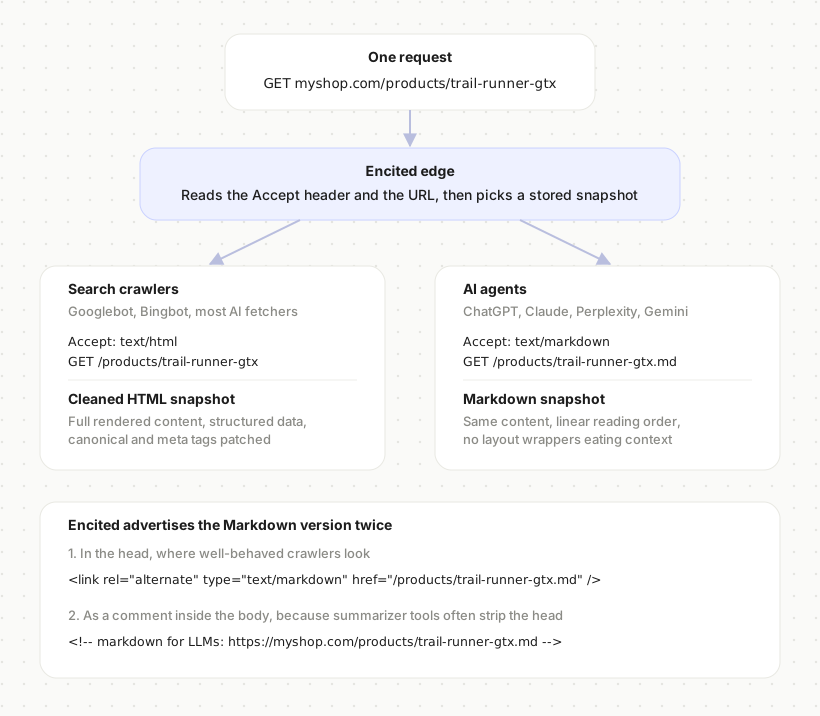
Two ways to ask for it. An agent can send an Accept header:
Accept: text/markdown
Or it can request the .md URL directly, so /products/trail-runner-gtx is also available at /products/trail-runner-gtx.md. Both return the same document.
Advertised in two places. Encited puts the Markdown version in the <head>, where a well-behaved crawler looks for alternates:
<link rel="alternate" type="text/markdown" href="/products/trail-runner-gtx.md">
And again as a comment inside the <body>:
<!-- markdown for LLMs: https://myshop.com/products/trail-runner-gtx.md -->
The second one is there because many summarizer and extraction tools throw the head away before the model ever sees the page. If the only signpost sits in the head, those tools never find it and you lose the benefit for no reason.
Where this makes the biggest difference. On a blog post, HTML and Markdown are close to equivalent. The document already reads top to bottom, so a parser following DOM order gets the article in the right sequence.
Product detail pages and directory listings do not work that way. Specs sit in a tab, reviews in a lazy-loaded panel under a carousel, the price in a sticky bar that is markup-adjacent to the header, related items in a grid that visually lands between two things it has nothing to do with. To a human the layout is obvious. In DOM order it is a mess, and a model reading it has to work out which numbers belong to which heading before it can use any of them.
What happens between the fetch and the answer. Fetching your page is only the first step. What follows is roughly the same everywhere: strip the boilerplate to find the main content, split what is left into passages, score those passages against the query, re-rank the survivors with a heavier model, then use the top few to write the answer.
Extraction and scoring punish messy markup. Two of those steps go badly for a messy document. Extraction is heuristic, and it has to guess which parts of the DOM are the content and which are navigation, promos and chrome. Content sitting in tabs, sidebars and repeated card grids is exactly what those heuristics tend to throw away. Scoring is the second one. Lexical scoring like BM25 rewards a passage where the query terms appear often relative to how long that passage is, so wrapper text and boilerplate that survives extraction dilutes the terms you actually want to rank for. Google has ranked individual passages inside a page since 2021, on top of ranking the page itself, and AI answer engines work on chunks the same way. A passage that got separated from its heading loses the words that would have matched the query in the first place.
Markdown is cheaper to extract from. It takes the guessing out of the first step. You hand the pipeline the extraction result directly, with headings intact and the reading order already correct, so the chunker splits on real boundaries and each passage keeps the heading that gives it meaning.
One reading order, real heading levels. The Markdown snapshot flattens all of that into one reading order with real heading levels. On those page types Encited sees up to 60% more of the page's content survive into what the model retains. Directory and listing pages behave the same way, because a repeating card grid in HTML is mostly wrapper markup wrapped around a handful of facts per item.
Where adoption actually stands. Worth being straight about it: most AI crawlers still take the HTML today, and Markdown request volume is small and climbing. Serving it costs you nothing, and the pages are already sitting there when a given crawler starts asking.
Observability
Rendering every page on a schedule has a useful side effect. Encited ends up holding a fetched, executed, status-checked record of your entire site, which is a better picture of its health than a one-off crawl gives you.
The problems that surface first are usually these:
- Pages that error or hang. A route that 500s under load, or an origin that stops responding mid-deploy, shows up as a failed render with the status Encited got back from your server.
- 404s left in your sitemap. Products get deleted, categories get merged, and the sitemap generator keeps listing them. Google spends crawl budget on those URLs and trusts your sitemap a little less each time.
- Redirect chains. URLs still listed as canonical destinations that now bounce through two or three hops before landing.
- Pages that render empty. The snapshot succeeded and the page came back as a shell, which almost always means an API call failed behind the scenes.
Then there is the log side. Because crawler traffic passes through Encited, you get the actual record of who fetched what, when, and what they received: Googlebot, GPTBot, PerplexityBot, Claude's fetcher, Grok. These are the requests themselves rather than an estimate. That is how you find out an AI crawler has spent a week on a paginated filter, or that it stopped fetching your money pages a month ago.
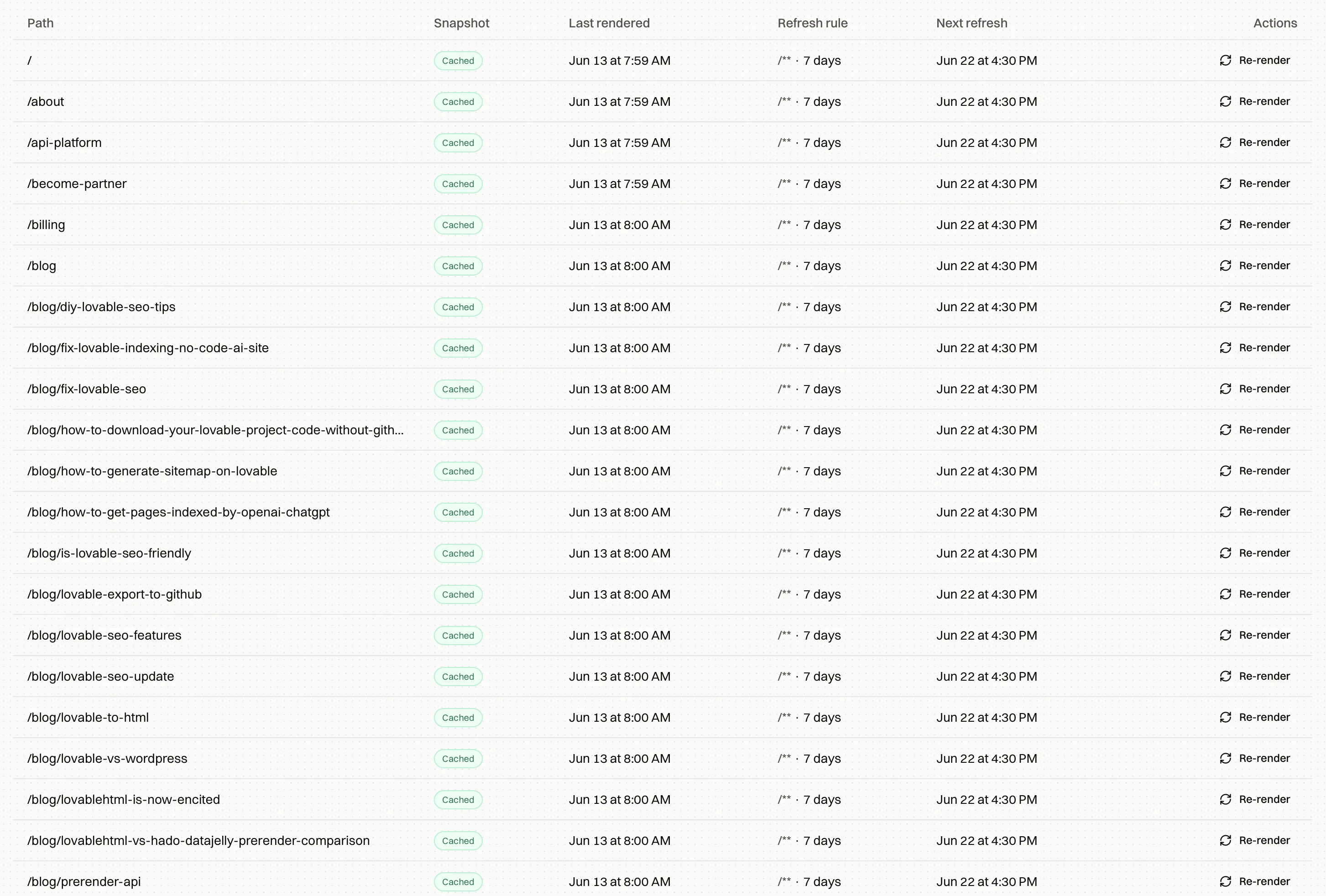
On-page issues Encited patches on the way out
Some technical SEO problems have exactly one correct answer, the fix is mechanical, and waiting on a developer ticket serves nobody. Encited corrects those in the snapshot itself:
- missing or wrong canonical tags
noindexon a page you are actively listing in your sitemap- missing or duplicated Open Graph and Twitter tags, which is usually why link previews break
- a missing
<h1>, or heading levels that skip, likeh1straight toh3 - duplicate metadata left behind by a router or a plugin
Everything else Encited reports and leaves alone, because it needs a judgment call you should be the one making. Thin content, weak internal linking and cannibalising titles all fall into that group.
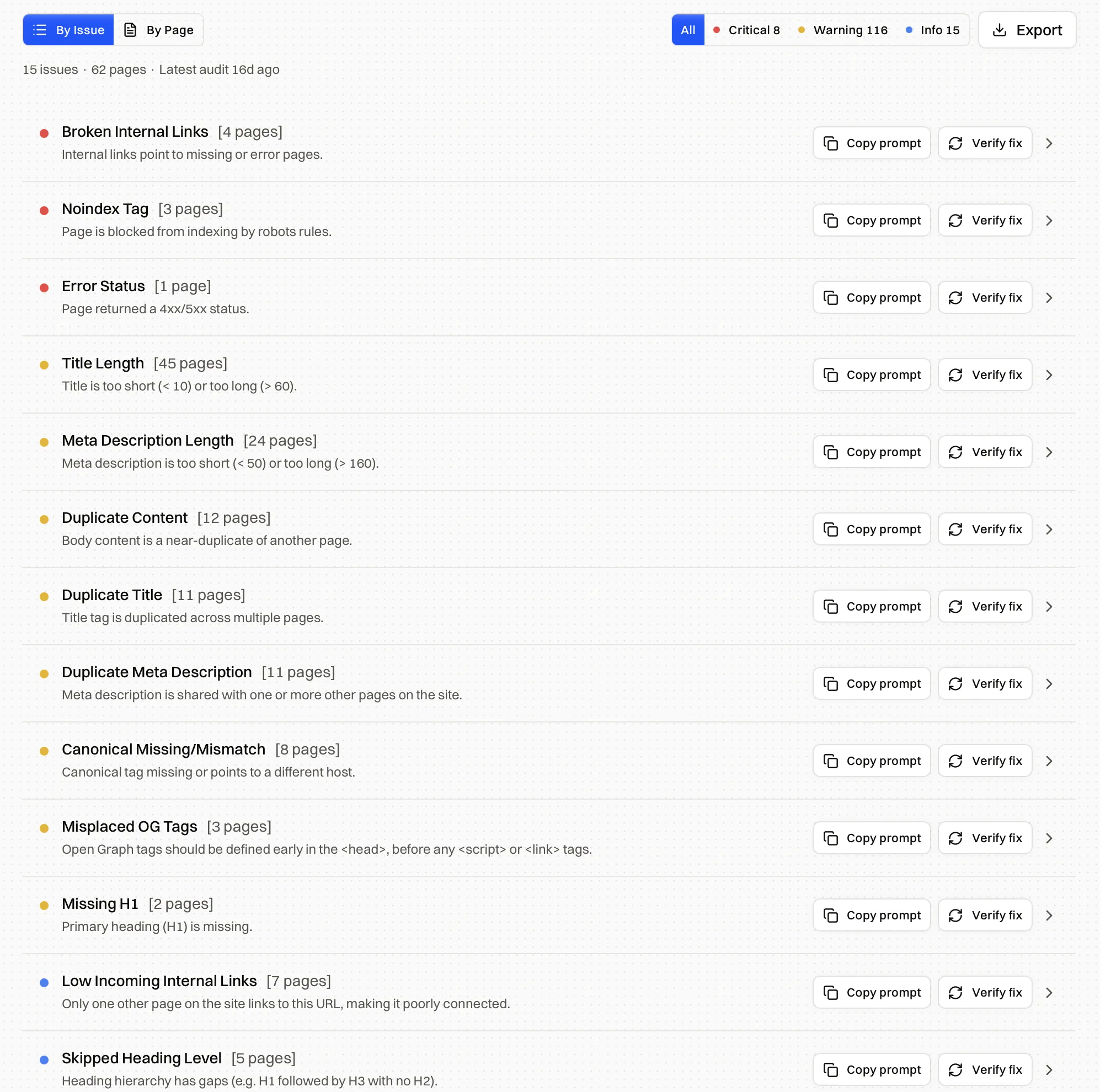
Encited's SEO Spider crawls your whole site, checks it against 40+ technical SEO issues, and explains each fix with prompts you can paste into your website builder.
Edge caching
Running a browser is the expensive part of pre-rendering, and it should never happen while a crawler is waiting on a response.
Snapshots are stored in Cloudflare object storage and cached at the edge closest to whoever is asking, so the median response comes back in about 15ms. When the nearest edge does not hold a copy, Encited reads it from object storage without launching a browser again. When a snapshot goes stale, Encited keeps serving it while the fresh one builds, so there is never a window where a crawler gets an empty page.
The full path looks like this:
- Encited renders and cleans the page.
- The HTML snapshot is stored.
- The Markdown version is stored or built from that snapshot.
- The nearest edge serves later crawler requests.
- Stale snapshots keep serving while a refresh runs in the background.
Your crawler response stops depending on database queries, API latency, JavaScript execution and origin load. You get the performance profile of a static file on a CDN, sitting on top of an application that is nothing of the sort.
The edge proxy, and why setup is a DNS record
Every other pre-rendering service asks you to put something inside your stack. A middleware package, an Nginx rule, a Cloudflare Worker, an Apache config. Whatever it is, it now lives in your request path, and you own it, debug it and keep it up to date.
Encited runs as an edge proxy you point a DNS record at. As far as we know it is the only pre-rendering service offered this way, which matters most to people who have no backend to install middleware into, and to agencies who would rather not touch fifty client stacks.
Once your traffic runs through that proxy, a few things become possible that middleware cannot do.
Stateless edge routing. Every request is resolved at the edge from the URL and the headers alone. There is no session to look up and no round trip to your origin to decide what to serve.
True 404s and 301s. A deleted page returns a real 404. Most JavaScript sites answer with a soft 200 and an empty shell, which is the most common indexing problem Encited turns up. Redirects go out as real 301s at the edge, before your application is involved at all.
Sitemap hosting on your own domain. A generated, always-current sitemap served from myshop.com/sitemap.xml, with no build step and no third-party domain. It reflects what actually renders, so the dead URLs from the section above stop being listed.
DDoS protection. Traffic terminates on Cloudflare's network before it ever reaches your origin.
Crawl log analysis. The proxy is the natural place to record crawler activity, which is where everything in the observability section comes from.
How Encited bills renders
A crawler request does not always point at a page worth rendering, so Encited checks your origin before it launches a browser.
Real 4xx and 5xx responses do not consume a render. A browser attempt that fails or comes back with no usable page is not billed. Redirects do not create a second billed render either, because Encited resolves the redirect first and renders the working destination.
Your render allowance goes to successful page snapshots. Dead URLs, failed origins and redirect hops are on Encited.
So which one do you need?
If everything you want indexed is already in the initial HTML response, your layout reads top to bottom, and your origin stays fast under crawler load, SSR is enough on its own. Check before you assume: curl one of your heaviest pages and read the raw output. If the specs, reviews and prices are in there, you are done and you can stop reading.
Pre-rendering earns its place the moment any of that stops being true. Content that hydrates after the first response. Layouts complex enough that DOM order and reading order have parted ways. Crawl budget going to waste on a slow origin. Agents you would like reading a clean, linear version of a page that humans navigate visually.
See your site the way a crawler sees it
DNS-only setup, about five minutes, no card required and no code changes. Plans start at $19/mo.
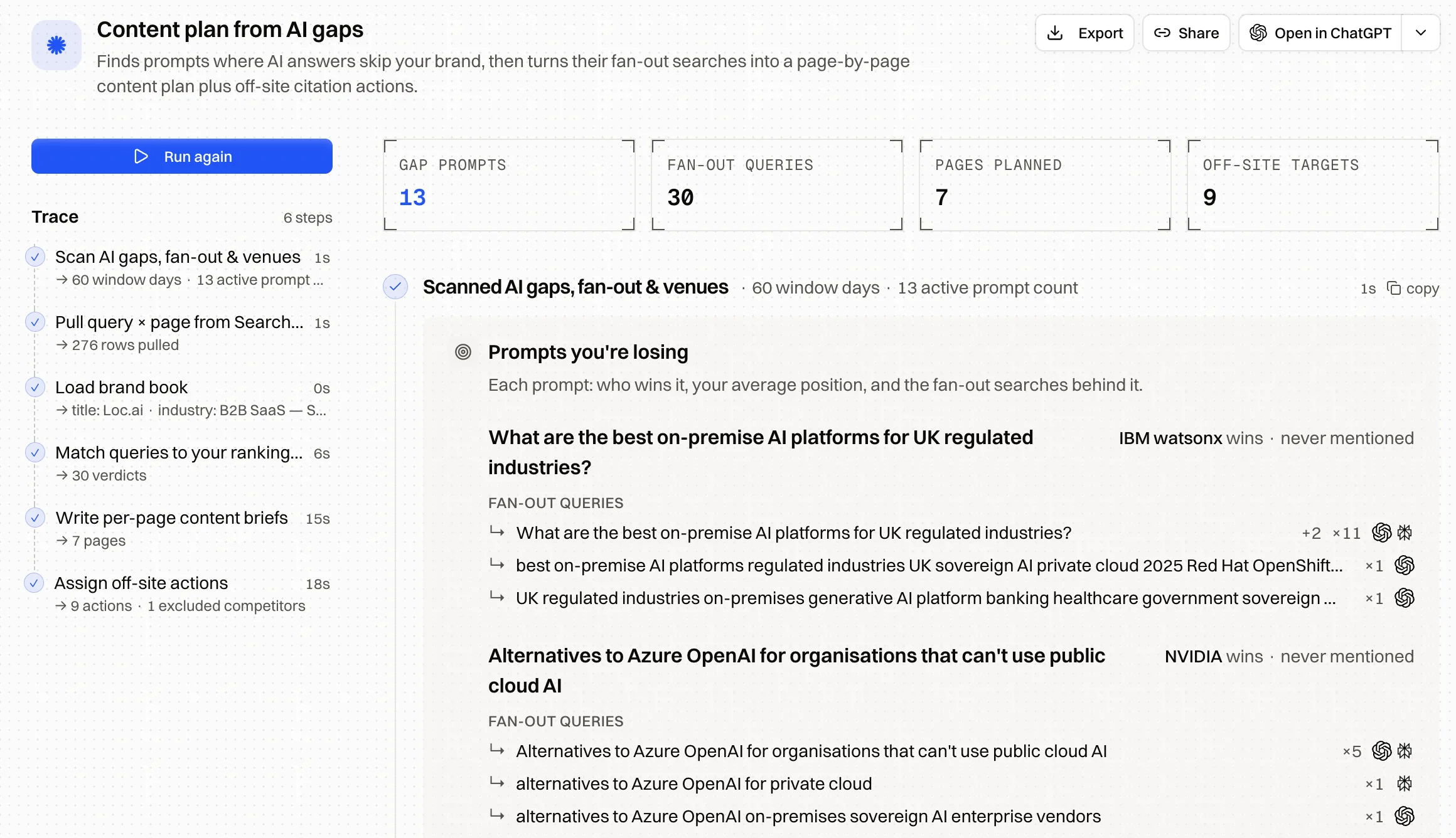
Encited MCP gives Claude, Cursor and ChatGPT direct access to your crawl logs, audits, Search Console data and AI visibility tracking, so you can debug and fix in the same place you write the code.
FAQ
I already use SSR. Do I need this?
Maybe not. Pull one of your pages with curl, read the raw HTML, and check whether the parts you care about are in there. If they are, and your response times hold up under crawler load, you do not need Encited.
Is pre-rendering cloaking?
No, as long as the snapshot matches what a human sees. Cloaking means serving crawlers different content. Encited serves the same page, already rendered.
Does this replace SSG?
No. If your pages are genuinely static, generate them and put them on a CDN. Pre-rendering is for the pages SSG cannot cover.
What happens when I update a page?
The refresh rule re-renders it on schedule, and you can force a re-render the moment you ship. The old snapshot keeps serving until the new one is ready.
Do I have to choose between HTML and Markdown?
No. Both are stored for the same URL and the caller picks, either with the Accept header or the .md path.
Does Encited charge a render for redirects, or broken pages?
No. Encited resolves the redirect first and renders the destination once. Real 4xx and 5xx responses, failed origins and browser attempts that return no usable page are not billed either.
Fast responses, complete HTML and a reading order a model can follow. That is most of the job, and all of it is within your control.
— Aki, Founder at Encited