Soft 404 Errors: What They Mean and How to Fix Them
A soft 404 is a page Google treats as missing even though it returns 200 OK. Find soft 404s in Search Console, see what causes them, and fix each one.
A soft 404 is a URL that returns a 200 OK status code while the page tells visitors it doesn't exist, or shows so little that Google treats it as empty. Google keeps these URLs out of its index and lists them under Soft 404 in the Search Console Page indexing report. To fix a soft 404, decide what the URL should be: a page that's gone returns a real 404 or 410, a page that moved gets a 301 redirect to its replacement, and a real page gets content Google can see.
Key takeaways
- Soft 404 is Google's label for a page that returns 200 OK but looks missing, empty or broken. No server sends it as a status code.
- Find them in Search Console under Indexing, then Pages, then Soft 404. URL Inspection shows what Google rendered for each one.
- Single-page apps return 200 for every URL, so each missing page on them is a soft 404 until something sends a real status.
- A real page flagged as a soft 404 usually rendered empty or thin for Googlebot. Fix what Google saw, then request indexing.
- After the fix, click Validate fix in the Page indexing report. Validation can take up to about two weeks.
What is a soft 404?
In a soft 404, the status code and the page disagree. The server sends 200 OK, and the page says "not found", shows an empty template, or carries so little content that Google can't tell it apart from an error page.
Google finds the mismatch by reading the page after it renders. Search Console's help describes a soft 404 as a page that shows a user-friendly not-found message without a 404 response code.
Soft 404 vs 404 vs 410
| Status code | What the page shows | What Google does | |
|---|---|---|---|
| 404 Not Found | 404 | An error page | Drops the URL from the index and crawls it less often over time |
| 410 Gone | 410 | An error page | The same as a 404 |
| Soft 404 | 200 | An error page, an empty template or very little content | Labels it Soft 404, keeps it out of the index and keeps crawling it |
A 404 says in the response that the page doesn't exist. A soft 404 depends on Google reading the page and judging it an error, so a real page can get caught by mistake.
Google's help page on 404 errors says: "Currently Google treats 410s (Gone) the same as 404s (Not found)." Its crawler documentation treats every 4xx code except 429 the same way. Use whichever your server makes easy.
Not found (404) is a separate status in Search Console, and how to fix 404 errors in Google Search Console covers it.
Do soft 404 errors hurt SEO?
A soft 404 on a page that should be gone costs little. The URL stays out of the index, which is what you wanted. Google keeps fetching URLs that answer 200, though, and on a site with thousands of empty filter pages or dead product URLs, those fetches take crawl time from pages you care about. New pages that wait for those crawls show up as Discovered - currently not indexed. The Google indexing field guide explains how that crawl budget works.
A soft 404 on a page you want found costs you the page. Google has decided it's empty, so it won't rank, and an indexed page that gets the label drops out of results. Fix those first.
How to find soft 404s in Google Search Console
- Open Search Console and go to Indexing, then Pages.
- Under "Why pages aren't indexed", click Soft 404.
- Export the example URLs. The report lists up to 1,000.
- Sort the list by URL pattern. Soft 404s usually come from one template: all tag pages, all expired listings, all products from one feed.
- Open two or three URLs from each group in URL Inspection.
Older guides call this status "Submitted URL seems to be a Soft 404", its name in the old Coverage report.
In URL Inspection, the verdict reads "Page is not indexed: Soft 404". Click "Test live URL", then "View tested page". The screenshot and the rendered HTML show what Googlebot got. An error screen, a spinner or a blank template is the page Google judged. If the screenshot shows your full page, the problem was temporary or the page is too thin.
The report runs behind Google's crawls. Three checks find soft 404s sooner:
- Request a made-up URL. Anything other than 404 or 410 means every missing page on your site can become a soft 404.
curl -s -o /dev/null -w "%{http_code}\n" https://yoursite.com/this-page-does-not-exist
- Crawl the site. A crawler visits every page and flags the ones that return 200 while showing not-found wording.
- Read the logs. Your server or crawl logs show the status code Googlebot got on each request. A URL that answered 200 to Googlebot while your site shows a not-found screen for it is a soft 404.
Inspecting hundreds of sitemap URLs one at a time in Search Console is slow. Index Rush pulls the live Search Console status of every sitemap URL, with Google's fetch result for each one, such as Soft 404 or Not found (404), and the SEO issues on that page.
What causes soft 404 errors
A not-found page sent with a 200
The site shows a "Page not found" template for a missing URL, but a custom error template, a plugin or a catch-all route sends it with a 200. Visitors see an error. Google sees a page that claims to exist.
Redirects to the homepage
Google's help page on 404s calls a redirect from a missing URL to the homepage a soft 404. Google can't tell the old URL is dead, and the visitor lands somewhere they didn't ask for. Redirect only to a page that replaces the old one.
Empty archive, search and filter pages
WordPress creates a page for every category and tag, and an empty one still answers 200 with a "nothing found" message. Internal search results with no matches, filter combinations with no products and paginated pages past the last item do the same. Faceted navigation SEO covers empty filter combinations on stores.
Out-of-stock and discontinued products
A product page reduced to "this item is no longer available" reads as an error page. The ecommerce SEO audit tests product, filter and missing URLs in one pass.
Expired listings
Job posts, events, property listings and classifieds expire on a schedule. When one expires, the URL often stays live with the content removed, and Google finds an empty page.
Real pages that render empty
Googlebot rendered a real page while an API call failed, a script errored or a loading spinner was still on screen, and it judged the empty result. Very thin pages get the same label.
Soft 404s on single-page apps: what we tested
A single-page app built with React, Vue, Angular or an AI website builder serves the same index.html for every path. The host returns 200, then JavaScript reads the URL and draws the right screen, including the not-found screen. To Google, every mistyped link, deleted page and old URL on the site is a 200 page that says "not found".
We requested a made-up URL on several sites on November 9, 2026, once with a browser user agent and once as Googlebot.
| URL | Browser gets | Googlebot gets | What the HTML holds |
|---|---|---|---|
| angular.dev/no-such-page-xyz | 200 | 200 | The homepage's HTML, titled "Home • Angular". "Page not found" appears only after JavaScript runs |
| A new made-up path on encited.com | 200, a 41 KB app shell | 404 | The rendered not-found page, titled "Page not found", with a robots noindex tag |
angular.dev is the Angular team's documentation site. For a missing URL, its server sends the homepage's HTML byte for byte, and Googlebot renders the "Page not found" screen on a 200 response, so every mistyped link to the site is a soft 404 candidate. AI crawlers such as GPTBot and ClaudeBot don't run JavaScript, so they read a copy of the homepage at a dead URL.
encited.com is a single-page app too. Googlebot gets a 404 with the rendered not-found page because Encited's pre-rendering sits in front of the app and turns detected not-found pages into real 404s for crawlers.
Until September 2026, an unknown blog slug on encited.com returned 200 with a "Post not found" message, to crawlers as well. A post we deleted in April answered that way for more than five months. Google's last recorded crawl of it in URL Inspection, on August 8, filed the URL under Crawled - currently not indexed. Google doesn't always use the Soft 404 label for an empty page. The Crawled - currently not indexed guide covers that status.
The other sites we tried, including react.dev, vuejs.org, lovable.dev, bolt.new and webflow.com, returned a real 404 for a made-up URL.
How to fix soft 404s on a single-page app
Use the first option your setup allows:
- Return 404 from the server or host. Send 404 for every path outside your route list, or use a framework that renders on the server and has a not-found call, such as
notFound()in Next.js orcreateError({ statusCode: 404 })in Nuxt. The setup for each router is in the React, Vue and Angular guide. - Use one of Google's client-side fixes. Redirect with JavaScript to a URL that returns 404, or add
<meta name="robots" content="noindex">to the not-found screen with JavaScript. JavaScript SEO covers both, with Google's caveat on noindex added by JavaScript. - Send crawlers a real status from a pre-render layer. With Encited, add one tag to your not-found route:
<meta name="prerender-status-code" content="404">
Crawlers then receive a 404 for that URL, or a 410 when you set content="410". Without the tag, Encited still flags a rendered page as a soft 404 when it carries a robots noindex meta tag and not-found wording such as "404", "page not found" or "doesn't exist" in its title or text, so an app that already follows Google's noindex advice gets real 404s with no code change. Put the tag only on the not-found route: in a static index.html it would turn every page into a 404 for crawlers. The soft 404 detection guide has a React example.
How to fix soft 404 errors
Decide what each URL should be, then make the response match it.
| What the URL should be | What to send | How |
|---|---|---|
| Gone, with no replacement | 404 or 410 | Fix the server, template or route so the error page sends the error code |
| Moved, or replaced by a close match | 301 to the replacement | A server, host or CMS redirect rule |
| A real page you want on Google | 200 with full content | Fix the render, then add what the page lacks |
| Useful to visitors only | 200 with noindex | A robots meta tag on the template |
| Temporarily out of stock | 200 with full content | Keep specs, reviews and similar products on the page |
Pages that are gone
Send 404 or 410 with an error page that gives visitors a way on: a search box, the main sections, popular pages. Then run the curl check above on the URL, because a custom 404 template often sends 200 by accident. Remove the URL from your sitemap and your internal links.
Pages that moved
Redirect with a 301 to the page that now answers the same need. Redirect rules for Apache, Nginx, Netlify and WordPress are in the 404 guide. On a site behind Encited, redirect rules run at the edge for bots and visitors, and a pattern such as /old-blog/** to /blog/$1 moves a whole folder in one rule.
Real pages flagged as soft 404
Run a live test in URL Inspection and match the screenshot and rendered HTML to one of these:
- The content is missing. The page depends on JavaScript or an API call that didn't finish for Googlebot. Send the content in the HTML with server-side rendering, static generation or pre-rendering. The free Googlebot Simulator shows the status code and HTML a crawler gets from any URL.
- The content is there but thin. Add what a visitor came for: specs, prices, photos, answers. A page with a title, one line and a footer gives Google nothing to index.
- The page carries not-found wording. A heading or widget that says "not found" or "no results" on a real page reads like an error. Change the wording or remove the empty widget.
Then click Request indexing in URL Inspection.
Pages that should stay out of Google
Internal search results, empty filter combinations and thin archives can stay live for visitors with a noindex tag. They move from Soft 404 to Excluded by noindex tag, which is the result you want. Don't block them in robots.txt as well, because Google can't read a noindex tag on a page it isn't allowed to fetch.
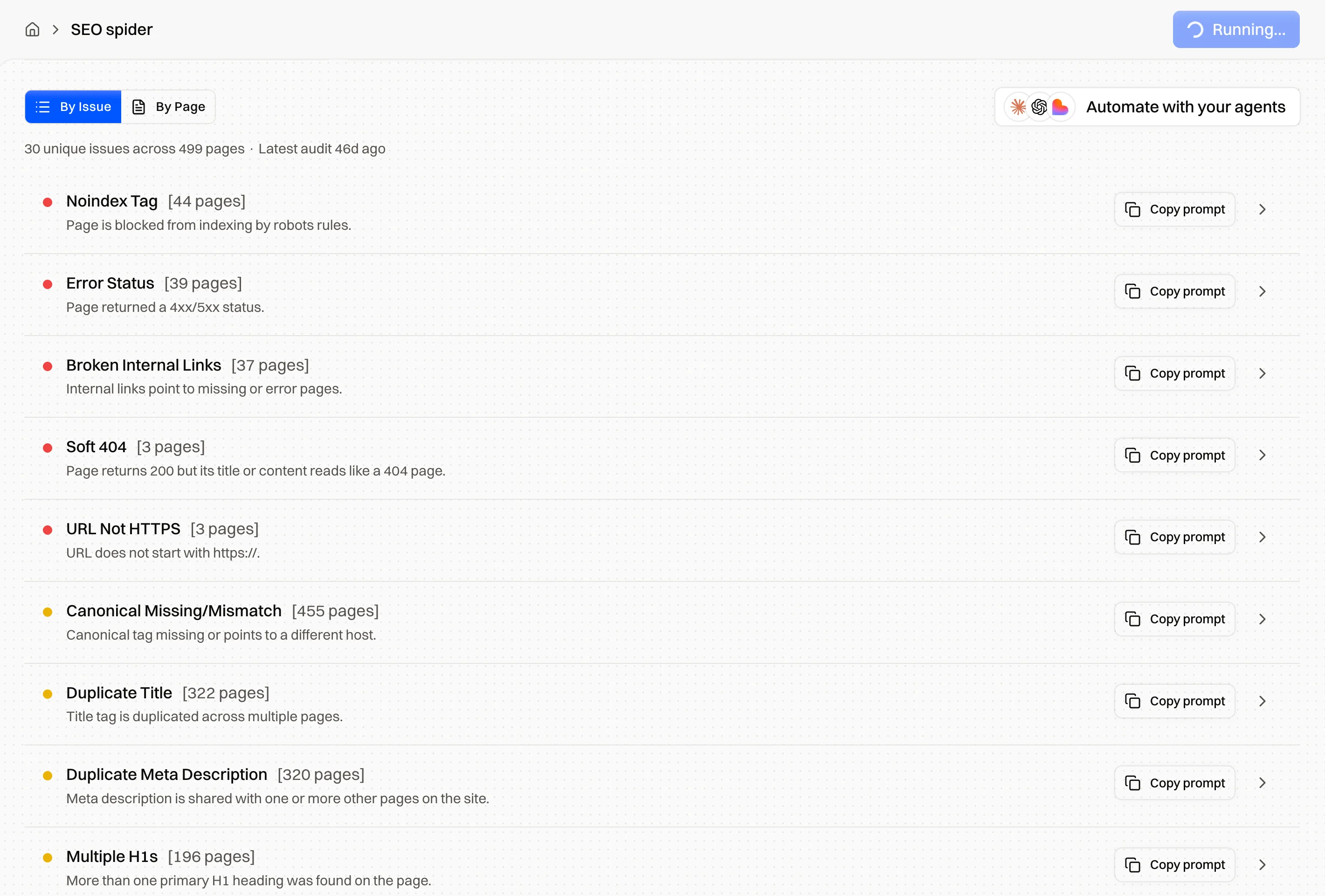
New soft 404s arrive with every deleted product, expired listing and new template. A site audit crawls your site and lists soft 404s, error statuses and broken internal links, each with a page count and a recommended fix, before Search Console reports them.
Validate the fix in Search Console
- Inspect one fixed URL and click "Test live URL". A page that's gone should now fail with a 404. A real page should read "URL is available to Google".
- In the Page indexing report, open Soft 404 and click Validate fix. Search Console checks a few URLs right away, then recrawls the rest of the list.
- Wait. Validation usually takes up to about two weeks and can take longer. Don't click Validate fix again while it runs.
Fix every URL in the group before you start, because validation stops at the first URL that still shows the problem. A URL that now returns 404 moves to the Not found (404) status, which is where a dead URL belongs. If validation fails, Search Console names the URL that failed. Fix it and start a new validation.
FAQ
What does soft 404 mean?
It means Google thinks a URL is an error page even though the server returned 200 OK. The page says it doesn't exist, shows an empty template or has too little content, so Google keeps it out of the index and reports it as Soft 404 in Search Console.
Is a soft 404 bad for SEO?
It depends on the URL. On a page that should be gone, the only cost is the crawls Google spends on it. On a page you want found, it means the page isn't indexed and can't rank.
What's the difference between a soft 404 and a 404?
A 404 is a status code the server sends to say the page doesn't exist. A soft 404 is Google's label for a page that returns 200 but looks like an error, so it depends on Google's reading of the page and can catch a real page by mistake.
Should I redirect soft 404 pages to the homepage?
No. Google treats a redirect from a dead URL to the homepage as a soft 404 too. Redirect to a page that replaces the old one, or return 404.
Why does Search Console show a soft 404 for a page that works?
Google rendered something different from what you see. Usually the content loads with JavaScript or an API call that failed or ran late for Googlebot, or the page is very thin. Run a live test in URL Inspection and check the screenshot.
How long does it take for soft 404 errors to clear?
After you click Validate fix, Search Console usually finishes within about two weeks. Without validation, the count changes as Google recrawls each URL on its own schedule.
Can I use noindex to fix a soft 404?
For a page that should stay live for visitors and out of Google, yes: it moves to Excluded by noindex tag. For a page that's gone, return 404 or 410. For a page you want indexed, noindex keeps it out, so fix the content.