Fix Crawled - Currently Not Indexed in Google Search Console
Crawled - currently not indexed means Google fetched your page and left it out. Find the real cause, fix it, and get the page indexed.
To fix Crawled - currently not indexed in Google Search Console, find out why Google left the page out, change the page, and then request indexing. The status means Googlebot already fetched and read the page, so requesting a crawl without a change gets the same result. The usual reasons are an empty JavaScript render, a canonical pointing to another URL, duplicate or thin content, a soft 404, or too few internal links.
Your page has sat in the Pages report under this status for weeks, and Search Console doesn't say what Google objected to. This guide goes through each cause in the order that finds it fastest, starting with the URL Inspection tool. If the page hasn't been crawled at all, the guide to Discovered - currently not indexed covers that status.
Key takeaways
- Crawled - currently not indexed means Googlebot crawled the page and chose to leave it out of the index, which is normal for part of every site.
- Confirm the status in URL Inspection first, because the Pages report runs a few days behind.
- Feeds, tag archives, filters and pagination in this status are often fine. Products, services and articles are the pages to fix.
- Check the rendered HTML first, since an empty JavaScript render explains many crawled but not indexed pages.
- When the Google-selected canonical differs from yours, align canonical tags, internal links, the sitemap and redirects on one URL.
- Duplicate, thin or off-intent pages need content only you can give them, or a merge into a stronger page.
- Soft 404s, unavailable products and gated pages need a 301, a real 404 or content Googlebot can see.
- Links from related pages that already rank tell Google the page matters.
- Server logs show the status code and response Googlebot got when it made its decision.
- Test a fix on 20 to 50 pages against an untouched group, then request indexing or click Validate fix.
- When most of the site has this status, the fix is site-wide: prune weak pages, merge overlapping ones and raise the quality of new ones.
What Crawled - currently not indexed means
Google indexes a page in stages. It discovers the URL, crawls it, renders it if the content depends on JavaScript, and then decides whether the page deserves a place in the index. This status means the page made it through the first three stages and failed the last one.
That decision is deliberate. Google doesn't index everything it crawls, and its own staff have said many times that it's normal for part of every site to stay out. The status only needs fixing when the page is one you want people to find: a product, a service page, an article, a category.
Confirm the status is current
The Pages report runs a few days behind. Before you change anything, paste the URL into the URL Inspection tool in Search Console. If it says "URL is on Google", the page has been indexed since the report was built, and you can move on.
If it still says "URL is not on Google", click "Test live URL". This shows the page as Googlebot fetches it now, including the rendered HTML, the canonical you declared, the canonical Google chose, and whether indexing is allowed. Keep that panel open. Most of the checks below start from it.
Decide which URLs matter
Open Indexing, then Pages, and click "Crawled - currently not indexed" to see every affected URL. Export the list. Sort it by URL pattern before you look at individual pages, because this status usually shows up by template.
A list dominated by tag archives, RSS feeds, internal search results, sort and filter parameters, and paginated pages is often Google making a sensible call. Those URLs rarely deserve to rank, and the right fix is to noindex them, canonicalize them to the main page, or stop linking to them. If the list contains your products, services or articles, those are the pages to work on first.
Check what Google rendered
Start with rendering, because an empty render makes every other check pointless. In the live test, open the rendered HTML and the screenshot. If your main content is missing, Google judged a blank page.
This happens on sites that build their content in the browser with JavaScript: React, Vue and Angular apps, and most AI website builders. Google renders JavaScript in a delayed second pass, and a failed API call or a script error can leave the rendered page with no text. You can check any page in a few seconds with the free Googlebot Simulator, which shows the HTML and text a crawler receives.
The fix is to send the content as HTML, through static generation, server-side rendering or pre-rendering. The SSR vs SSG vs pre-rendering guide compares the three. Pre-rendering is the one that needs no rebuild: Encited serves every crawler a fully rendered copy of each page after a DNS change that takes about five minutes.
Check which canonical Google picked
In the URL Inspection result, compare "User-declared canonical" with "Google-selected canonical". When they differ, Google has folded your page into another URL and will keep this one out of the index.
The other URL is usually a variant of the same page: www and non-www, http and https, a trailing slash, a parameter or tracking URL, or a print or feed version. Make every signal point to one version. That means the canonical tag, internal links, the sitemap and redirects. When Google picks a genuinely different page as canonical, the two pages are too similar, and one of them needs to change or merge into the other.
Check for duplicate and near-duplicate content
Google leaves out pages that repeat content it already has, on your site or anywhere else. Product pages with the manufacturer's description, location pages that differ only by city name, syndicated articles, and several posts that answer the same question all fall into this.
Search a distinctive sentence from the page in quotes. If other URLs come up with the same text, that's the problem. Rewrite the page so it carries something only you can give it: your own specs, photos, prices, reviews, local detail or data. When two of your own pages cover the same topic, merge them into one stronger page and 301 the weaker URL to it.
Check if the page is thin or off intent
Some pages are unique and still get left out, because they don't answer the search better than pages already in the index. Search the query you want the page to rank for and read page one. If the results are step-by-step guides and your page is a short product blurb, or the results compare tools and yours describes one, Google has little reason to add yours.
Programmatic pages hit this often. A page with a business name, an address and boilerplate gives Google nothing new. Add the information a searcher is looking for, such as prices, opening hours, availability, comparisons or answers to common questions. When a whole template is thin, fix the template before you publish more pages from it.
Check for soft 404s and unavailable pages
A page can return a 200 status and still look empty or dead to Google. Out-of-stock products with no alternatives, expired job and event listings, search results pages with no results, and empty category pages all read as soft 404s.
Decide what each one should be. A discontinued product with a replacement should 301 to it. A page that's gone for good should return a real 404 or 410. A temporarily unavailable product should stay useful, with the specs, reviews and links to similar items that a visitor would still want.
Check gated and private content
If Googlebot hits a login wall, a paywall teaser or a cookie screen that hides the content, it indexes what it can see, and that's often too little. The live test in URL Inspection shows exactly what Googlebot received. If the page should be public, make sure the content loads without a session. If it should stay private, add a noindex tag so it leaves this report.
Check internal links
Pages with no internal links pointing to them land in this status often. Google reads few internal links as a sign that the page doesn't matter to you. Find two or three related pages that already rank and link from them to the stuck page, with anchor text that says what it's about. A search for site:yourdomain.com "your topic" finds candidates quickly.
Check what Googlebot actually received
Search Console shows a sample of Google's view. Your server logs show every request. For pages that stay stuck, check the logs for verified Googlebot visits: the status code Googlebot got, how long the response took, and whether it fetched the URL you want indexed or a variant of it. Verify the bot by reverse DNS or Google's published IP ranges, because fake Googlebots are common.
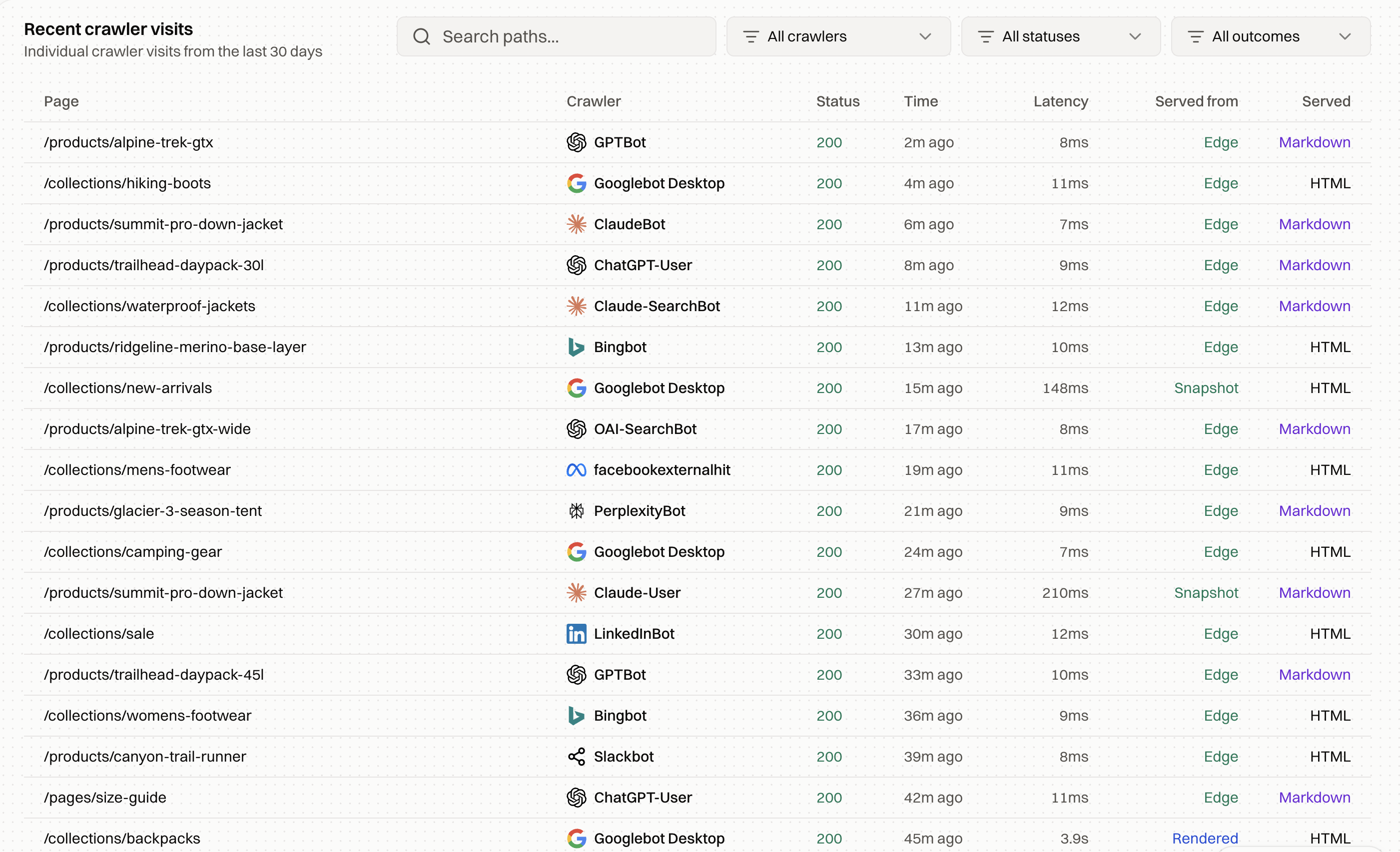
Encited crawl logs record every known crawler visit with the status it received, the response time, and the snapshot it was served, so you can see what Googlebot got on the day it made its decision.
Test the fix on a small group first
When a whole template is affected, don't change every page at once. Pick 20 to 50 affected URLs from the same template and apply the fix you think is right. Leave a similar group untouched. Track both for three to four weeks in URL Inspection and in the Pages report.
If the test group gets indexed and the control group doesn't, the fix works, and you can roll it out. If neither moves, the cause is somewhere else, and you found out on 50 pages before touching 5,000.
Request indexing after you fix the page
Once the page has changed, request indexing in URL Inspection. For a batch, click "Validate fix" on the status in the Pages report, and Google recrawls the affected URLs over the following days. Requesting an unchanged page usually brings the same result, or a short stay in the index that ends within days.
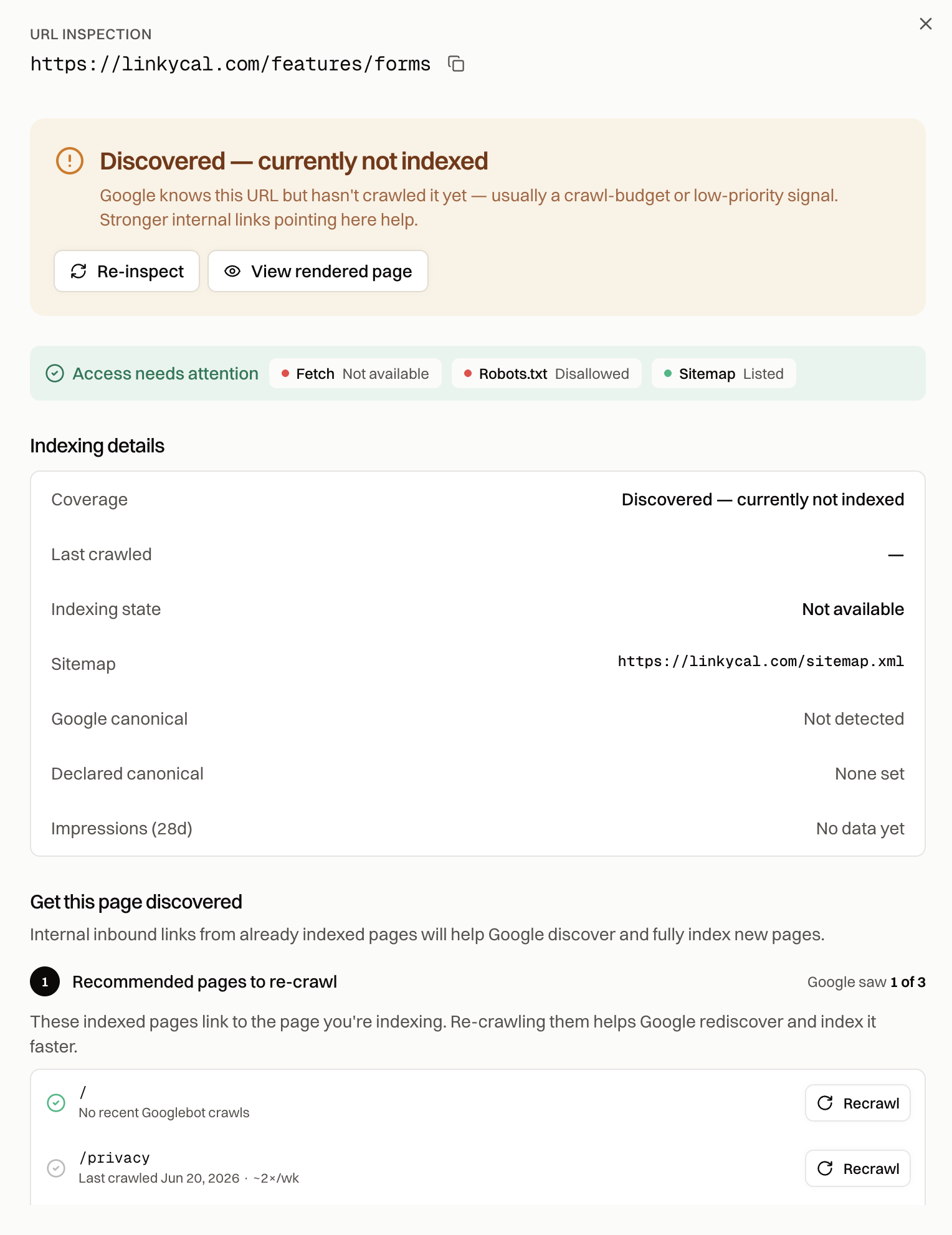
Index Rush keeps this workflow on one screen. It pulls live indexing status from Search Console, shows the canonical, crawl and rendering signals for each stuck URL, lists the SEO issues on it, and recommends already-indexed pages to recrawl so Google finds the fixed page through them.
When most of the site has this status
If a large share of your important pages sit here, the cause sits at the level of the whole site. Google judges quality across a domain, and a big pile of thin, duplicate or templated pages lowers its opinion of everything else. The fix is pruning the weakest pages, merging overlapping ones, and raising the quality of what you publish next. That takes months to show, because Google has to recrawl enough of the improved site to change its view.
The Google indexing field guide explains how that site-level judgment forms, and the guide to getting Google to index your website covers the full set of steps once the pages are ready.
FAQ
Is Crawled - currently not indexed bad?
It depends on the URL. It's a problem when Google crawls pages you want found and leaves them out. It's expected for duplicates, feeds, filters, pagination and thin archive pages, and those often don't need any fix.
How long can a page stay Crawled - currently not indexed?
Indefinitely. Google doesn't retry on a schedule until the page gets in. Without a change to the page or its signals, the status can stay for months.
Should I request indexing for these pages?
Only after you've changed something. A request on an unchanged page asks Google to repeat a decision it already made.
Can a canonical tag cause Crawled - currently not indexed?
Yes. When Google selects a different canonical from the one you declared, it indexes that URL and keeps yours out. Compare the two in URL Inspection and align your canonical tags, internal links, sitemap and redirects on one version.
What's the difference between Crawled and Discovered - currently not indexed?
Discovered means Google knows the URL and hasn't fetched it yet. Crawled means Google fetched it and decided to leave it out, so the fix for Crawled usually lies in what Google found on the page, while Discovered comes down to crawl priority. The Discovered - currently not indexed guide covers the first one.
Do backlinks fix Crawled - currently not indexed?
Links help Google see a page as worth indexing, but they won't rescue a page that renders empty, duplicates another URL or points its canonical elsewhere. Fix those first. Links help most when the page is already sound.