How to Fix 404 Errors in Google Search Console
Not found (404) in Search Console is often fine. See which 404 errors to ignore, which to redirect, how to find the links behind them, and how to validate.
To fix 404 errors in Google Search Console, open Indexing, then Pages, then Not found (404), and export the URLs. Sort them into groups. A page you deleted on purpose with no replacement can keep its 404. A page that moved, or an old URL that still gets links and traffic, gets a 301 redirect to its closest live replacement. A broken link or a dead sitemap entry on your own site gets fixed at the source. Then validate the fix for the URLs you changed.
Key takeaways
- Not found (404) means Googlebot requested a URL and your server answered with a 404 status code.
- Fix the 404s your own pages link to or your sitemap lists. Most of the rest can stay.
- A moved page, a common typo and a dead URL with backlinks or past traffic each get a 301 redirect to the closest live page.
- In our own crawl log, 4 of the 15 URLs that verified Googlebot got a 404 for on encited.com needed a redirect. The rest never existed.
- The report only lists URLs that returned 404 in the past month, so a 404 you leave alone drops off on its own.
What Not found (404) means in Search Console
Google found the URL somewhere: a link on your site or someone else's, a sitemap, an older version of the page, or a string in your JavaScript that looked like a path. Googlebot requested it and got a 404, so Google keeps it out of the index and retries it less and less often. Google's help says there's no way to tell Googlebot to forget a URL for good.
The report only lists URLs that returned a 404 in the past month. A URL drops off about a month after Google last got a 404 for it.
Soft 404 is a separate status, for pages that return 200 while they look like an error. The soft 404 guide covers it.
Older guides call part of this list "Submitted URL not found (404)", the old Coverage report's name for a 404 on a URL in your sitemap. Google's help page still says a submitted URL that returns 404 is worth fixing.
Do 404 errors hurt SEO?
Not by themselves. Google's help page says 404 errors "won't impact your site's search performance" when you're certain the URLs shouldn't exist. Its crawler documentation says 4xx codes other than 429 have no effect on crawl rate, so crawl budget isn't a reason to chase them either.
They cost you in three cases:
- The URL had backlinks. A 301 to the closest live page keeps links from other sites working for you.
- The URL had traffic. People still arrive from bookmarks, old emails, social posts and search results Google hasn't updated, and they hit an error.
- Your own site points at it. A broken internal link or a dead sitemap entry sends visitors and Googlebot to a dead end on every visit.
How to find 404 errors in Google Search Console
- Open Search Console and go to Indexing, then Pages.
- Scroll to "Why pages aren't indexed" and click Not found (404).
- Click Export to download the example URLs. The list holds up to 1,000.
- Sort the list by folder or URL pattern, so a deleted section or a renamed category shows up as one group.
- Paste a few URLs from each group into URL Inspection. Under Discovery, Sitemaps shows whether you submitted the URL, and Referring page shows a page Google may have found it on.
To see which 404 URLs once had traffic, open Performance, filter by page and paste the URL. Search Console keeps 16 months of data.
Search Console reports Google's last crawl, which can be weeks old, so check what each URL returns today. The free Googlebot Simulator fetches a URL as Googlebot and shows the status code and HTML it gets back.
How to fix each 404 error
| What the URL is | What to do | Status it should return |
|---|---|---|
| A page you deleted with no replacement | Leave it | 404 or 410 |
| A page that moved or was merged into another | Redirect to the new URL | 301 |
| A deleted page with backlinks or past traffic | Redirect to the closest relevant page | 301 |
| A page deleted by mistake | Restore it | 200 |
| A common typo, or a link with a stray character | Redirect to the right URL | 301 |
| A URL in your sitemap | Fix the page, or remove the URL from the sitemap | 200, or out of the sitemap |
| A broken link on your own site | Fix the link on the page that holds it | No change to the dead URL |
| A URL that never existed: scanners, junk, strings from code | Ignore it | 404 |
- 404 or 410 for deleted pages. Google's help page on 404 errors says Google currently treats a 410 the same as a 404. Use a 410 when your server makes it easy and the removal is final.
- Redirect to a page that replaces the old one. Google's help page calls a redirect from a dead URL to the homepage a soft 404, and visitors land somewhere they didn't ask for.
- Don't block 404s in robots.txt. Google can't see the 404 on a URL it isn't allowed to fetch, and its help page warns that blocking 404s makes your site harder to process.
- The Removals tool doesn't clear this report. A removal request hides a URL from search results for a while. The 404 stays in the Page indexing report until it ages out.
What Googlebot requested on encited.com
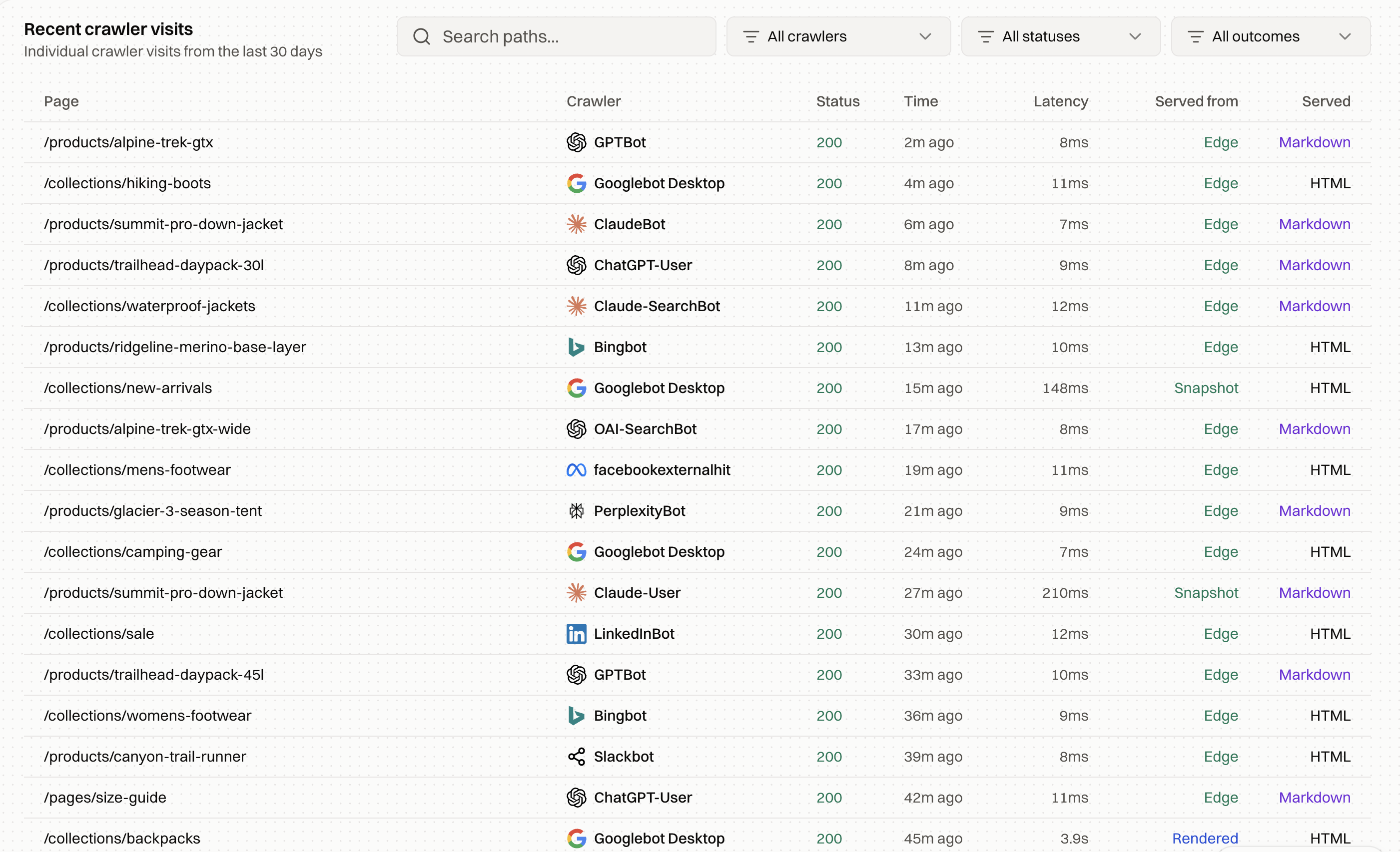
We pulled every request with a Google user agent that got a 4xx on encited.com from our crawl log, for the 30 days to November 9, 2026. Without three test requests of our own, there were 89. "Verified" below means the request came from Google's published IP ranges.
| Group | Requests | Example paths | What it needs |
|---|---|---|---|
| Fake Googlebots from non-Google IPs | 43 | /wp-json, /id_rsa, /proc/self/cmdline | Nothing. Scanners use Googlebot's name to probe for WordPress and secret files |
| GoogleOther, verified | 21 | Image paths with a full-width closing bracket stuck to the end, %EF%BC%89 | Nothing. The bracket isn't part of any real URL |
| Gemini's URL-context fetcher | 8 | /api-platform/pricing, /api-platform/prices | Nothing. Pricing URLs that don't exist, read through the Gemini API |
| Googlebot, verified | 17 | See below | Redirects for 4 URLs |
The 17 verified Googlebot requests covered 15 URLs:
- A blog post we deleted in April. Googlebot requested it twice on October 19, more than six months after it went. Its topic now lives on a landing page, so it needs a 301 to that page.
- Three mistyped links to live pages.
/freetools/crawler-simulatoris missing a hyphen,/free-tools/googlebot-simulatoris missing a folder, and one blog post URL arrived with an invisible word-joiner character (%E2%81%A0) pasted after the slug. Each needs a 301 to the page it meant. - Eleven URLs that were never pages. Short paths such as
/s,/o,/api,/loginand/submit, a long ID, and a few broken fragments. Most look like strings Googlebot picked out of JavaScript and tried as links, which Google's help page names as a source of 404s for URLs that never existed. They need nothing.
Search Console lags behind the log. On November 9, URL Inspection still showed the deleted post's last crawl as August 8.
Encited's crawl log filters by crawler and status, so a 4xx filter on Googlebot gives this list for any site behind it.
How to find the links pointing at a 404
- URL Inspection. Referring page names a page Google may have found the URL on. It can be the page with the link, or a page one or two steps above it, and the field is often empty. An empty field doesn't mean nothing links there.
- A crawl of your own site. A crawler follows every internal link and records which pages link to a URL that returns an error.
- Your XML sitemap. Request every URL in the sitemap and look for anything that doesn't return 200.
- Links from other sites. A backlink tool lists the external pages that link to a dead URL. Ask the owner to update the link when it's a site you work with, and add a 301 either way.
Broken internal links are hard to find by hand on a large site. A site audit crawls the whole site, flags every page that links to a URL returning an error under Broken Internal Links, lists sitemap URLs that return a 4xx or 5xx, and gives each issue a recommended fix you can copy as a prompt for an AI coding agent.
How to set up the redirects
Redirect at the server, host or CDN with a 301, in one hop from the old URL to the final page. Use a 302 only when the old page is coming back.
Apache (.htaccess):
Redirect 301 /old-page /new-pageRedirect gone /removed-page
Nginx:
location = /old-page { return 301 /new-page; }location = /removed-page { return 410; }
Netlify (_redirects):
/old-page /new-page 301
WordPress. The Redirection plugin, Rank Math's Redirections module and Yoast SEO Premium's redirect manager all create 301s without touching server files. Rank Math also has a 404 Monitor that logs the missing URLs visitors hit.
Encited. On a site behind Encited, redirect rules run at the edge before anything renders, for bots and visitors alike. A pattern such as /old-blog/** to /blog/$1 moves a whole folder in one rule, and a source with a query string, such as /old.asp?id=42, matches that exact URL.
After you add a redirect, request the old URL and read every hop:
curl -sIL https://yoursite.com/old-page | grep -iE "^HTTP|^location"
You want one 301 followed by a 200. When a page has moved twice, point the oldest URL straight at the newest one so Googlebot doesn't follow a chain.
Validate the fix in Search Console
- Inspect one fixed URL and click "Test live URL" to confirm Google can fetch the restored page. For a redirected URL, the live test checks the page it redirects to.
- In the Page indexing report, open Not found (404) and click Validate fix. Search Console checks a few URLs right away, then recrawls the rest of the list.
- Wait. Validation usually takes up to about two weeks and can take longer. Don't click Validate fix again while it runs.
Validation stops at the first URL that still returns a 404, so a list that mixes fixed URLs with deleted pages you're keeping as 404 will fail. Skip validation for a mixed list. Search Console updates each URL as Google recrawls it, with or without a validation request.
For restored pages you want ranked, click Request indexing in URL Inspection. For 404s you left on purpose, do nothing.
Stop new 404s before Google finds them
- Redirect in the same change. When you delete or move a page, add the redirect, update the internal links and regenerate the sitemap at the same time.
- Make the 404 page useful and correct. Give it a search box and links to the main sections, then check that it sends a 404 status. A custom error page that sends 200 turns every missing URL into a soft 404.
- Watch 4xx responses after each release. Your server logs or crawl log show each dead URL Googlebot requests on the day it requests it.
Pages Google found and hasn't crawled are listed as Discovered - currently not indexed, and pages it crawled and left out as Crawled - currently not indexed. The Google indexing field guide explains every other status in the Page indexing report and which of them need a fix.
FAQ
Do 404 errors hurt SEO?
Not by themselves. Google's help page says 404s on URLs that shouldn't exist won't impact search performance. They cost you when the dead URL had backlinks or traffic, or when your own pages and sitemap still point at it.
Do I need to fix every 404 error in Search Console?
No. Fix the 404s your own pages link to or your sitemap lists, and redirect pages that moved. A deleted page with no replacement can keep its 404, and URLs that never existed can be ignored.
Should I use a 404 or a 410 for a deleted page?
Either works. Google's help page says Google currently treats a 410 the same as a 404. Use a 410 when your server makes it easy and the page is gone for good.
Should I redirect all 404 pages to the homepage?
No. Google's help page calls a redirect from a dead URL to another page, such as the homepage, a soft 404. Redirect to a page that replaces the old one, or let the URL return 404.
How long do 404 errors stay in Search Console?
The Page indexing report only lists URLs that returned a 404 in the past month. A URL drops off about a month after Google's last request for it got a 404.
What's the difference between Not found (404) and Soft 404?
Not found (404) means your server returned a 404 status code. Soft 404 means your server returned 200 but Google judged the page an error or empty. The fixes differ, and the soft 404 guide covers the second.
Can I remove 404 URLs with the Removals tool?
No. A removal request hides a URL from search results for a while, but it doesn't take the URL out of the Page indexing report. A 404 leaves the report on its own once Google stops getting it.
Why does Google crawl URLs that never existed on my site?
Google tries URLs it finds anywhere: mistyped links on other sites, strings in your JavaScript that look like paths, and old sitemaps. Those 404s need no fix unless the same mistyped URL keeps coming back. Then a 301 to the right page helps visitors too.