Fix Discovered - Currently Not Indexed in Google Search Console
Discovered - currently not indexed means Google knows your URL but hasn't crawled it. Find why the queue isn't moving and get the page crawled.
To fix Discovered - currently not indexed in Google Search Console, give Google a reason to crawl the page: link it from pages Google already indexed, request indexing for the most important URLs, stop Googlebot wasting crawls on filter and search URLs, and keep your server fast. The status means Google found the URL and hasn't crawled it yet, so the last crawl date in URL Inspection is empty.
A few new pages in this status is normal and usually clears within two weeks. When hundreds of URLs sit here for a month, or the number grows with every release, Google doesn't see enough reason to crawl your site. This guide covers each cause. If Google did crawl the page and left it out, the guide to Crawled - currently not indexed covers that status.
Key takeaways
- Discovered but not indexed means the URL is in Google's crawl queue and has never been fetched.
- Check each URL in URL Inspection and note its publish date, because pages from the last two weeks may just need time.
- Filter, search, tag and pagination URLs here usually don't need indexing, and the endless ones belong in robots.txt.
- Request indexing for your most important pages, at about ten requests a day per property.
- Links from pages Google already indexed are the fix that works most often.
- Blocking crawl waste on filters, redirects and soft 404s leaves more crawls for your real pages.
- Server errors, rate limits and firewall challenges slow Googlebot down across the whole site.
- New domains need their first external links and their strongest pages published first.
- Directories and other large sites do better releasing linked clusters of about 25 pages.
- JavaScript sites that send empty HTML earn little crawl demand until the content arrives as HTML.
- Server logs show whether Googlebot visits at all and where it spends its time.
- Single pages usually get crawled within days of a fix. Site-wide causes take weeks to months.
What Discovered - currently not indexed means
Google finds URLs through links, sitemaps and direct requests, and puts each one in a crawl queue. How fast a URL leaves the queue depends on your crawl budget. Google describes that as two things combined: how many requests your server can take, and how much Google wants your content, based on the site's popularity, the quality of what it crawled before, and how often you publish something new.
This status means the URL is still in the queue. For a handful of recent pages on a small site, that's normal, and it often resolves within days or a couple of weeks. When hundreds of URLs sit here for a month, or the number climbs with every release, the queue has stopped moving for your site.
Confirm the pages are really stuck
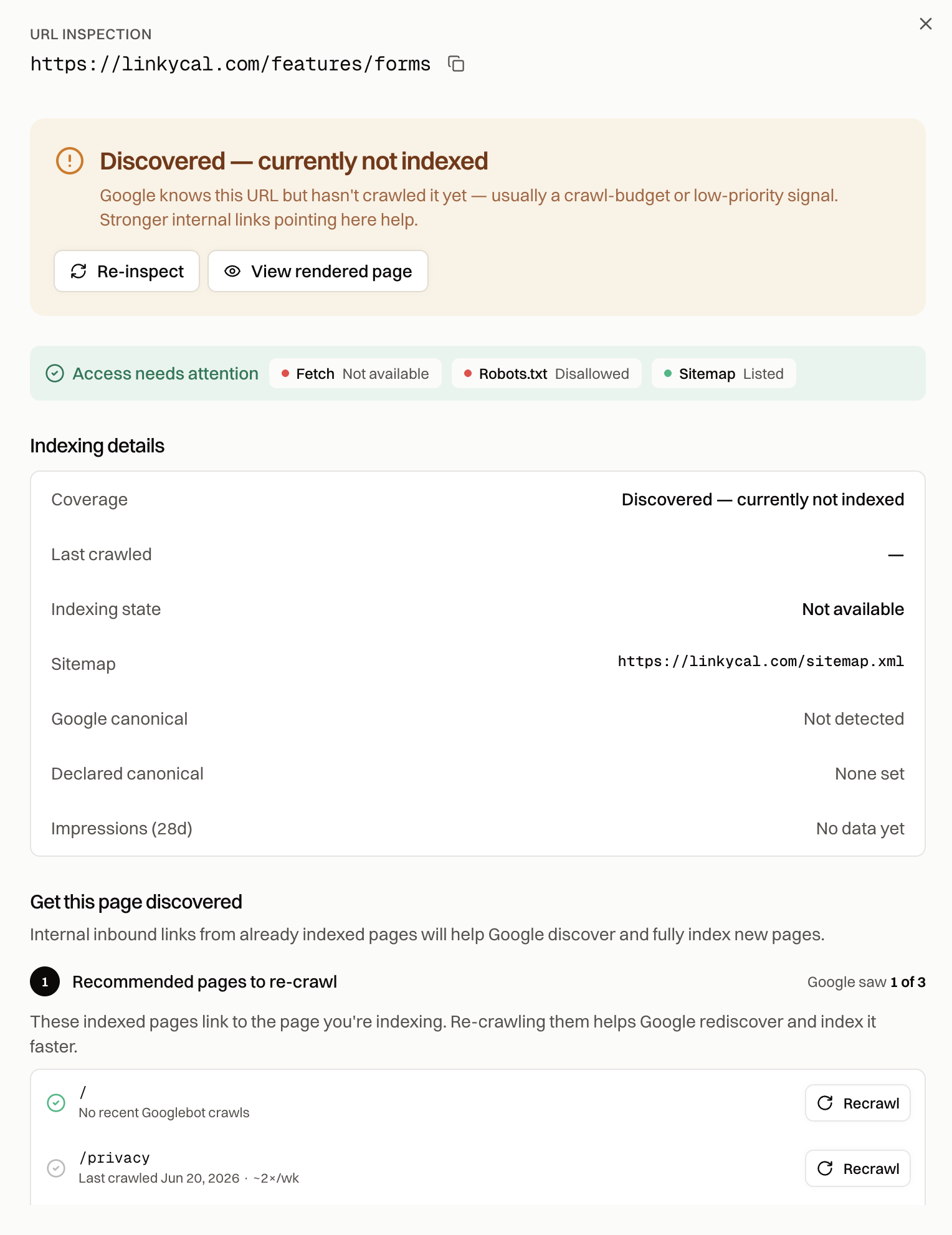
Paste an affected URL into the URL Inspection tool in Search Console. If it now says "URL is on Google", the Pages report was behind. If it says "Discovered - currently not indexed" with no last crawl date, the page has never been fetched.
Then open Indexing, then Pages, click the status, and export the full list with each URL's publish date next to it. Anything from the last two weeks may just need time. A page published two months ago that's still waiting needs one of the fixes below.
Decide which URLs matter
Before you fix anything, sort the export by URL pattern. Filter and sort parameters, internal search results, tag pages and old pagination often sit in this status because Google has correctly decided they aren't worth a crawl. Those don't need to be indexed. Stop linking to them, and block the infinite ones in robots.txt so they stop taking crawls from the pages you care about.
The pages that matter are the ones you'd want someone to land on from a search: products, services, articles, locations and categories. Start with those.
Request indexing for the most important pages
For a small number of important pages, open each one in URL Inspection and click "Request indexing". Search Console allows roughly ten requests a day per property, so use them on the pages that bring customers. A request puts the page in a priority queue, and on most sites that gets a first crawl within days.
Requests don't scale to hundreds of pages, and they don't fix the reason the queue stalled. For anything larger, use the fixes below.
Link the pages from pages Google already indexed
This is the fix that works most often. A URL that only appears in your sitemap, with no internal links pointing to it, tells Google it isn't important. Google follows links from pages it already crawls regularly, so a link from an indexed page gives the stuck page a path in and a reason to be crawled.
Add links to each stuck page from two or three related pages that are already indexed, with anchor text that describes the target. Keep important pages within two or three clicks of the homepage. On large sites, an HTML hub page that lists everything in a section, linked from the navigation, reaches deep pages that menus and pagination bury.
Then request indexing for the linking page. When Google recrawls it, it finds the stuck URLs on the way. Index Rush lists the already-indexed pages that link to each stuck URL, so you know exactly which pages to request.
Stop Googlebot wasting crawls
Every crawl Googlebot spends on a useless URL is one it doesn't spend on your real pages. Open Settings, then Crawl stats in Search Console, and look at what Googlebot requested. Parameter combinations from filters and sorting, internal search pages, redirect chains, 404s and soft 404s are the usual drains.
Block infinite URL spaces such as faceted filters and internal search in robots.txt. Point parameter variants to the clean URL with canonical tags. Collapse redirect chains to one hop. Return a real 404 or 410 for pages that are gone. Keep the sitemap to canonical URLs that return a 200 status, and check that your site builder or CMS isn't listing URLs that don't exist.
Keep the server fast and available
Googlebot slows its crawl on servers that respond slowly or return errors, and that slowdown applies to the whole site. Crawl stats shows your average response time and the share of requests that failed. Server errors (5xx) and rate limiting (429) both cut the number of pages Google is willing to fetch.
Check your firewall and bot protection too. A CDN or security rule that challenges Googlebot, or treats it as a bot to block, keeps your pages in the queue while the site looks fine in a browser.
Earn crawl demand as a new site
A brand-new domain has no history, no links and no traffic, so Google has little reason to spend crawls on it. The first few links from sites Google already trusts do more for this than anything else. Three to five real links, from your Google Business Profile, industry directories, partners that list their clients, or a launch post where your buyers gather, give Googlebot a way in and a signal that the site exists.
Google also bases crawl demand on what it found last time. A new site whose first crawled pages were thin or templated gets its next pages crawled more slowly. Put your strongest, most complete pages up first.
Release large sites in batches
Directories, marketplaces and programmatic sites hit this status hardest. Publish 3,000 pages on day one, and Google crawls a sample, judges the pattern, and parks the rest. Once that judgment forms, it takes months to reverse.
Release in complete, linked clusters: one city, one category, one product line at a time, each with a hub page that links to every page in it. Start around 25 pages. When about 80% of them are indexed within a few weeks, release the next cluster and grow the batch size. When they aren't, improve the template before you publish more, because every unindexed page from it lowers Google's opinion of the pattern.
Check whether JavaScript is the cause
Sites that build their content in the browser send Google an almost empty HTML file on the first visit. Google judges crawl demand partly on what it reads, and a site of empty shells earns very little. That's why large "Discovered" backlogs are so common on single-page apps and sites made with AI builders.
Check a page with the free Googlebot Simulator. If the text a crawler receives is missing, the pages need to send their content as HTML through static generation, server-side rendering or pre-rendering. The SSR vs SSG vs pre-rendering guide compares them. Encited pre-renders your pages for every crawler after a DNS change that takes about five minutes, and pre-rendered pages on Encited get indexed roughly 5x faster than the same sites served as JavaScript shells.
Check what Googlebot actually requested
Your server logs show whether Googlebot visits at all and where it spends its time, which Search Console can't. Filter the logs for verified Googlebot requests, confirmed by reverse DNS or Google's published IP ranges. If Googlebot fetches thousands of filter URLs a day and never reaches your product pages, that's your cause.
Encited crawl logs show every known crawler visit with the URL, the status it received and the response time, so you can see where Googlebot goes without exporting raw server logs.
How long recovery takes
Isolated pages usually get crawled within days of a new internal link and a request. When the cause is site-wide, such as low crawl demand, a large backlog or crawl waste, recovery takes weeks to months after the fix, because Google adjusts its crawl rate gradually as it sees the improved site.
Once pages get crawled, some may move to "Crawled - currently not indexed". That means Google has now read them and has a different objection, which the Crawled - currently not indexed guide covers. The guide to getting Google to index your website covers the full set of steps, and the Google indexing field guide explains how crawl budget and crawl demand work in more depth.
FAQ
Is Discovered - currently not indexed bad?
It depends on which pages and for how long. A few recent pages in this status is normal. Important pages stuck for weeks, especially ones that are internally linked and in a clean sitemap, need work. Filter, search and archive URLs in this status usually don't.
How long does Discovered - currently not indexed last?
For new pages on a healthy site, usually a few days to two weeks. When the site has low crawl demand, it can last months, and there's no point at which Google is guaranteed to crawl the page.
Does requesting indexing fix Discovered - currently not indexed?
For a few important pages, often yes. It puts the page in a priority queue. For hundreds of pages, it doesn't scale, and the lasting fix is internal links, less crawl waste and more crawl demand.
Can a sitemap cause Discovered - currently not indexed?
A sitemap can make it worse when it lists URLs that redirect, return errors, or don't exist, because Google learns to trust it less. It can't get pages crawled on its own either. Keep it to canonical, indexable URLs and link those pages internally as well.
Does robots.txt cause Discovered - currently not indexed?
A URL blocked by robots.txt shows its own status, "Blocked by robots.txt". Robots.txt helps with this status when you use it to block the low-value URL spaces that take crawls from your real pages.
What's the difference between Discovered and Crawled - currently not indexed?
Discovered means Google hasn't fetched the page yet. Crawled means it fetched the page and decided to leave it out, which points to something Google found on the page. Discovered points to crawl priority. The Crawled - currently not indexed guide covers the second one.