
Read your crawl log
Your crawl log is the record of every visit a known crawler made to your site: which bot, which page, when, and what it got back. Search Console covers the same ground days late and in aggregate, and raw server logs never tell you what the bot was actually served.
It settles the questions you'd otherwise guess at. Whether Googlebot comes at all and how often. Whether GPTBot and ClaudeBot are taking your content. Whether the page you shipped yesterday has been picked up. When traffic drops, it separates a crawling problem from a ranking one before you change anything on the site.
Time: 10 minutes. You need: pre-rendering connected for a few days.
Where to find it#
Monitor → Crawl Analytics.
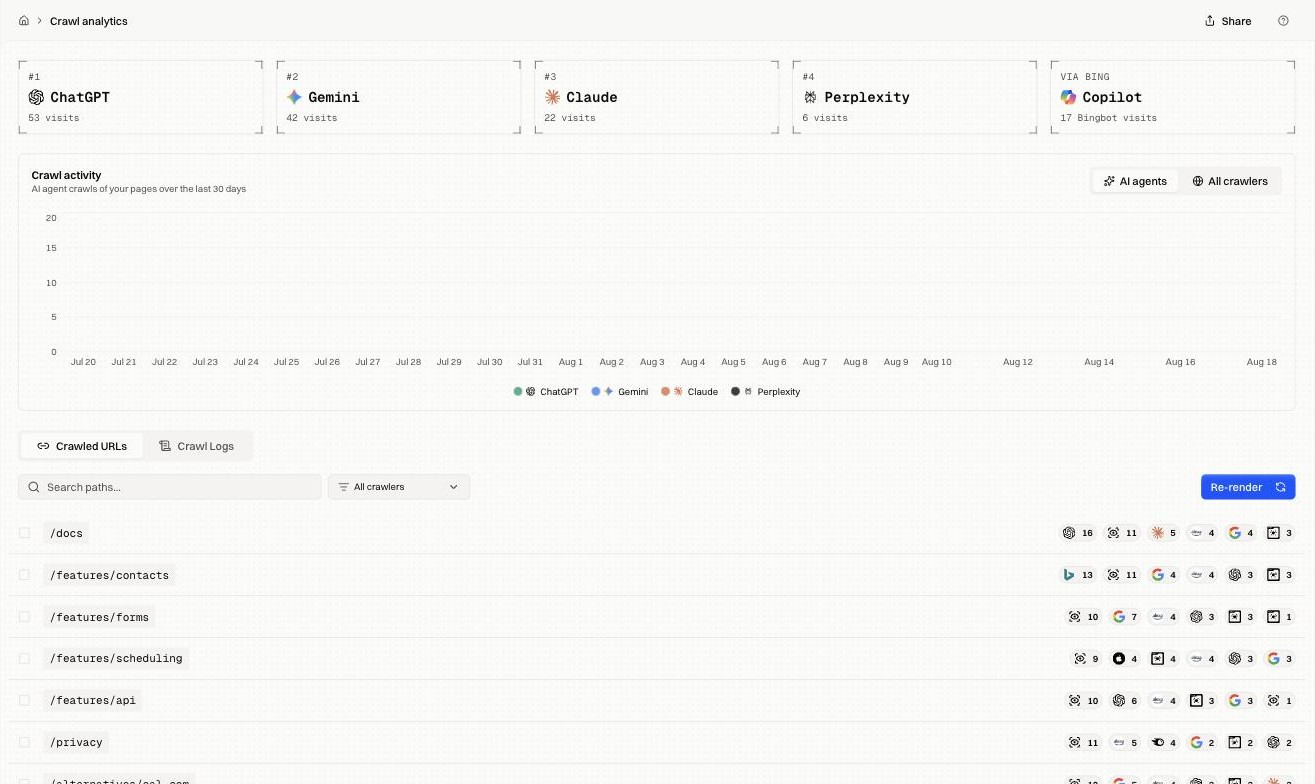
The page has three parts: crawler cards ranking your top bots, an activity chart over 30 days, and a tabbed table underneath. Everything covers the last 30 days.
How it works#
The activity chart#
The chart stacks visits per day, one colour per crawler. It opens filtered to AI agents. Switching to All crawlers widens the same chart to include search engines and SEO tools alongside them.
Bing gets its own card because Copilot answers are built on Bingbot's crawl, so Bingbot traffic counts as AI exposure as well as search.
Crawled URLs and Crawl Logs#
Crawled URLs aggregates by page: one row per path, with per-crawler counts. Use it to check whether a specific page has been fetched.
Crawl Logs is the raw feed: one row per visit.
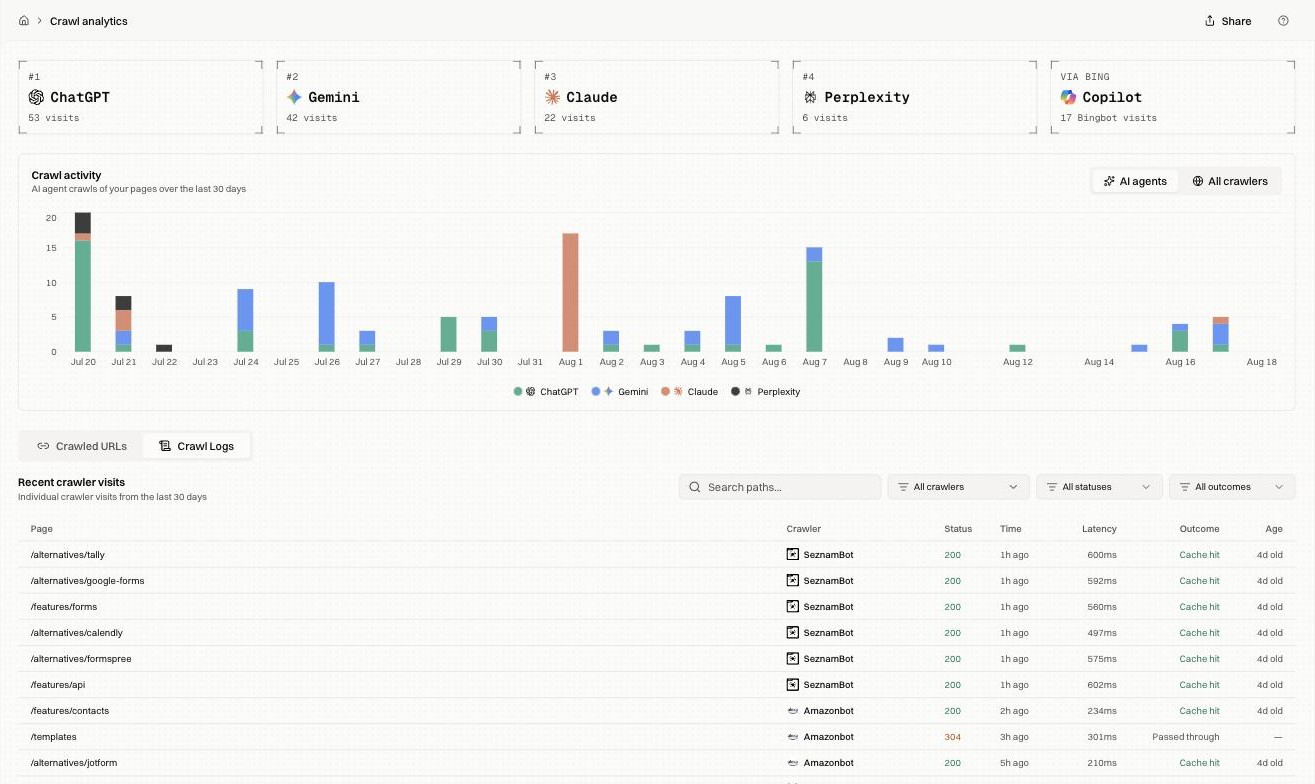
| Column | What it holds |
|---|---|
| Page | The path requested |
| Crawler | Which bot, by user agent |
| Status | The HTTP code returned |
| Time | How long ago |
| Latency | How long the bot waited for a response |
| Outcome | What was served |
| Age | How old the snapshot was at that moment |
What each outcome means#
Outcome is the column raw server logs can't give you. A 200 says the request succeeded; the outcome says where the response came from.
| Outcome | What happened |
|---|---|
| Cache hit | A stored snapshot was served. The usual healthy case, and the fastest |
| Edge cache | A cache hit served from the edge tier, closer to the crawler and faster still |
| Rendered | No usable snapshot existed, so the page was rendered on demand for that request. Slower, and it consumes a render |
| Passed through | The request went to your origin unchanged. Normal for non-HTML and for paths you've excluded |
| Redirect | A redirect rule matched and the bot was sent elsewhere |
| Hosted file | A file Encited serves directly, such as a sitemap or robots.txt |
A run of Rendered where you expect Cache hit means snapshots are expiring before crawlers arrive, which costs render quota and adds latency. Tighten the refresh rule for those paths.
Passed through on a page you meant to pre-render means the request didn't match the rules. Check ignored paths in Site settings.
Filtering#
Three filters sit above the log, plus a path search.
| Filter | Options |
|---|---|
| Crawler | Any single bot, or all |
| Status | 2xx Success, 3xx Redirect, 4xx Client error, 5xx Server error |
| Outcome | Served (cached), Served (fresh render), Served from origin, Redirect, Hosted file |
Filtering status to 4xx and 5xx surfaces the pages returning errors to bots. Those come first: a crawler that gets a 500 comes back less often.
Combining a crawler filter with a path search answers "did Googlebot get this specific page, and what did it get".
Fixes by symptom#
| Symptom | What to check |
|---|---|
| Log is empty | Pre-rendering isn't live yet, or bots haven't arrived. Confirm the domain is connected |
| Googlebot missing while AI agents visit | Check robots.txt and Search Console for crawl errors |
| Everything shows Passed through | Requests aren't matching the pre-render rules. Check ignored paths in Site settings |
| Mostly Rendered instead of Cache hit | Snapshots expire before crawlers arrive. Tighten refresh rules |
| High latency on cache hits | The snapshot was being rebuilt. Check refresh rules |
| A path returns 404 to bots but loads for you | Your origin answers differently for crawlers. Open the page in Pre-rendering |
| Age is weeks old | The refresh rule for that path is too slow |
FAQ#
How far back does it go? 30 days.
Are unknown bots recorded? Recognised crawlers are. Ordinary browser traffic and unidentified agents aren't, which keeps the log about search and AI coverage.
Does Encited appear in its own log? No. To keep it out of your analytics too, see Detect Encited visits.