
How to Fix Discovered and Crawled Currently Not Indexed in Google Search Console
Learn how to diagnose and fix Discovered - currently not indexed and Crawled - currently not indexed in Google Search Console using URL Inspection, crawl data, and Googlebot logs.
Built with Lovable? The Lovable-specific version of this guide is at Fix Lovable SEO.
Google Search Console gives you two indexing statuses that sound more useful than they are:
- Discovered - currently not indexed
- Crawled - currently not indexed
Both tell you that a URL is missing from the index. Neither gives you the real reason.
That is why these reports create so much confusion. A page can be discovered and ignored because Google does not think it is important enough to crawl yet. A page can be crawled and skipped because Google thinks another version is better. The same label can also show up because of canonical problems, duplicate content, thin templates, rendering issues, server errors, or crawl traps.
The way to debug these issues is to stop treating the Search Console label as the diagnosis. Treat it as the starting point.
Quick summary
Discovered - currently not indexed means Google knows about the URL and has not crawled it yet. Start by checking internal links, crawl depth, sitemap quality, crawl traps, and server behavior.
Crawled - currently not indexed means Google fetched the URL and left it out of the index. Start by checking canonical signals, duplicate content, rendered HTML, soft 404 patterns, and whether the URL adds enough value compared with similar pages.
The fastest practical workflow is:
- Export affected URLs from Search Console.
- Group them by page type or template.
- Create an indexed control group from the same templates.
- Pull URL Inspection data.
- Verify Googlebot activity in server logs.
- Compare indexed and non-indexed cohorts.
- Fix one likely issue on a small test group.
- Measure the test group against the control group.
If you only inspect one or two URLs, you will usually miss the pattern. Indexing problems tend to reveal themselves at the template, section, or URL-pattern level.
| Status | What Google did | First things to check | Usually means |
|---|---|---|---|
| Discovered - currently not indexed | Found the URL and has not crawled it yet | Internal links, crawl depth, sitemap quality, crawl traps, server stability | Google does not see enough reason to crawl it yet |
| Crawled - currently not indexed | Fetched the URL and left it out of the index | Canonicals, duplicate content, rendered HTML, soft 404 signals, template quality | Google crawled it and chose another page, or no page, for the index |
What Discovered - currently not indexed means
Discovered - currently not indexed means Google knows the URL exists and has not crawled it yet.
Google may have found the URL in an XML sitemap, through internal links, through external links, or from a previous crawl. If your sitemap is generated by an AI site builder, make sure it is not hallucinating URLs. The Lovable sitemap guide shows the cleaner script-based approach. The important detail is that the URL has not been fetched recently enough for Google to decide whether it should be indexed.
This usually points to a crawl priority issue.
Common causes include:
- weak internal links
- orphan URLs
- URLs only listed in XML sitemaps
- deep crawl depth
- large numbers of low-value parameter URLs
- faceted navigation creating crawl noise
- slow or unstable server responses
- sections of the site that Google does not consider valuable enough to crawl often
For small sites, DNI can simply mean Google has not got around to the URL yet. For large ecommerce, marketplace, publisher, or programmatic sites, it often means Google is being selective about what it crawls.
What Crawled - currently not indexed means
Crawled - currently not indexed means Google fetched the URL and chose to leave it out of the index.
That makes it a different problem. You are no longer asking, "Why did Google not crawl this?" You are asking, "What did Google see, and why did it decide this URL should not be in the index?"
Common causes include:
- duplicate or near-duplicate content
- Google choosing a different canonical URL
- thin or mostly templated pages
- soft 404 signals
- rendered HTML missing the main content
- feed, print, tag, or parameter URLs competing with the main page
- another domain having stronger signals for the same content
- technical problems causing many URLs to return the same content
- site or section quality issues
One practical case reported by Search Engine Journal showed a CNI issue caused by canonical confusion. Google had treated RSS feed URLs as the canonical version instead of the real HTML pages. The Search Console status was "crawled - currently not indexed." The actual issue was canonicalization, rather than a generic quality problem.
CNI is a bucket. The real cause sits underneath it.
How to find these reports in Search Console
You can find both statuses in Google Search Console under:
Indexing > Pages > Why pages aren't indexed
The exact wording can shift over time, but the workflow is usually the same:
- Open the Pages report.
- Find Discovered - currently not indexed or Crawled - currently not indexed.
- Export the affected URLs.
- Inspect a few representative URLs manually.
- Use the URL Inspection tool to compare the live page, the indexed page, the user-declared canonical, and the Google-selected canonical.
Do not stop at the sample URLs shown in the interface. Export the data and group the URLs yourself. The most useful insight is rarely "this one page is not indexed." The useful insight is usually "this template, directory, or URL pattern is not getting indexed."
Why Search Console is not enough
Search Console is useful, but it is not a full debugging system.
It can tell you:
- whether Google reports a URL as indexed
- whether Google selected a different canonical
- whether crawling is blocked
- whether the page was last crawled
- whether the URL appears in a sitemap
- whether indexing is allowed
It cannot reliably tell you:
- how often Googlebot hits that URL type
- whether Googlebot gets intermittent errors
- whether Googlebot receives different HTML than users
- whether one template performs worse than another
- whether internal linking separates indexed and non-indexed URLs
- whether Google is wasting crawl on low-value URL patterns
- whether CNI is driven by duplication, canonicalization, rendering, or server behavior
For that, you need logs and crawl data.
How to debug currently not indexed pages in Index Rush
If you do this manually, most of the work is data collection. You need Search Console exports, URL Inspection checks, crawl data, server logs, canonical data, internal link counts, and a way to keep affected URLs grouped by template.
Index Rush puts that workflow on one URL-level screen. Use it to find pages Google skipped, inspect the reason, fix the blocker, and then request a re-crawl only after the checks are done.
1. Refresh indexing data from Google Search Console
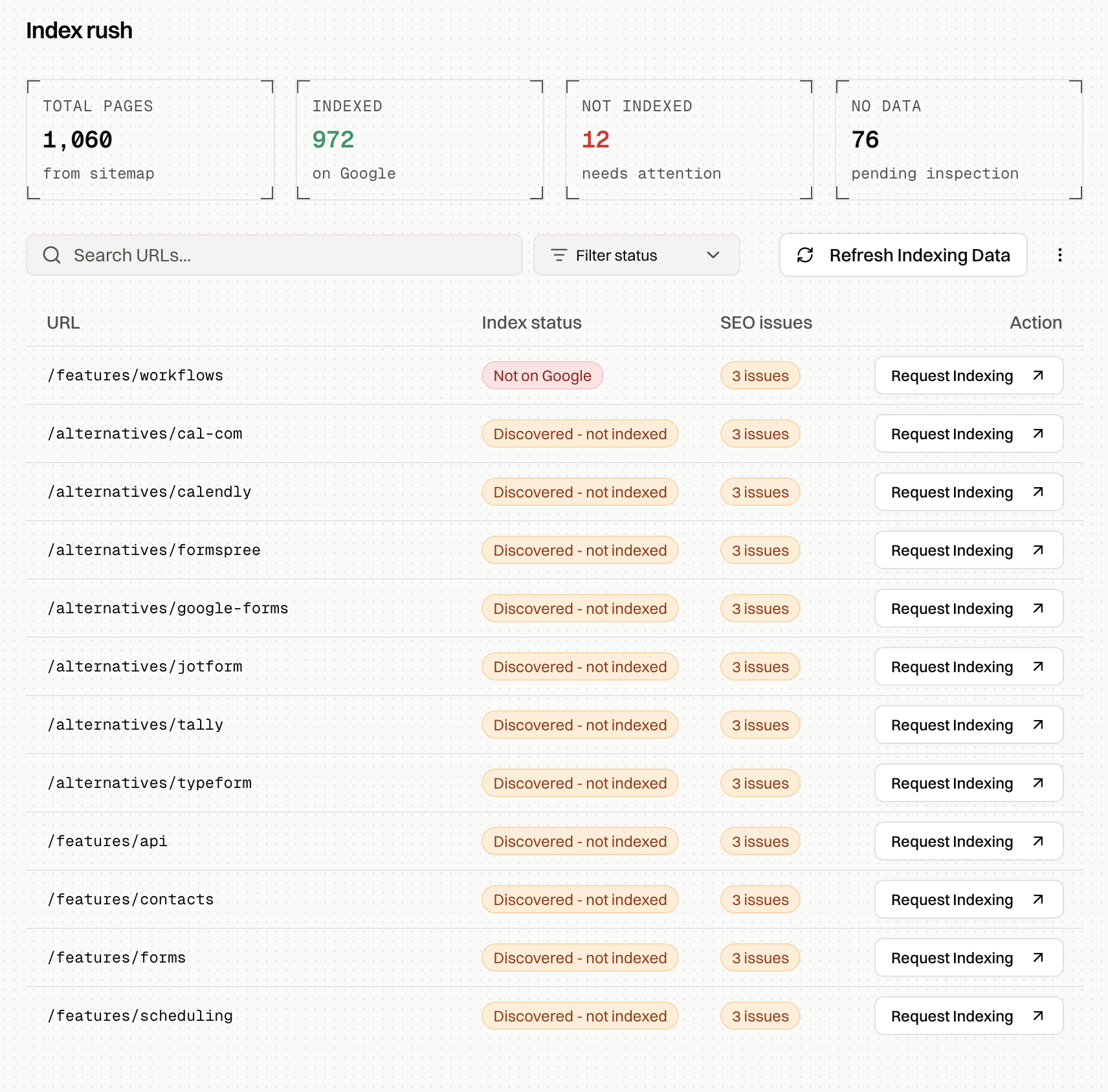
Open Index Rush and click Refresh Indexing Data. This fetches the latest live indexing status from Google Search Console for the URLs in your current filter, so you are not debugging stale "currently not indexed" data.
2. Open the URL you want to inspect
Filter to the pages that need attention, such as Not on Google, Discovered - currently not indexed, or Crawled - currently not indexed. Click any URL you want to debug. Start with an important canonical page, not a random tag, feed, parameter, or archive URL.
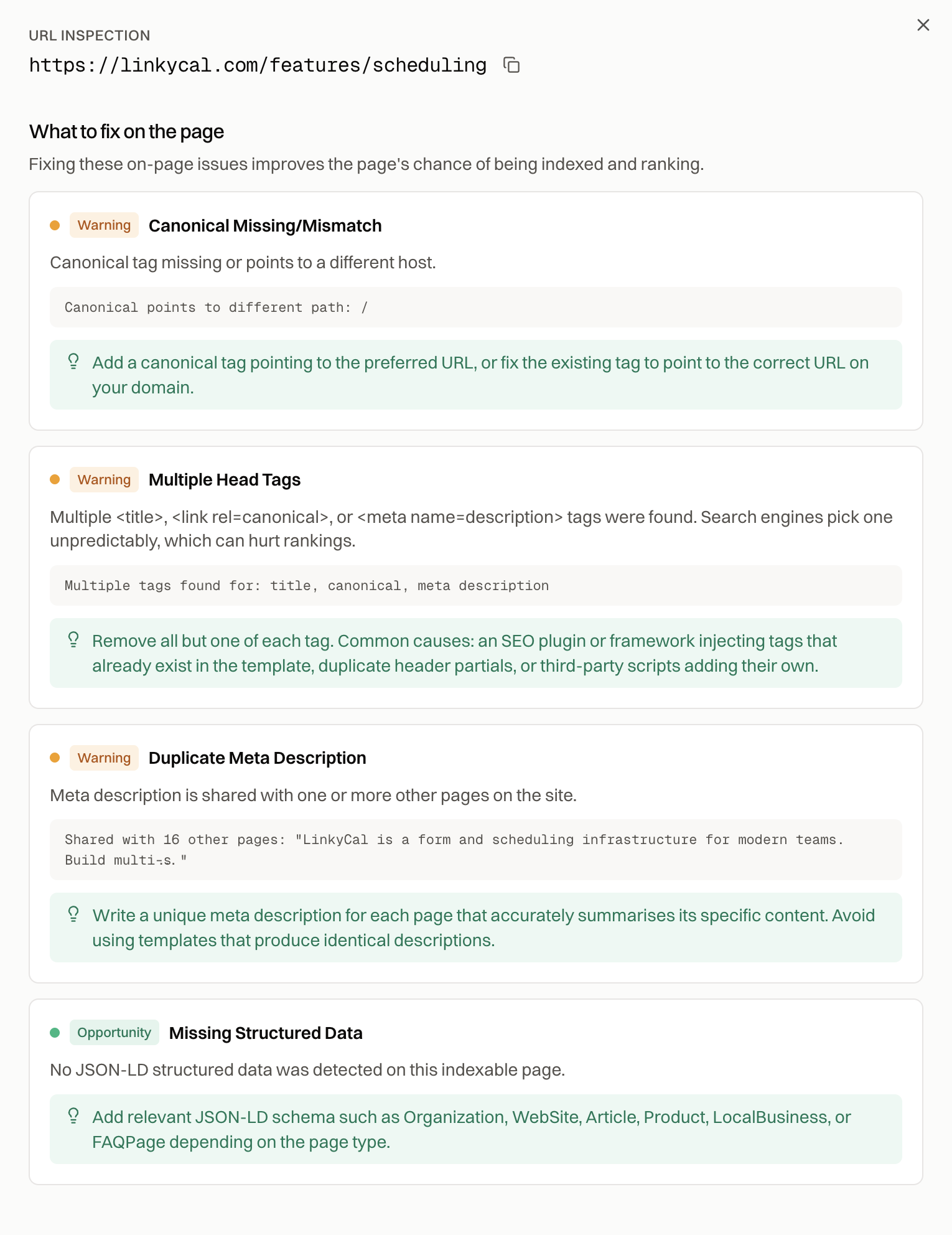
3. Read the page details drawer
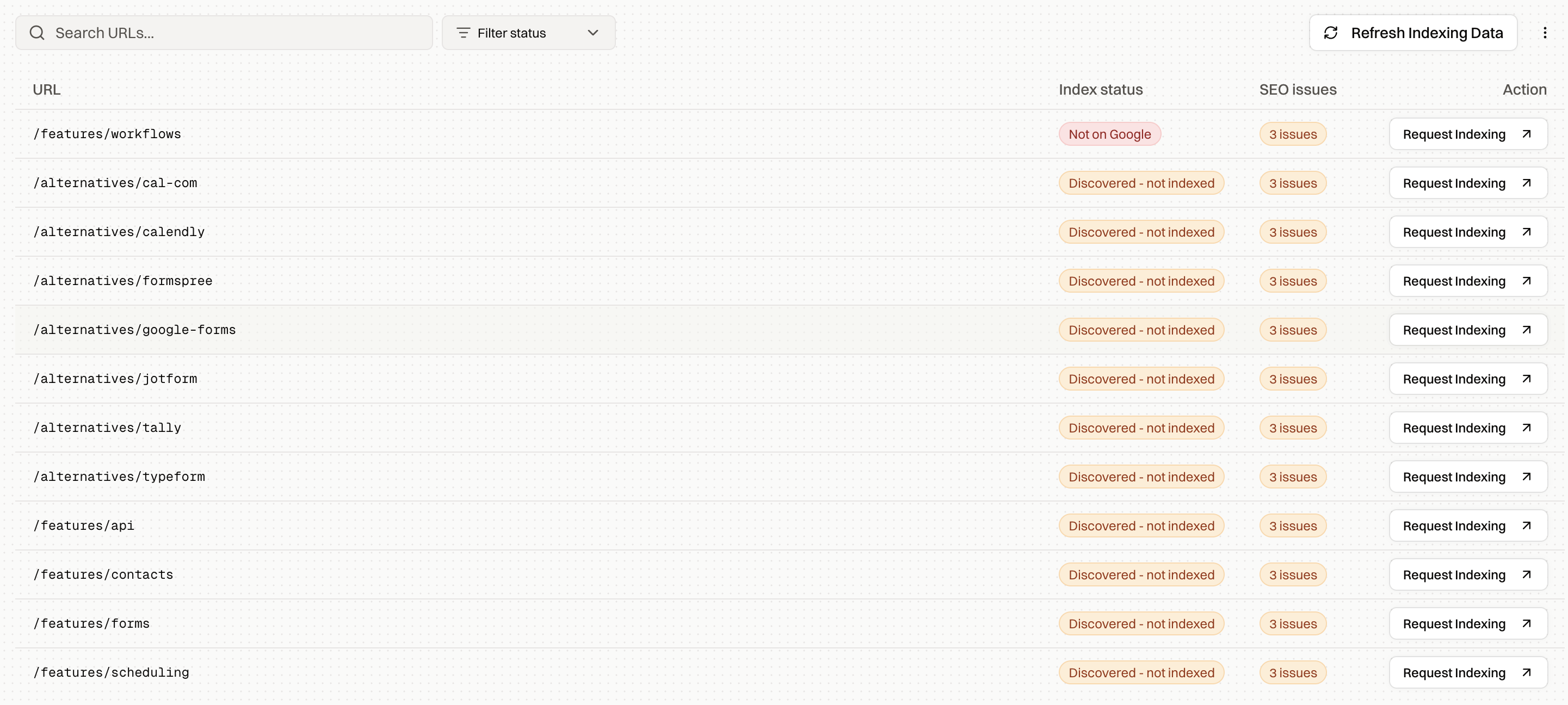
The page details drawer gives you the signals you need before deciding what to fix:
- Google index status and the last time the URL was checked
- URL Inspection details from GSC, including last crawl date, user-declared canonical, Google-selected canonical, and crawl access signals
- on-page SEO issues from the last site audit
- recent Google activity for that page, including Inspection tool and Googlebot Smartphone or Desktop visits
- a rendered-page view so you can confirm Google receives the real page content, not an empty shell
4. Fix the specific blocker before requesting a re-crawl
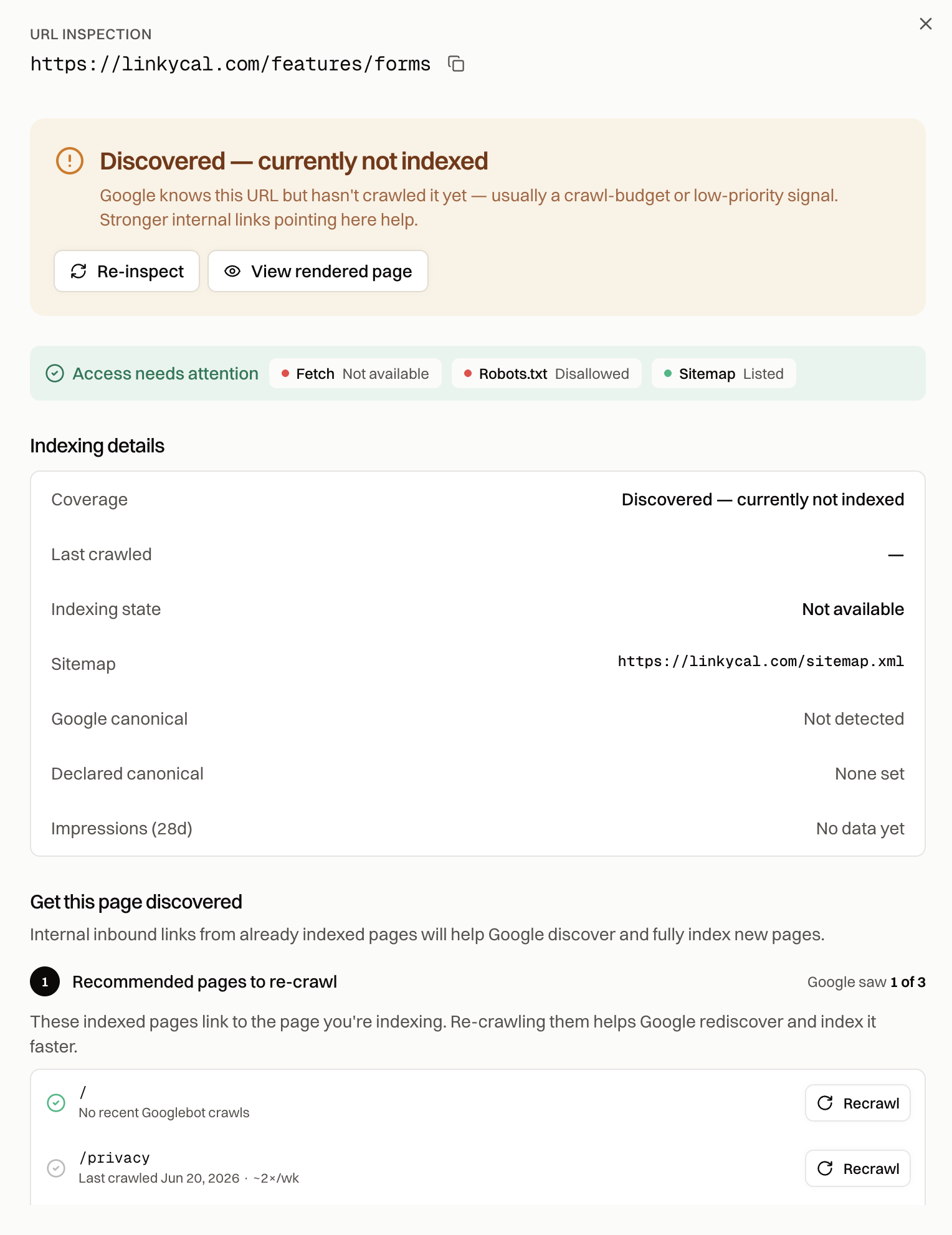
Use the drawer to decide what kind of issue you have. If the canonical points somewhere else, check whether Google selected a different version of the same URL, such as www vs. non-www, HTTP vs. HTTPS, a trailing-slash variant, or a parameter URL. If the page is not in the sitemap, add the canonical URL. If robots.txt, noindex, or a redirect blocks the page, fix that first. If the rendered page is thin or blank, fix rendering or content depth before asking Google to try again.
5. Use indexed pages to help Google rediscover it
After the page is fixed, use the What to do next section. Index Rush shows recommended pages to re-crawl: already-indexed pages that link to the URL you are trying to index. Those pages are useful because Google already knows about them and has them in the index.
For hub, category, collection, or listing pages, this step matters even more. A hub page can help Google rediscover many child URLs, so manually request re-indexing only after the hub links, canonical tags, rendered content, and sitemap signals are correct.
Then use the Request Indexing or Request re-crawl action to open the priority crawl queue in GSC. Submitting the URL before the checks are done usually just asks Google to confirm the same problem again.
Assess severity before fixing anything
Not every unindexed URL is a problem.
Before fixing, answer five questions:
- Is the URL supposed to be indexed?
- Is the URL canonical, indexable, and useful as a search result?
- How many URLs are affected?
- Are the affected URLs from one template or many?
- Do affected URLs matter commercially?
A blog tag archive in CNI may not matter. A newly published revenue page in DNI probably does.
Separate affected URLs into groups:
- important URLs that should be indexed
- duplicate or variant URLs that do not need indexing
- low-value URLs that should be noindexed, canonicalized, blocked, or removed from internal links
- uncertain URLs that need more inspection
This step prevents a common mistake: trying to force every URL into Google. A healthy site can have many excluded URLs. The goal is to get the right URLs indexed.
The data you need before diagnosing
Start with a sample of affected URLs. Do not try to diagnose every URL at once.
Create a spreadsheet with three groups:
- DNI URLs
- CNI URLs
- indexed control URLs from the same templates
The control group matters. If you compare CNI product pages against indexed blog posts, the data will not tell you much. Compare product page to product page, category page to category page, location page to location page.
For every URL, collect:
- Search Console status
- URL Inspection result
- user-declared canonical
- Google-selected canonical
- sitemap inclusion
- last crawl date
- robots meta status
- X-Robots-Tag status
- robots.txt access
- HTTP status code
- redirect target
- internal link count
- crawl depth
- page type or template
- title and meta duplication
- main content similarity
- word count or content depth
- rendered HTML status
- verified Googlebot hits from logs
The last item is the one most teams skip. It is usually the most useful.
Verify what Googlebot actually did
Server logs show what bots actually requested. A crawl tool simulates crawling. Search Console reports a sampled view. Logs show the request.
For SEO debugging, you want access logs. These typically include:
- requested URL
- timestamp
- user agent
- IP address
- response code
- response size
- response time
- referrer
- request method
Before using log data, verify Googlebot. A user agent that says Googlebot is not enough. Fake bots use Googlebot user agents all the time. Use reverse DNS, Google's published crawler IP ranges, Cloudflare bot verification, or a log analysis tool that verifies bots.
Once you have verified Googlebot logs, answer these questions:
- Did Googlebot request the URL?
- When was the last verified hit?
- What status code did Googlebot receive?
- Was the response slow?
- Was the response complete?
- Did it hit the canonical URL or a variant?
- Did it crawl many similar low-value URLs in the same directory?
- Did it crawl parameter URLs more often than important URLs?
For DNI, logs tell you whether Google has truly ignored the URL.
For CNI, logs tell you what Google received when it made its decision.
How to debug DNI URLs
If a URL is discovered but not indexed, first check whether Googlebot has crawled it.
If there are no verified Googlebot hits, treat it as a crawl priority problem.
Start with internal linking. A URL that exists only in a sitemap is usually weaker than a URL linked from relevant, indexed pages. XML sitemaps help discovery. They do not replace internal links.
Check crawl depth next. If affected URLs are buried five or six clicks deep, Google may not prioritize them. This is common with ecommerce filters, pagination, old blog archives, and large location directories.
Then check whether Googlebot is spending time elsewhere. Log files can show if Google is crawling thousands of parameter URLs, internal search pages, filtered category pages, tag archives, or feed URLs. If low-value URLs consume most of the crawl activity, important pages may stay in DNI longer.
Also check server behavior. If Googlebot regularly receives 5xx errors, 429 responses, slow HTML responses, or CDN/WAF challenges, Google may reduce crawl activity.
Good DNI fixes include:
- adding contextual internal links from indexed pages
- reducing crawl depth for important URLs
- cleaning XML sitemaps so they only include canonical indexable URLs
- removing low-value URL patterns from internal links
- blocking true crawl traps where appropriate
- consolidating duplicate or thin pages
- improving server response consistency
The goal is not to force every discovered URL into the index. The goal is to make important URLs easier to find, crawl, and trust.
How to debug CNI URLs
If a URL is crawled but not indexed, start with what Google selected as canonical.
A common pattern is that the user-declared canonical and Google-selected canonical do not match. If Google chooses another URL, the page may stay CNI because Google has consolidated it into a different version.
Check for canonical problems such as:
- canonical tags pointing to the wrong page
- parameter URLs competing with clean URLs
- HTTP and HTTPS variants
- trailing slash inconsistencies
- mobile or alternate versions
- RSS, feed, print, or tag pages containing similar content
- product variants with near-identical content
Next, check duplication. CNI often appears when a page is too similar to another URL with stronger signals. This can happen within the same site or across different sites. Syndicated content, manufacturer descriptions, boilerplate location pages, and programmatic templates are common examples.
Then check rendered content. Source HTML may contain the right tags, while rendered HTML is empty, delayed, blocked, or missing the main content. This is common on single page apps, including many AI-built sites. For the broader SPA crawlability problem, read Is Lovable.dev SEO Friendly? and How to Convert Your Lovable to HTML. Use URL Inspection, browser rendering, and a crawl tool with JavaScript rendering to compare source and rendered HTML.
Also check for soft 404 behavior. A page can return 200 OK while looking like a dead, empty, unavailable, or low-value page. Examples include out-of-stock product pages with no alternatives, location pages with no real local content, search result pages with no results, and thin tag pages.
Good CNI fixes include:
- correcting canonical signals
- consolidating duplicate variants
- adding unique main content
- improving template usefulness
- removing accidental indexable feed or print URLs
- fixing JavaScript rendering issues
- strengthening internal links to the canonical URL
- pruning or noindexing low-value duplicates
CNI is usually less about "make Google crawl it again" and more about "make this URL clearly worth selecting."
Additional CNI edge cases to check
Some CNI cases are not obvious from a basic page inspection.
False positives
Search Console reports can lag. Before assuming a URL is still excluded, search for the exact URL or use URL Inspection. If the page is already indexed, note the reporting delay and move on.
Search intent mismatch
Sometimes the page is crawlable, technically indexable, and unique, but it does not satisfy a clear search intent. This is common with programmatic pages that contain facts but do not answer the query better than pages already in the index.
Expired or unavailable pages
Product pages, job posts, event pages, real estate listings, and deal pages often fall into CNI when the main item is unavailable and the page offers no useful alternative. If the page exists only to say "not available," Google may crawl it and skip it.
Gated or private content
If Googlebot sees a login wall, paywall preview, blocked state, or thin teaser, the page may not be worth indexing. Check what Googlebot receives, not what logged-in users see.
Paginated and faceted URLs
Some paginated, sorted, filtered, or faceted URLs are crawled but not indexed because Google treats them as discovery paths rather than search results. That is not always a problem. It becomes a problem when canonical category pages are also being ignored.
RSS and feed URLs
Feed URLs can show up as crawled but not indexed. Often that is fine. The problem starts when feeds compete with the real HTML pages or Google chooses the feed as the canonical version.
Use cohort analysis instead of one-off checks
One URL rarely proves the issue.
Take 50 to 200 affected URLs from the same template. Compare them against 50 to 200 indexed URLs from the same template.
Look for differences in:
- internal links
- crawl depth
- Googlebot hit frequency
- canonical selection
- content uniqueness
- title duplication
- response time
- rendered content
- sitemap inclusion
- template type
- directory pattern
This usually reveals the actual issue faster than inspecting URLs one by one.
Example findings might look like this:
- Indexed product pages average 35 internal links. CNI product pages average 3.
- Indexed category pages have unique intro copy. CNI category pages use duplicated boilerplate.
- DNI URLs only appear in XML sitemaps and have no internal links.
- Googlebot crawls filtered URLs ten times more often than canonical categories.
- CNI pages return 200 OK, but the rendered content is empty for Googlebot.
- Google-selected canonical points to parent categories for most affected URLs.
That is the kind of evidence you can act on.
Run a controlled indexing test
Once you have a likely cause, test it.
Pick a small group of affected URLs. Keep a similar group untouched as a control.
For DNI, you might:
- add internal links from relevant indexed pages
- move URLs into a stronger hub
- update sitemap entries
- remove internal links to noisy parameter URLs
- improve section navigation
For CNI, you might:
- fix canonical tags
- improve unique content
- merge duplicate pages
- fix rendering
- add useful product, location, or category information
- link more strongly to the preferred URL
Track the test group and control group for a few weeks.
Monitor:
- verified Googlebot hits
- recrawl dates
- URL Inspection status
- Google-selected canonical
- indexed count
- impressions
- clicks
If the test group improves and the control group does not, you have a real signal.
What to avoid
Do not keep requesting indexing for the same URLs. If the issue is structural, manual submission will not solve it.
Do not assume every excluded URL should be indexed. Many DNI and CNI URLs are low-value variants that Google is right to ignore.
Do not remove millions of URLs because of a vague crawl budget theory. Reducing URLs helps only when it improves the quality and crawlability of the remaining site.
Do not diagnose CNI from content quality alone. Canonicalization, rendering, duplication, and server behavior can all produce the same status.
Do not rely on one tool. Search Console, crawl tools, and logs each show different parts of the problem.
FAQs
Is Discovered - currently not indexed bad?
Not always. It is bad when important canonical URLs stay there for a long time, especially if they have internal links, appear in clean sitemaps, and should already be indexed. It is less concerning for duplicate, low-value, faceted, or archive URLs.
Is Crawled - currently not indexed bad?
It depends on the URL. CNI is a problem when Google crawls important pages and still chooses not to index them. It is expected for many duplicate, thin, paginated, feed, or variant URLs.
Should I request indexing?
Request indexing only after fixing the issue. If the page has weak internal links, duplicate content, bad canonicals, rendering problems, or soft 404 signals, submitting it again is unlikely to change the outcome.
How long can a URL stay currently not indexed?
It can stay there indefinitely. There is no guaranteed time limit. If Google does not see enough reason to crawl or index the URL, the status may persist.
Can robots.txt cause these statuses?
Robots.txt can affect crawl behavior, and it is separate from noindex. If Google cannot crawl a URL because robots.txt blocks it, Google may know the URL exists while lacking the content needed to evaluate it. Check robots.txt, meta robots, and X-Robots-Tag separately.
Can canonical tags cause Crawled - currently not indexed?
Yes. If Google selects a different canonical, the crawled URL may remain out of the index because Google has consolidated it into another URL. Always compare the user-declared canonical with the Google-selected canonical.
Do backlinks help?
They can, but they are not the first fix for most technical indexing issues. Start with crawlability, internal links, canonicals, content uniqueness, and rendered HTML. External links help most when the page is already technically sound and worth indexing.
A practical checklist
For DNI URLs:
- Is the URL internally linked?
- How deep is it from the homepage or main hub?
- Is it in a clean XML sitemap?
- Has verified Googlebot requested it?
- Is Googlebot crawling low-value URLs instead?
- Are there server errors or slow responses?
- Is the page type mostly duplicate or thin?
For CNI URLs:
- Did verified Googlebot receive a clean 200 response?
- Is the user-declared canonical correct?
- Did Google select a different canonical?
- Is the page substantially unique?
- Is the rendered HTML complete?
- Does the page look like a soft 404?
- Are stronger duplicate versions available?
- Does the URL have enough internal link support?
Summary
Discovered - currently not indexed and Crawled - currently not indexed are not root causes. They are broad indexing states.
DNI usually means Google knows about the URL but has not prioritized crawling it. Start with internal links, crawl depth, sitemaps, crawl traps, and server behavior.
CNI means Google crawled the URL but did not select it for indexing. Start with canonicals, duplication, rendered content, soft 404 signals, and template quality.
The reliable workflow is:
- Export affected URLs.
- Group them by template.
- Build an indexed control group.
- Pull URL Inspection data.
- Verify Googlebot in server logs.
- Add crawl data.
- Compare indexed and non-indexed cohorts.
- Test one fix on a small URL set.
- Measure against a control group.
That process will not make Google explain itself directly. It will usually give you enough evidence to identify the underlying issue and fix the part of the site that is holding indexing back.
For this workflow in one dashboard, Index Rush shows which pages Google is missing, what issues are attached to each URL, and which indexed pages can help Google rediscover them faster.
Related resources
- How to Get Your Pages Indexed on Google - the complete indexing guide covering every site type and every Search Console status
- How to Generate Sitemap on Lovable - useful when DNI pages only appear in a sitemap, or your sitemap contains non-canonical URLs
- Is Lovable.dev SEO Friendly? - background on why JavaScript SPAs can create crawlability and rendering problems
- How to Convert Your Lovable to HTML - a practical path when rendered HTML is the indexing blocker
- Prerender.io Alternatives - compare prerendering options for React, Vue, Angular, and AI-built apps
- How to Get Your Pages Indexed by ChatGPT, Perplexity, and Other AI Search Engines - related visibility work for AI crawlers and answer engines