Encited logo
Pricing
← Back to blog
How to get your pages indexed on Google: Complete guide for every scenario

How to get your pages indexed on Google: Complete guide for every scenario

July 3, 2026·by Aki from Encited

In this 5000 word, ultimate indexing guide, we will cover every single type of website, how to get them indexed and complete list of indexing issues and how to debug them

TL;DR: Google no longer indexes new sites just because you submitted a sitemap. It wants proof that your site matters: a few external links, clean technical signals, internal links that make sense, and content it hasn't seen a thousand times before. This guide covers how to get indexed for every common site type (brochure sites, directories, blogs, e-commerce, JavaScript-rendered sites), how to debug "Crawled – currently not indexed" and "Discovered – currently not indexed", and what every status in the Search Console page indexing report actually means.

If you launched a site in the last year or two, you've probably lived this: the site is done, the sitemap is submitted, Search Console is verified, and then... nothing. Days go by. You check the Pages report and your URLs sit in "Discovered – currently not indexed" like they're waiting in a line that never moves.

You're not doing anything wrong. The game changed.

AI website builders and AI writing tools made publishing nearly free. The number of new sites and new pages hitting the web has grown at a pace Google has never dealt with before. Google's response was predictable: it got pickier. Crawling and indexing cost real money at Google's scale, and the index is already full of pages that answer almost every query. A new page now has to earn its spot.

Ten years ago you could submit a sitemap and watch a fresh domain get indexed within days. Today, a sitemap submission on a brand-new domain with zero external links often does nothing at all. Google treats a sitemap as a hint about what exists on your site. It treats links from sites it already trusts as evidence that your site is worth its crawler's time. Until it sees at least a few of those links, many new domains just sit in the discovery queue.

This guide is long on purpose. We run a prerendering and AI-search-visibility platform, we render around 20 million pages a month and audit close to 1 million, and indexing problems are the single most common reason people show up at our door. Below is everything we know, organized so you can jump to your exact situation.

How Google indexing actually works

Getting a page into Google's index is a pipeline with four stages, and a page can stall at any of them. Knowing which stage your page is stuck at tells you what to fix.

1. Discovery. Google learns the URL exists. This happens through links from pages Google already knows, through your XML sitemap, or through direct submission in Search Console. Discovery alone means nothing. Google discovers billions of URLs it never bothers to crawl.

2. Crawling. Googlebot fetches the page. Whether and when this happens depends on your crawl budget, which Google describes as a mix of two things: crawl capacity (how hard Google can hit your server without hurting it) and crawl demand (how much Google actually wants your content, based on your site's popularity, historical quality, how much genuinely new information you publish, and how much topical authority you've built). Google's own documentation says crawl budget is mainly a concern for sites with over a million pages, or sites with 10,000+ pages that change daily. In practice, we see much smaller sites hit crawl demand problems, because demand is a quality judgment and new sites haven't earned any.

3. Rendering. If your page depends on JavaScript to show its content, there's an extra stage. Googlebot first reads the raw HTML. Pages that need JavaScript go into a separate rendering queue, where a headless Chromium instance eventually executes the scripts and extracts the final content. This queue can take hours or days, sometimes weeks or months, and on low-priority sites the render may never happen at all. It's rate-limited, and a single JavaScript error can silently abort the render. This is where most AI-builder sites and single-page apps quietly die, and we cover it in detail below.

4. Indexing. Google evaluates the crawled (and rendered) content and decides whether it deserves a slot in the index. This is a real decision. Google does not index everything it crawls, and John Mueller has said repeatedly that it's normal for some pages on every site to stay out of the index.

Everything in this guide is about moving pages through these four stages faster.

The new-site reality: why sitemaps alone stopped working

Here's the pattern we see over and over on new domains. Site launches, sitemap gets submitted, homepage gets indexed within a week or two, and then everything else stalls. Sometimes even the homepage takes weeks.

The reason is trust. A brand-new domain has no history, no links, and no user signals. Google has limited data to judge whether your 40 pages are a real business or the ten-thousandth AI-generated affiliate site launched that day. So it crawls cautiously and indexes reluctantly until the picture clears up.

The SEO community has called this the "sandbox" for twenty years. Google has denied a literal sandbox filter exists, but the observable behavior is real: new domains index slowly and rank slowly, with most people reporting a trust-building window somewhere between two and eight months depending on the niche. You can't skip it entirely. You can shorten it.

What actually moves the needle for a new domain:

Get a handful of real external links. This is the single biggest unlock. You don't need dozens. Three to five links from legitimate, already-indexed sites give Google a path to your domain through pages it already trusts, and they signal that someone besides you thinks the site exists. Practical sources that work for almost any business: your Google Business Profile, relevant industry directories, a launch post on a community your audience actually uses, a partner or supplier who lists their clients, a founder profile that links home. Skip fiverr link packages and mass "web 2.0" spam. Junk links at best do nothing and at worst mark you as exactly the kind of site Google is trying to filter out.

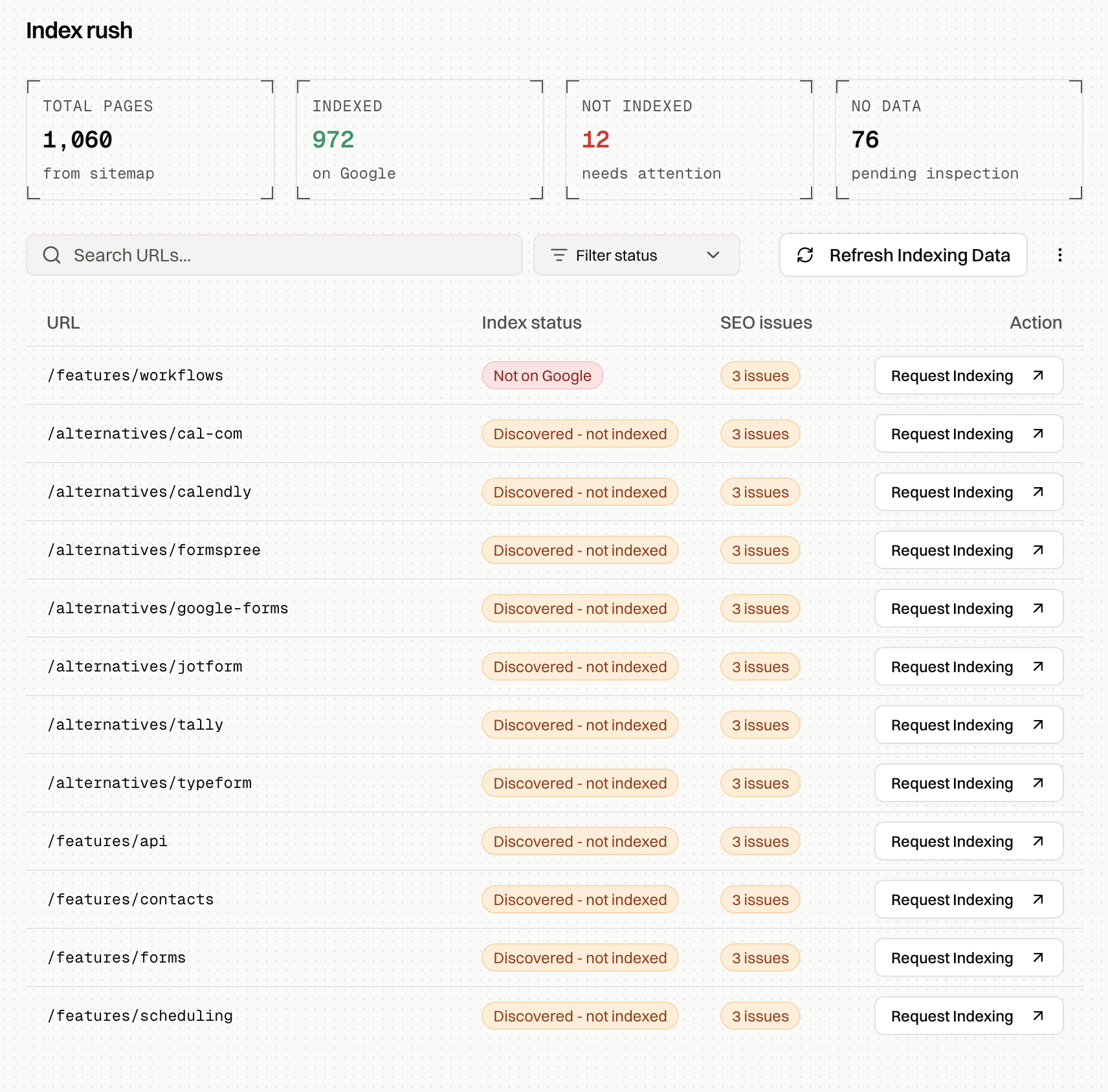
Set up Search Console properly and use URL inspection. Verify the domain property, submit the sitemap, then manually request indexing for your most important pages through the URL Inspection tool. Manual requests are effectively capped at around 10 per day, so spend them on the pages that matter: homepage, main service or product pages, your best content. A manual request doesn't guarantee indexing, but for a new site it's often the fastest way to get the first crawl to happen. Inspecting and requesting URLs one by one gets tedious fast; Encited tracks your unindexed pages, flags on-page SEO issues on them, and tells you which pages to request first so each of your daily requests has the most compounding effect on the site.

Index Rush overview showing total, indexed, not indexed, and pending page counts from the sitemap, with per-URL index status, SEO issues, and request indexing actions
Click to zoom

Make sure the boring technical stuff is clean. One canonical version of the site (https, one subdomain choice), no accidental noindex tags left over from staging, robots.txt that doesn't block anything important, pages returning clean 200 responses, server that responds fast. A shocking number of "Google won't index my site" cases are a staging noindex that shipped to production. Encited's SEO Spider runs a full end-to-end technical audit of your site, checks it against 40+ common technical issues, and gives you an explanation of each fix plus prompts you can drop straight into your website builder.

Publish something worth indexing. Ten thin pages of template text give Google nothing to work with. A new site with a genuinely useful homepage, clear service pages, and two or three substantial pieces of content indexes faster than a new site with fifty shallow pages, because Google's early quality judgment of your domain is built from whatever it crawls first. First impressions are literal here. AI makes publishing nearly free; use it to produce good content at scale, and resist the temptation to flood Google with slop, because the slop is what your domain gets judged by.

Find what's holding your pages back

Encited's SEO Spider crawls your whole site, checks it against 40+ technical SEO issues, and explains each fix with prompts you can paste into your website builder.

An Encited SEO Spider audit run listing technical issues found across a site

Now let's get specific by site type, because the right strategy for a 6-page brochure site is very different from a 5,000-page directory.

How to get a brochure site indexed

A brochure site is the classic small business site: homepage, about, services, contact, maybe a few location pages. Five to twenty pages total. These should be the easiest sites on the internet to index, and when they're built as plain HTML they usually are. When they stall, it's almost always one of these:

The site is new and has zero links. Everything in the section above applies. For a local business specifically, the Google Business Profile link plus two or three local directory citations (chamber of commerce, industry association, local listings) is usually enough to wake Google up.

The site was built with an AI builder or a JavaScript framework and Google sees an empty shell. This is the fastest-growing cause we see. Test it right now: run your homepage through a Google crawler simulator (we have a free one) and see what a crawler actually reads. If it can't read any of your content, your site is a single-page application: Googlebot's first pass sees nothing, and your tiny site is competing in the render queue with every other JavaScript site on the internet. Jump to the JavaScript section below.

Every page says almost the same thing. Ten location pages that are word-for-word identical except for the city name often get folded together as duplicates or skipped as thin. Make each page answer something real about that location or service.

For brochure sites the full playbook is short: clean HTML that contains your content, one clear internal link path from the homepage to every page, sitemap submitted, manual indexing requests for each page (you have few enough that the daily cap doesn't matter), and three to five legitimate external links to the domain. If all of that is in place, a small site typically gets fully indexed within a few weeks. If it doesn't, work through the debugging sections later in this guide.

How to get a directory or programmatic site indexed

Directories, listing sites, and programmatic SEO plays are where indexing strategy matters most, because you're asking Google to index hundreds or thousands of structurally similar pages from a domain that usually hasn't earned that level of trust yet.

The failure mode is always the same: launch with 3,000 pages in the sitemap on day one, get 50 indexed, watch 2,950 rot in "Discovered – currently not indexed" for months. Google looked at the URL pattern, sampled a few pages, decided the pattern wasn't worth its crawl budget, and deprioritized the whole batch. Once that judgment forms, it's slow to reverse.

Here's the approach that works:

Release in semantic batches. Don't publish the whole directory at once. Group your pages into topical clusters (one city, one category, one vertical) and release one cluster at a time. A useful benchmark from the programmatic SEO world: start with a batch of around 25 pages. If roughly 80% of them get indexed within a few weeks, release the next cluster and scale up batch sizes as your indexation rate holds. If indexation is poor on the first batch, fix the template before publishing more, because every additional unindexed page lowers Google's opinion of the pattern.

Semantic batching beats random batching for a reason: a complete, interlinked cluster (say, all plumbers in one city, linked to a city hub page) looks like a coherent, finished section of a site. Twenty-five random pages scattered across your taxonomy look like sampled output from an infinite page generator.

Make internal linking do the heavy lifting. On a directory, internal links are how Google discovers pages, how it judges their importance, and how crawl priority flows. Every listing page needs links from at least one hub page, and hubs need links from the homepage or main navigation. Pages reachable only through the sitemap, with no internal links pointing at them, are the first to be ignored. Breadcrumbs, "related listings" modules, and HTML hub pages that enumerate a cluster are worth far more here than on a normal site. Add contextual links inside the content itself too: when a listing's description mentions a related category, neighborhood, or service, link that mention to the relevant page with a descriptive anchor ("emergency plumbers in Austin" rather than "click here"). In-content links with real anchor text carry more weight than navigation links and tell Google what the target page is about.

Don't act like a spammer while you're in the trust-building window. During your first months, Google is actively deciding what kind of site you are. This is the worst possible time to publish thousands of near-identical pages, stuff every page into a huge sitemap, blast manual indexing requests through automation, or buy links. All of these are the signature moves of the spam sites Google's filters were built for. Slow, clustered, quality-first releases during the sandbox period; aggressive scaling only after your indexation rate proves Google trusts the pattern.

Give every page a reason to exist. The template question Google is effectively asking about each programmatic page: does this page contain information that isn't already on another page of this site or a hundred other sites? Unique data fields, reviews, real descriptions, photos, structured data. If a listing page is a name, an address, and boilerplate, expect "Crawled – currently not indexed" at scale. There's a cumulative effect here that most people miss: think of every page as carrying equity for your site's topical authority. A page that adds unique, relevant information deposits equity; a page that adds nothing withdraws it. Pile up enough negative-equity pages and they pollute Google's judgment of the whole domain, which is why pruning weak pages often improves indexation for the pages that remain. This shows up repeatedly in site-quality research and in Google's own guidance about site-wide quality signals.

Control your URL space. Faceted filters, sort orders, and search-result URLs can generate near-infinite URL variations that burn your limited crawl budget on garbage. Block parameter combinations you don't want indexed in robots.txt, canonicalize variants to the clean version, and keep the sitemap strictly to canonical, 200-status, indexable URLs.

How to get a blog indexed

Blogs have the most straightforward path, because fresh content on an established domain is exactly what Google's crawler is designed to pick up. The variables are your domain's existing trust and your publishing cadence.

If your blog already has some indexed content and traffic, new posts should index within hours to a few days on their own. Publishing consistently, up to around one post a day if you can sustain the quality, trains Googlebot to come back often; crawl frequency follows publishing frequency. For each new post, request manual indexing through URL Inspection anyway. It costs you thirty seconds and regularly cuts the wait from days to hours. Link every new post from at least one older, already-indexed post, and surface recent posts on your homepage so the crawler finds them on its next visit without needing the sitemap.

One warning on cadence: publishing velocity has to match your site's earned crawl budget. A young blog pushing out ten AI-assisted posts a day will watch most of them pile up unindexed, and a large backlog of unindexed pages is itself a negative quality signal about the domain. If your indexation rate is dropping, slow down and consolidate. One strong post a day beats ten thin ones by a wide margin, and for most new blogs two or three a week is the honest ceiling.

If your blog is brand new, you're a new site first and a blog second: everything from the new-site section applies. Build the first few external links, publish your strongest material first, and expect the first posts to take weeks rather than hours.

Keep old content in the game. Google recrawls pages it considers alive. Industry crawl data suggests pages that go roughly 130 days without a recrawl are at risk of dropping out of the index entirely. Updating and republishing your important older posts, and linking to them from new ones, keeps their crawl frequency healthy. One caveat: before refreshing or expanding an old post, check it doesn't start competing with another of your posts for the same keywords. Poaching your own keywords splits your topical authority across two pages and usually leaves both ranking worse than one consolidated page would. Encited's GSC auditing agent finds these pages for you, both the ones going stale and the ones cannibalizing each other, and tells you which to refresh, merge, or leave alone.

How to get an e-commerce site indexed

E-commerce combines every hard problem: lots of pages, heavy templating, faceted navigation, and often a JavaScript storefront. The directory advice above mostly applies, with a few store-specific points.

Product pages need unique content. Manufacturer descriptions pasted across your store and fifty competitors are the canonical cause of "Duplicate" and "Crawled – currently not indexed" statuses on product URLs. Rewrite descriptions for your important products, add your own photos, specs, and reviews.

Tame faceted navigation. Filters and sorts (?color=red&size=m&sort=price) can multiply your crawlable URL count by 100x. Pick which facet pages deserve indexing (usually none, or a curated handful with real search demand), canonicalize or block the rest, and keep them out of the sitemap.

Handle out-of-stock and discontinued products deliberately. Discontinued products should 301 to the closest replacement or return a real 404/410. Soft 404s (a "product unavailable" message served with a 200 status) waste crawl budget and pollute your quality signals.

Watch your platform's rendering. Headless storefronts and heavily scripted themes frequently hide product content, prices, and internal links behind JavaScript. Same test as before: view source on a product page and check whether the product name, description, and links to related products exist in the raw HTML.

How to get a JavaScript site, SPA, or AI-builder site indexed

This section exists because of a pattern we see constantly: a technically excellent site, good content, clean sitemap, proper canonicals, and almost nothing indexed months after launch. A recent public case study described it perfectly: a 198-page React single-page app, built with every SEO best practice, had 20 pages indexed after six months, with 147 URLs parked in "Discovered – currently not indexed". The content wasn't the problem. Google simply couldn't see it.

The mechanics, one more time, because they explain everything: Googlebot's first pass reads your raw HTML. If your content only exists after JavaScript runs, the page goes into a rendering queue that is delayed, rate-limited, and fragile. While your pages wait for rendering, Google is judging your site by the empty HTML shells it can see, and empty shells earn low crawl demand. Low crawl demand means fewer pages get crawled, which means fewer reach the render queue. It's a downward spiral, and it hits new low-authority domains hardest because they have no trust to spend.

And Google is the generous one here. Bing renders far less JavaScript. Social platforms basically never do. Most AI crawlers (GPTBot, PerplexityBot, Claude's crawler) read raw HTML and move on. A client-rendered site indexes slowly on Google and stays invisible to a growing share of the other systems that decide whether anyone ever sees your content.

You have three ways out:

1. Use a framework that ships HTML. If you're starting fresh and search traffic matters, build with something that server-renders or statically generates pages: Next.js, Astro, Nuxt, SvelteKit. This is the cleanest fix and the right call for new projects.

2. Add server-side rendering to your existing app. Correct but expensive. Retrofitting SSR onto a mature SPA is a serious engineering project, and for many teams it stalls for months for exactly that reason.

3. Prerender. Serve crawlers a fully rendered, cached HTML snapshot of each page while human visitors get your normal JavaScript app. Google has long been fine with this pattern as long as the snapshot matches what users see. It requires no rewrite and works with any stack that renders in a browser, which includes every AI website builder we've been asked about: Lovable, Bolt, v0, Base44, Replit, and the rest, along with hand-built React, Vue, and Angular apps.

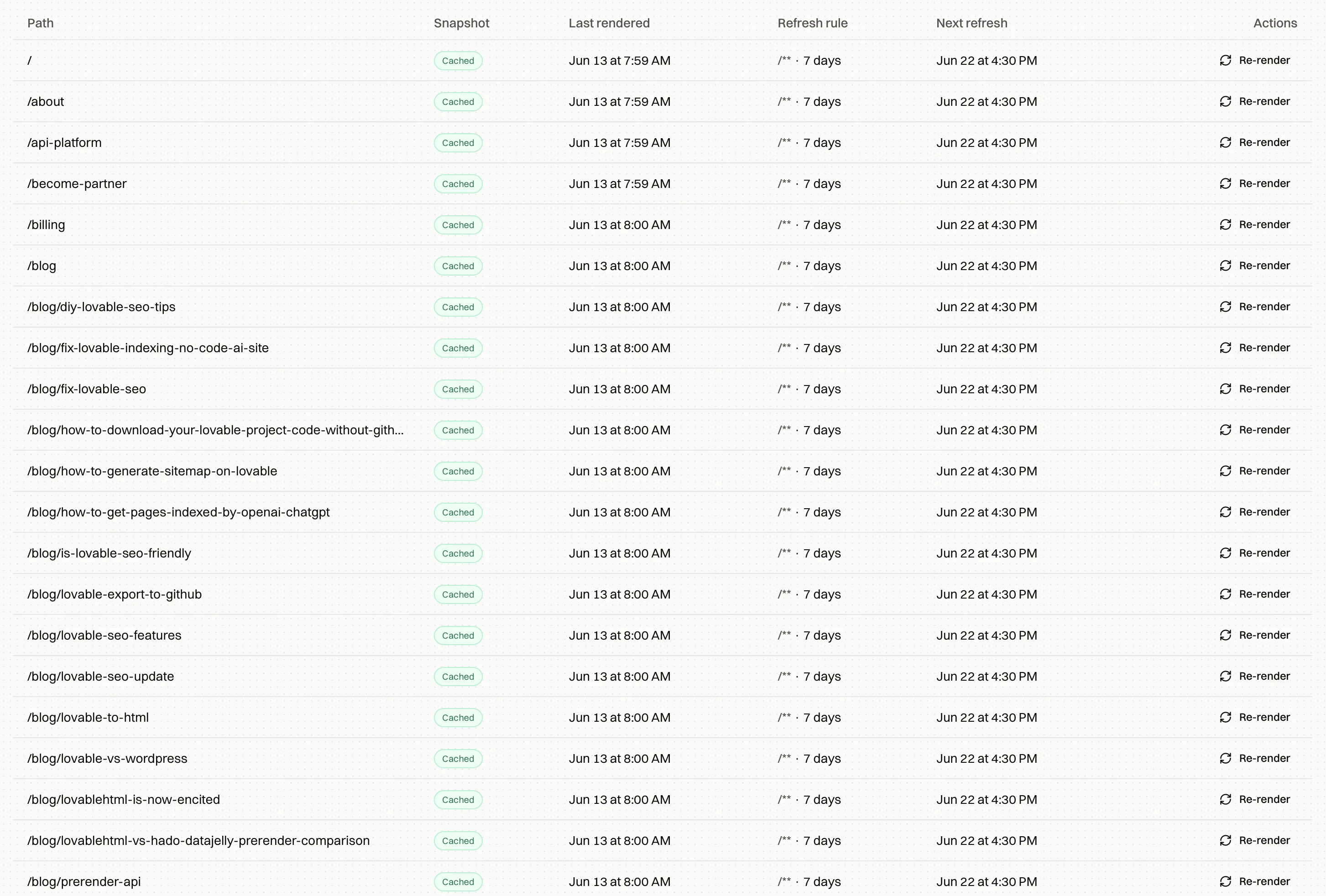
This is the part of the stack we build. Encited sits in front of your site as a prerendering layer: setup is DNS-only, takes about five minutes, and needs no code changes. When Googlebot, GPTBot, PerplexityBot, or any other crawler requests a page, it gets the complete rendered HTML immediately. Across sites on our proxy, prerendered pages get indexed roughly 5x faster than the same sites did serving raw JavaScript shells, and you can watch every crawler hit in the crawl logs to verify what Google is actually fetching.

Recent crawler visits log showing Googlebot hits per page with timestamps and cache-hit status
Click to zoom
Is Google seeing an empty page on your site?

Encited prerenders your JavaScript site for every search and AI crawler. DNS-only setup in about 5 minutes, plans from $19/mo, 7-day free trial.

Encited's prerendered pages list showing rendered HTML snapshots served to crawlers

How to debug "Crawled – currently not indexed"

This status means Google fetched your page, evaluated it, and chose to leave it out of the index. That's an active decision. Google saw the content and passed. Here's the debugging order that finds the cause fastest:

Step 0: Confirm it's real. The Pages report lags behind reality, sometimes by days. Run the URL through the URL Inspection tool first. If inspection says the page is indexed, you're chasing a reporting delay. Move on.

Step 1: Check what Google actually rendered. In URL Inspection, view the crawled page and the rendered HTML. If the content Google saw is empty or missing major sections, you have a rendering problem, and everything else on this list is irrelevant until it's fixed. This one step explains a huge share of "crawled but skipped" cases on JavaScript sites, because Google crawled the shell, rendered late or partially, and judged what it saw.

Step 2: Look for the pattern in what's excluded. Open the full list of affected URLs. If it's dominated by tag archives, feed URLs, parameter variants, and pagination, that's Google correctly ignoring low-value URLs, and the right move is to noindex or block them so they stop diluting your quality signals. If your money pages and real articles are in the list, keep going.

Step 3: Audit the page against what already ranks. Search your target query and look at page one. Does your page match the intent (guide vs. tool vs. product page)? Does it say anything the top results don't? Thin pages, near-duplicates of your own other pages, and content that's interchangeable with the existing top ten are the most common quality reasons for this status. Consolidate overlapping pages into one strong page with canonicals or redirects.

Step 4: Check internal links. Orphan pages (zero internal links pointing at them) routinely land here. Find your topically related pages that already perform, and link from them to the stuck page with descriptive anchors. A quick way to find candidates: search site:yourdomain.com "target topic" and add links from whatever comes up. This is the cheapest fix on the list and it works surprisingly often.

Step 5: Check for duplication signals. Same content reachable at multiple URLs, boilerplate that outweighs unique content, syndicated content that exists elsewhere. Canonicalize properly and make sure the canonical version is the one you're trying to index.

Step 6: Then, and only then, request indexing. A manual request on an unchanged page usually produces nothing, or a brief "freshness" indexing that decays in days. Fix something first, then request. If a large batch is affected, use Validate Fix on the status in the Pages report after your changes ship.

If a large fraction of your whole site sits in this status, stop treating it as a page-level problem. Mueller has been explicit that this is usually a site-level quality judgment. The fix is pruning weak content, consolidating overlap, and raising the average quality of what you publish, which takes months to reflect, and no amount of resubmission shortcuts it.

How to debug "Discovered – currently not indexed"

This status means Google knows the URL exists but hasn't crawled it yet. The last crawl date in URL Inspection is empty. The page is in a queue, and your job is to figure out why the queue never advances. Two possible causes: Google can't crawl more of your site (capacity), or Google doesn't want to (demand). Demand is the common one.

If it's a small number of recent URLs: this is often just the queue. New pages on smaller sites can sit here for days or a couple of weeks and resolve on their own. Request indexing for the important ones and wait before doing anything drastic.

If URLs sit here for weeks, or the count keeps growing:

Check crawl demand first. Google prioritizes crawling based on what previous crawls of your domain found. If past crawls kept hitting thin, duplicate, or templated pages, new URLs matching similar patterns get parked. This is why "Discovered" pile-ups so often follow a big programmatic release. The fixes are the directory playbook from earlier: release in smaller clusters, strengthen the template, prune the weakest pages, and build a few external links to raise the domain's overall standing.

Check internal linking depth. URLs that exist only in the sitemap, or that are five clicks from the homepage, are telling Google they don't matter. Get important stuck pages linked from strong pages, ideally within two or three clicks of the homepage. HTML hub pages that enumerate a section work well when your architecture buries things.

URL inspection drawer for a page stuck in Discovered – currently not indexed, showing coverage details, canonical signals, and recommended already-indexed pages to re-crawl
Click to zoom

Check for crawl waste. Pull the Crawl Stats report (Settings → Crawl stats). If Googlebot is spending its visits on parameter URLs, redirect chains, 404s, and soft 404s, your real pages never get their turn. Block the infinite spaces in robots.txt, flatten redirect chains, return real 404/410s for dead pages, and keep the sitemap clean: canonical, indexable, 200-status URLs only.

Check server health. Slow responses and 5xx errors make Googlebot back off the whole site. Crawl Stats shows average response time and error rates; if response times are high or errors spike, fix hosting before anything else.

Check whether it's a rendering problem in disguise. A site full of JavaScript shells earns low crawl demand for the reasons covered above, and "Discovered – currently not indexed" at scale is one of the classic symptoms on SPA sites. If view-source shows empty pages, that's your root cause.

One expectation to set: when the cause is systemic (site quality, crawl demand), recovery takes weeks to months after the fix, because Google has to recrawl enough of your improved site to change its judgment. Isolated pages can flip in days.

If you want to go deeper on debugging these two statuses, with control groups, verified Googlebot logs, and cohort analysis, we have a dedicated debugging guide for exactly that workflow.

Debug your unindexed pages in one screen

Index Rush pulls live indexing status from Search Console, shows the issues attached to each stuck URL, and recommends which pages to request first.

Index Rush table showing URL-level index status, issues, and request indexing actions

Every Search Console indexing status, explained

The complete list from the Pages report, what each status means, and whether you should care.

Server error (5xx). Your server returned a 500-level error when Googlebot asked for the page. Always worth fixing. Check hosting capacity, firewall and bot-protection rules (security tools sometimes block Googlebot), and whether the errors cluster at specific times. Persistent 5xx errors also drag down crawl capacity for the whole site.

Redirect error. The redirect couldn't be followed: a loop, a chain that's too long, a redirect to a dead or malformed URL. Trace the hop chain with a crawler or curl and make every redirect a single hop to a final 200 page.

URL blocked by robots.txt. Googlebot was told not to fetch the page. If intentional, fine. If these are pages you want indexed, remove the disallow rule. Two traps here: robots.txt blocks crawling but doesn't reliably prevent indexing (a blocked URL can still get indexed from external links, with no snippet), and a page must be crawlable for Google to even see a noindex tag on it. Never combine "disallow in robots.txt" with "noindex on the page" and expect the noindex to work.

Blocked due to unauthorized request (401) / access forbidden (403). The page demands authentication or the server refused Googlebot. Normal for login areas and staging environments; a problem if it's hitting public pages, which usually means a CDN, WAF, or bot-protection layer is challenging Googlebot. If these URLs shouldn't be public, also ask how Google found them and remove the links or sitemap entries exposing them.

Not found (404). The page doesn't exist. Fine for genuinely removed content; Google eventually crawls these less. If pages that should exist show up here, fix the links or restore the pages, and 301 removed pages that have replacements.

Soft 404. The page tells users "nothing here" but returns a 200 status, or it's so thin Google treats it as empty. Common on empty category/tag archives and out-of-stock product pages. Return a real 404/410, redirect to a relevant page, or add substance. Soft 404s keep getting recrawled and quietly eat crawl budget.

Blocked due to other 4xx issue. A client error outside the usual ones (400, 429, and friends). Check the actual status code the URL returns and fix accordingly; 429s in particular point at rate-limiting rules hitting Googlebot.

Excluded by 'noindex' tag. Google saw a noindex directive and obeyed it. Perfect when intentional. The classic accident is a staging noindex shipped to production, or an SEO plugin setting applied too broadly. Audit this list regularly; wanted pages showing up here is one of the most common self-inflicted indexing wounds we see.

Page with redirect. The URL redirects somewhere else, so this URL won't be indexed (the destination might be). Almost always healthy: http→https, trailing-slash normalization, old URLs pointing at new ones. Only investigate if a page you expect to be a real destination is redirecting.

Alternate page with proper canonical tag. The URL declares another URL as canonical and Google agrees. Usually parameter variants, UTM-tagged URLs, or mobile/AMP alternates. Working as intended; no action.

Duplicate without user-selected canonical. Google found duplicates of this page and you didn't declare a canonical, so Google picked one itself. Add explicit canonical tags so the version you want indexed is the version that gets indexed. Use URL Inspection to see which URL Google chose.

Duplicate, Google chose different canonical than user. You declared a canonical and Google overrode it, which means Google thinks another URL is a better representative of this content. Usually a sign the pages are too similar, or that internal links and sitemaps point at a different version than your canonical tags do. Differentiate the content or align all your signals (links, sitemap, canonicals) on one version.

Crawled – currently not indexed. Covered in depth above. Google fetched it and passed. Quality, duplication, rendering, or internal linking.

Discovered – currently not indexed. Covered in depth above. Google knows it exists and hasn't crawled it. Crawl demand or crawl capacity.

Blocked by page removal tool. Someone filed a temporary removal request for this URL in Search Console. Removals last about six months; if it shouldn't be blocked, check the Removals report and cancel the request.

Indexed, though blocked by robots.txt (warning). The page got indexed from external signals even though Googlebot can't crawl it, so it shows in results with no useful snippet. If you want it hidden, unblock it in robots.txt and add a noindex tag (Google must crawl the page to see the noindex). If you want it indexed properly, just unblock it.

A note on reading this report sanely: almost every healthy site has plenty of URLs in the "not indexed" bucket, and much of it is Google correctly processing redirects, canonicals, and intentional noindexes. The report is not a to-do list. The job is making sure every page you actually care about is indexed and everything else is excluded for a reason you chose. As a loose benchmark for content sites, having 5–15% of known URLs excluded is unremarkable; important pages stuck for weeks is what deserves your attention.

FAQ

How long does indexing take in 2026?

Established site with regular publishing: hours to a few days per new page. Healthy small site: days to a couple of weeks. Brand-new domain with no links: anywhere from a couple of weeks to a couple of months for meaningful coverage, and the external-link and quality work above is what compresses that.

Does requesting indexing manually actually help?

Yes, as a nudge for pages that are ready. It moves a crawlable, indexable, decent page up the queue. It does nothing durable for a page Google already evaluated and skipped; fix the page first, then request. You get roughly 10 requests a day, so spend them on pages that matter.

Should I use indexing APIs or paid indexing tools?

Google's official Indexing API is documented for job postings and live-event pages. Tools that abuse it for regular content do get pages crawled sometimes, but you're building on a loophole, it does nothing for the underlying trust problem, and pages indexed this way without merit tend to fall back out. The same effort spent on real links and internal linking pays off for years.

Do backlinks really affect indexing, or only ranking?

Both. Links are a discovery path and a crawl-priority signal. The difference between a new domain with zero external links and the same domain with five real ones is often the difference between months of "Discovered – currently not indexed" and normal indexing behavior.

My page is indexed but doesn't rank. Is that an indexing problem?

No. Indexing gets you into the library; ranking is whether anyone recommends your book. If URL Inspection says the page is on Google, your remaining work is content quality, relevance, and links.

Can Google index my client-rendered JavaScript site at all?

Eventually, partially, sometimes. Google can render JavaScript; the queue delays, rate limits, and fragility mean you shouldn't build a business on it, and most other crawlers (Bing to a large degree, social platforms, and most AI crawlers) won't render it at all. Serve HTML to crawlers via SSR, static generation, or prerendering.


If you've worked through this guide and your pages are still stuck, the fastest thing you can do is find out exactly what crawlers see when they hit your site. That's the first thing we check for every site that connects to Encited, and it's the root cause more often than anything else on this page.

Get discovered anywhere search happens

Readable, citable, outranking pages.

Avatar
How can we help?
Get instant answers to your questions or leave a message for an engineer will reach out
Ask AI about Encited
See our docs
Contact support
Leave a message
We'll get back to you soon
Avatar
Ask AI about Encited
Team is also here to help
Thinking
Preview
Powered by ReplyMaven
Avatar