
Usage and billing
Your plan comes with an allowance for renders, tracked prompts, and content credits. Going past the allowance doesn't stop anything, it bills. Going past the hard limit does stop work. Telling those two numbers apart is the difference between an invoice you expected and a refresh that quietly stopped running.
Time: 5 minutes. You need: Admin or Owner.
Where to find it#
Settings → Usage & Billing.
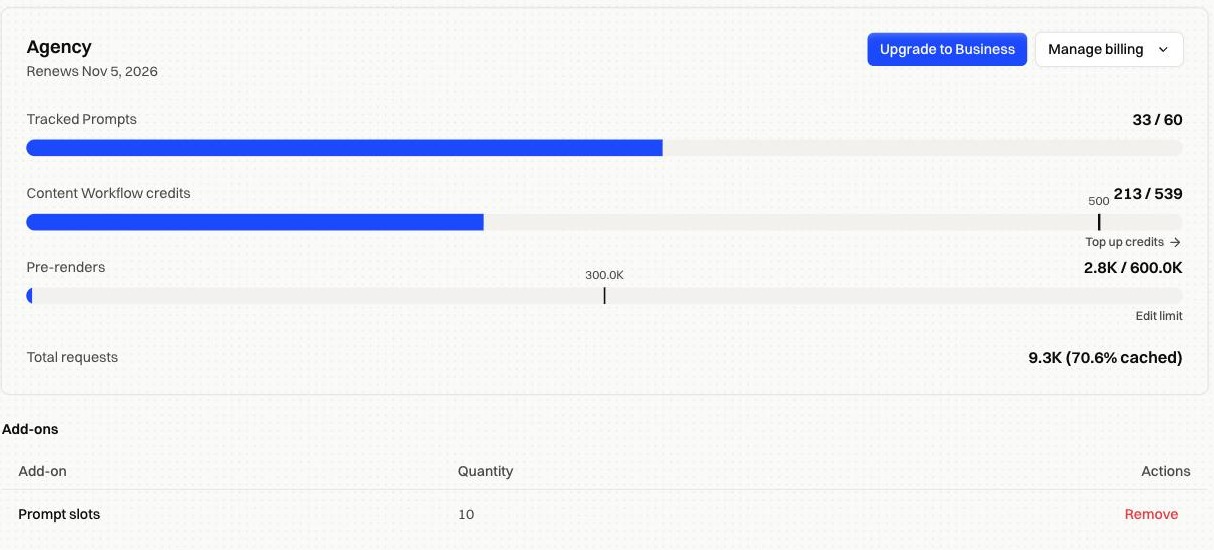
The header shows your plan and renewal date. Everything below covers the current billing period, and it resets when the period does.
How it works#
Every bar has two numbers#
The marker partway along each bar is what your plan includes. The number after the slash is your hard limit, which is where the work stops.
So a bar reading 2.8K / 600.0K with a marker at 300.0K means 300,000 renders included, 2,800 used, and rendering continues to 600,000 before it stops. Renders between the marker and the limit are billed as usage on top of your plan fee.
| Row | What it counts |
|---|---|
| Tracked prompts | Prompts being monitored, including any prompt-slot add-ons |
| Content workflow credits | Credits spent by content workflows, plus anything you've topped up |
| Pre-renders | Pages rendered this period |
| Total requests | Every crawler request served, and the share answered from cache |
A high cached share on that last row is the healthy case. It means crawlers are being served stored snapshots rather than triggering fresh renders.
The hard limit#
Edit limit sets where rendering stops for the period. It starts at twice what your plan includes.
Raise it to absorb a traffic spike without interruption. Lower it to cap what you can spend. When the period's renders reach it, scheduled refreshes and bulk re-renders stop until the period rolls over.
Lowering the limit below what you've already used stops rendering immediately for the rest of the period.
Managing the subscription#
Manage billing covers the rest:
| Option | What it does |
|---|---|
| Billing details & history | Invoices and receipts |
| Update payment method | Change the card on file |
| Change billing period | Switch between monthly and annual |
| Pause subscription | Stop billing without losing your configuration |
| Cancel subscription | End the plan at the end of the current period |
Add-ons#
Anything bought on top of the plan, such as extra prompt slots, is listed with its quantity and can be removed here. Removing one takes effect from the next period.
Fixes by symptom#
| Symptom | What to check |
|---|---|
| Renders stopped partway through the month | The period's renders reached the hard limit. Raise it, or wait for the period to roll over |
| An invoice was larger than the plan fee | Usage went past the marker. The gap between the marker and your usage is what got billed |
| Scheduled refreshes stopped but pages still render | Same cause. The limit gates scheduled and bulk work first |
| Usage looks wrong after a plan change | Allowances follow the new plan from the next period, and used counts don't reset mid-period |
| No Edit limit button | It's hidden on trials without a card, and for members below Admin |
FAQ#
Can I reset the used count? No. Usage is metered as it happens and only rolls over with the billing period.
Does pausing keep my sites connected? Pausing stops billing and the work that costs money. Your domains, settings, and history stay as they are.
Who can see this page? Admins and Owners. It's hidden from members scoped to specific sites.
Who can change roles and seats? See Invite your team and set roles.