
Run a site audit
An audit is a full crawl of your site, checking every page it reaches against 45 on-page and site-wide signals. You run one when rankings drop and nothing obvious changed, after a migration or a redesign, before pushing a large batch of new pages, and on a repeat schedule so regressions surface without anyone watching for them.
Time: 2 minutes to start. A few hundred pages finish in minutes; large sites take longer. You need: a site added to Encited.
Where to find it#
Inspect & Optimize → SEO Spider, then Run SEO audit at the top right.
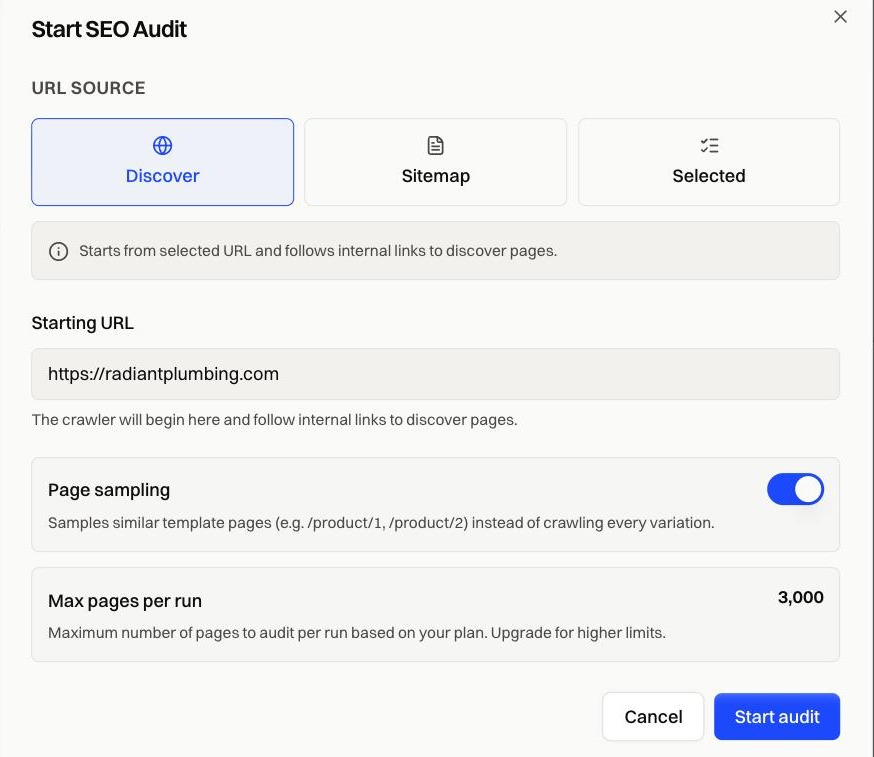
How it works#
URL source#
| Source | What it crawls | Pick it when |
|---|---|---|
| Discover | Starts at one URL and follows internal links from there | You want everything reachable, and your sitemap is missing or incomplete |
| Sitemap | Every URL listed in your sitemap.xml | Your sitemap is the list of record |
| Selected | Only the URLs you paste in, up to 100 | You're re-checking a section you just fixed |
Discover reaches a page only when something links to it. Sitemap and Selected fetch each URL directly, which is why orphan pages surface in those two modes and never in Discover.
The starting URL has to be on the same domain as the site.
Page sampling#
On by default. Pages built from one template, like /product/1 and /product/2, get sampled instead of crawled one by one, so your page allowance goes on distinct pages. Turn it off when every URL genuinely differs and each needs its own check.
Max pages per run#
The dialog shows your per-run cap. Above the audit history you'll find how much of the monthly allowance is left. A crawl that reaches the cap finishes with a Limit Reached status and keeps everything collected up to that point.
Snapshot freshness#
On a connected site the crawler is served your pre-rendered snapshots, the same HTML a search bot gets. When those snapshots haven't changed since your last audit, the dialog says so and links you to re-render first. Auditing unchanged snapshots repeats the previous result.
Repeat audits#
Plans that include scheduling re-run the audit on their own, in Discover mode, with no setup. The Trigger column in Audit history shows MANUAL or SCHEDULE for each run.
Fixes by symptom#
| Symptom | What to check |
|---|---|
| Sitemap mode won't start | No reachable sitemap was found. Set the sitemap URL in Configure → Site settings |
| Run finished as Limit Reached | The crawl hit your per-run page cap. Narrow the starting URL, or raise the cap with your plan |
| Far fewer pages crawled than expected | Internal links are missing or broken, so Discover couldn't reach them. Try Sitemap mode |
| The same issues come back after fixing them | The snapshots still hold the old HTML. Re-render, then audit again |
| Discover is greyed out | Your plan doesn't include full-site crawls. Use Sitemap or Selected |
| The button is disabled | An audit is already running, the monthly pages are used up, or you need Editor access |
FAQ#
How long does it take? Minutes for a few hundred pages. Larger crawls run in the background, and the Issues tab fills in once the run finishes.
Can I run two audits at once? No. The button stays disabled while a run is queued or running.
Does an audit change anything on my site? No. It only fetches pages.
Do I need pre-rendering connected? No. Audits run on any site added to Encited. On a connected site the crawler sees your snapshots instead of fetching each page fresh.