
Track your health score
The health score turns an audit into one number you can watch. Every page starts at 100 and loses points for each issue found on it, weighted by how much that issue costs. The site score is the average across every page in the run, and the run-to-run change is what tells you whether a month of fixes moved anything.
Time: 5 minutes. You need: at least two completed audits.
Where to find it#
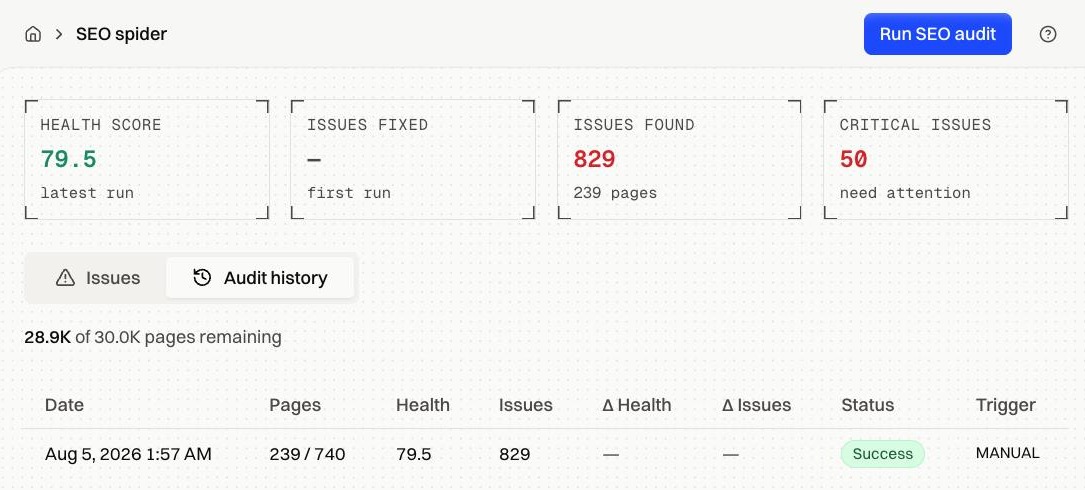
Inspect & Optimize → SEO Spider → Audit history.
How it works#
How the score is built#
Each page starts at 100. Every issue subtracts a penalty: an error status costs the most, a missing meta description costs almost nothing. A page can't fall below 0. The site score is the average of every page crawled in that run.
Two things follow from that. Crawling deeper into a weak section pulls the average down even when nothing broke, so a drop after a bigger crawl isn't a regression. And clearing a long list of Info findings barely moves the number, while fixing one page returning 500s moves it a lot.
The table#
| Column | What it holds |
|---|---|
| Date | When the run started |
| Pages | Pages crawled, and pages discovered when Discover found more than it could crawl |
| Health | Site score for that run |
| Issues | Total findings |
| Δ Health | Change against the previous run, green when it improved |
| Δ Issues | Change against the previous run, green when the count fell |
| Status | How the run finished |
| Trigger | MANUAL or SCHEDULE |
Clicking a row opens that run in full, page by page.
Run statuses#
| Status | What happened |
|---|---|
| Success | The crawl finished |
| Limit Reached | It hit the per-run page cap. Everything collected is kept |
| Partial | It stopped early. A continuation run picks it up automatically |
| Error | The crawl failed and recorded nothing |
| Queued, Running | Still in flight |
Page allowance#
The line above the table shows how much of your monthly page allowance is left. Every page a crawl fetches counts against it, scheduled runs included.
Fixes by symptom#
| Symptom | What to check |
|---|---|
| Score dropped after a round of fixes | The run crawled more pages, or a template edit added one issue to many pages at once |
| Δ columns are empty | First run, so there's nothing to compare against |
| Score barely moves | You're clearing Info findings. Switch to the Critical filter on the Issues tab |
| Two runs the same day return identical numbers | Both audited the same snapshots. Re-render, then run again |
| Status is Error | Check that the starting URL resolves and returns a 200, then retry |
FAQ#
What counts as a good score? Above 70 shows green, 40 to 70 amber, below 40 red. The direction over several runs matters more than the number itself.
Why doesn't Issues Fixed match Δ Issues? Issues Fixed only counts a net reduction. When the count holds steady or rises it shows no change, while Δ Issues shows the signed difference either way.
Do scheduled runs affect the score the same way? Yes. They're ordinary runs with a different trigger.