
Confirm a bot got your content
You published a page and want to know whether a crawler has taken it, and whether what it took was complete.
Time: 5 minutes. You need: the page live and in your sitemap.
1. Search for the path#
Go to Monitor → Crawl Analytics and type the path into the search box on Crawled URLs.
A row with crawler counts means bots have fetched it. No row means no known crawler has, so check that the page is in your sitemap and linked from a page that does get crawled.
2. Check what each visit returned#
Switch to Crawl Logs and search the same path.
| What you see | What it means |
|---|---|
200 and Cache hit |
The bot received the pre-rendered snapshot |
200 and Passed through |
The bot received your origin's response, not a snapshot |
304 and Passed through |
Pre-rendering didn't apply, and the bot went to your origin |
4xx or 5xx |
The bot got an error |
Age tells you how old the snapshot was at that moment. A bot that took a snapshot from before your last content change saw the old page.
3. Read the snapshot the bot was served#
Getting a 200 doesn't prove the content inside was complete. Open Inspect & Optimize → Pre-rendering and click the path.
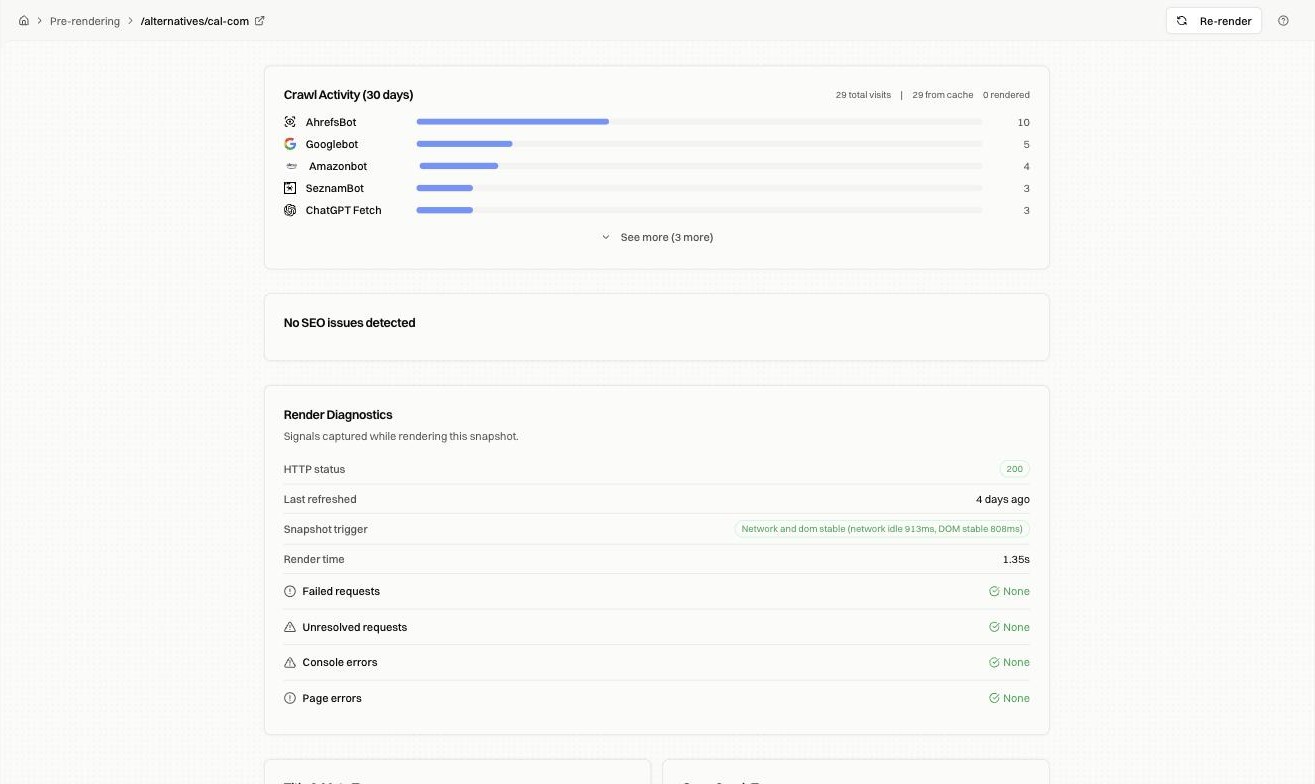
Crawl Activity repeats the per-bot counts for this page. Render Diagnostics shows whether the render finished cleanly: HTTP status, what triggered the snapshot, render time, and any failed requests or console errors.
Snapshot details covers reading the head fields and heading structure.
4. Re-render after a fix#
If the snapshot the bot received was stale or incomplete, click Re-render on that page. The next crawler visit gets the new snapshot.
Bots decide their own schedule, so a fresh snapshot doesn't pull them back. To ask for a recrawl, open Inspect & Optimize → Index Rush.
Fixes by symptom#
| Symptom | What to check |
|---|---|
| No crawler has taken the page | Confirm it's in the sitemap, then use Refresh sitemap |
| Bots get 200 but the page is missing from search | The snapshot may be missing content. Check Render Diagnostics |
| Only AI agents fetch it, never Googlebot | Check robots.txt and the URL's status in Search Console |
| The bot got a snapshot older than your last edit | Tighten the refresh rule for that path, then re-render |
| Cache hits on some visits, passed through on others | The snapshot expired between visits |
FAQ#
How soon after publishing should a bot arrive? Days to weeks, depending on how often your site gets crawled. Your activity chart shows your normal rhythm.
Does re-rendering tell Google to come back? No. It changes what's served on the next visit.