
See the queries engines actually run
Fan-out queries are the web searches an assistant runs on the user's behalf before it answers. Someone asks "best scheduling tool for small teams" and the assistant doesn't search that phrase. It writes its own set of searches, runs them, reads what comes back, and composes the answer from that.
Those searches are worth studying closely. They show the phrasings that actually decide answers in your industry, which competitors get pulled into the comparison, and what facts an engine goes looking for before it recommends anyone. They shift as engines change how they decompose a question, so it pays to keep an eye on them rather than reading them once.
Time: 15 minutes. You need: prompts that have run at least once.
Available on Pro and above Fan-out queries need a Pro plan or higher. On lower plans the panel shows a preview and an upgrade link.
Where to find it#
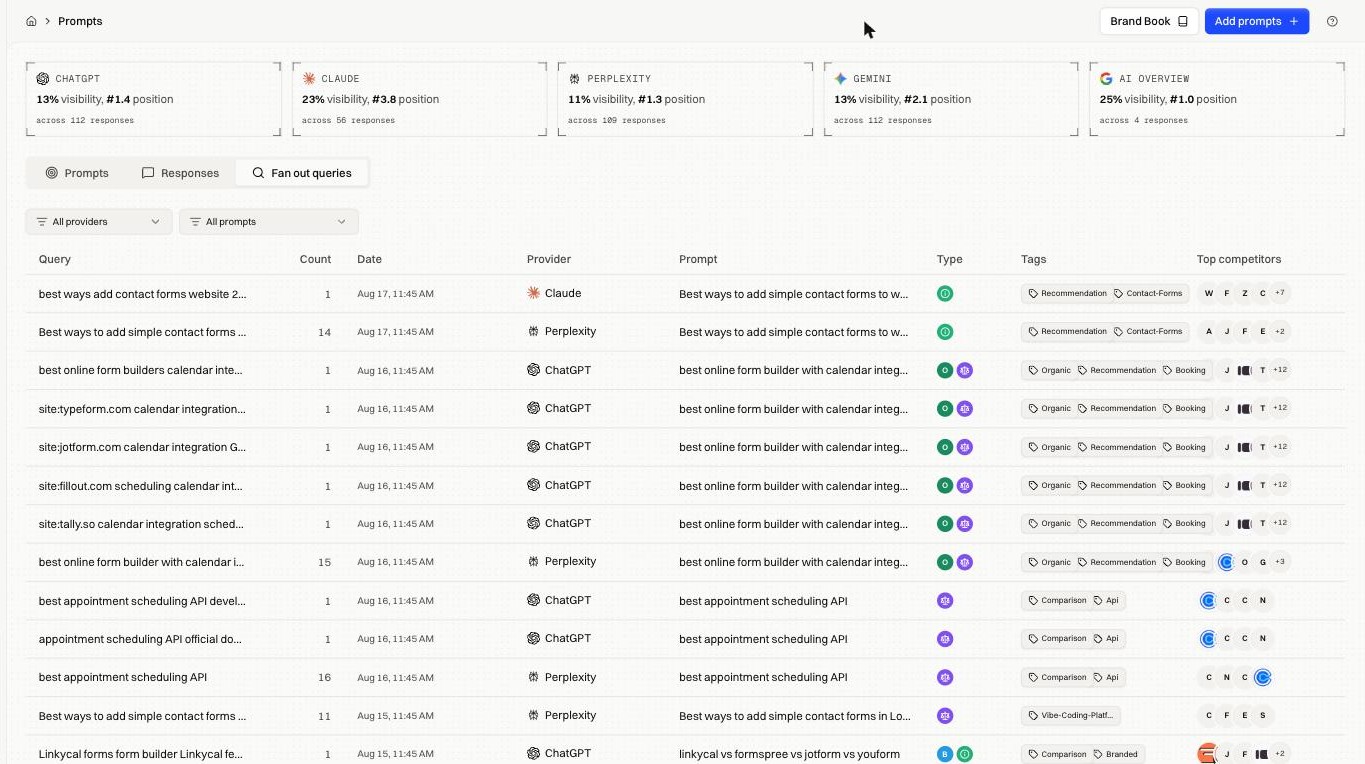
Monitor → Prompts, then the Fan out queries tab.
They also appear per response: open any run from a prompt and the drawer has its own Fan out queries tab, showing what that single answer was built from.
How it works#
Each row is one search an engine ran, tied back to the prompt that caused it.
| Column | What it holds |
|---|---|
| Query | The search the engine actually ran |
| Count | How many times it has been run |
| Date | When it last ran |
| Provider | Which engine ran it |
| Prompt | Your tracked prompt that produced it |
| Type and Tags | Inherited from that prompt |
| Top competitors | Brands that surfaced for the query |
Count is the first thing to sort by. A query run many times is one the engines lean on repeatedly, and those phrasings rarely match the ones you'd have picked yourself.
The site: searches#
Engines frequently run searches restricted to a single competitor's domain, in the form site:competitor.com <topic>.
A run of those against several rivals means the engine is building a structured comparison, pulling facts from each company's own pages. Two things follow:
- Your equivalent page has to exist and be readable. If an engine runs
site:yourdomain.com pricingand gets a JavaScript shell, you're absent from the comparison it builds. Check Inspect & Optimize → Pre-rendering. - Your page has to state the fact plainly. These searches look for specifics: a price, an integration, a limit. A page that gestures at the answer loses to one that states it.
Filtering#
All providers and All prompts narrow the list. Comparing one prompt across two engines shows how differently they decompose the same question, which often explains why one names you and the other doesn't.
Turning them into tracked prompts#
Fan-out queries are real searches rather than guesses, which makes them the best source of new prompts. In Add prompts, the Query Fanouts tab in the Ideas panel offers them directly; click + to start tracking one.
Tracking a fan-out query separately tells you whether you win that specific search, apart from the broad question that generated it.
Fixes by symptom#
| Symptom | What it means |
|---|---|
Mostly site: searches against competitors, none against you |
You aren't in the comparison set. Get named on the listicles the engine reads first. |
| Queries are about a product you don't sell | Your brand book Industry or Audiences are too broad. |
| Very few queries | Engines are answering from memory. Being cited elsewhere outweighs your own pages. |
| Queries look right but visibility is flat | The searches reach pages that don't mention you. Work Monitor → Citations. |
FAQ#
Why don't these match my Search Console keywords? They're different demand. Search Console shows what humans typed into Google. Fan-out shows what a model generated to answer a question. Overlap is common and partial.
Can I make an engine run a specific query? No. You can influence what it finds when it does. The list reports what happened.